
Windows · System Tools
Best Linux alternatives to MSI Dragon Center
MSI Dragon Center controls fan speeds, performance modes, and RGB lighting on MSI laptops, but has no Linux version.
Updated
Quick answer
The best Linux alternative to MSI Dragon Center is CoreCtrl. Other strong options: TLP, TLP-UI, power-profiles-daemon.
5 Linux alternatives to MSI Dragon Center
-
CoreCtrl is a Linux GUI tool for fine-tuning system performance, CPU/GPU frequencies, and fan curves on desktops and laptops.
CoreCtrl is a solid replacement for MSI Dragon Center if you're comfortable with manual setup and don't rely on RGB control. It handles CPU/GPU performance profiles, fan curves, and real-time monitoring well, especially on AMD systems. While it lacks native RGB support, its systemd integration…
Feature parity75% -
TLP is a command-line power management tool that optimizes battery life and system performance on Linux laptops.
TLP is not a direct replacement for MSI Dragon Center, but it’s a solid choice if your main goal is power efficiency and CPU performance tuning on Linux. It excels at automated power management, battery preservation, and system tuning, but lacks fan control, RGB lighting, and real-time performance…
Feature parity40% -
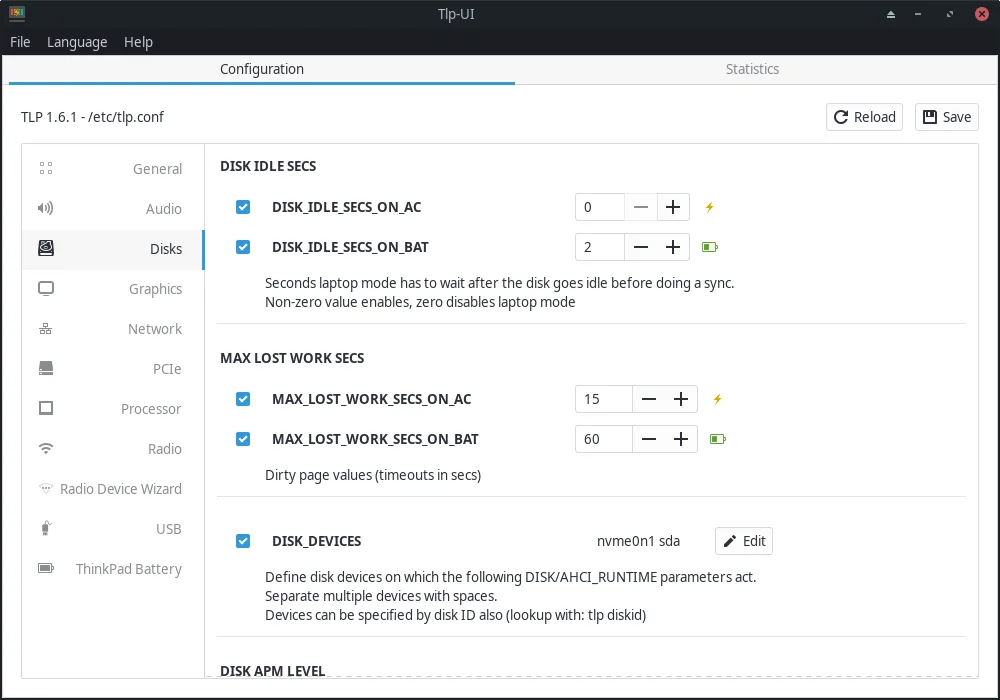
TLP-UI is a graphical frontend for managing TLP power-saving settings on Linux laptops.
TLP-UI is not a direct replacement for MSI Dragon Center, but it serves users who prioritize power management over hardware control. If your main goal is tuning CPU scaling, power profiles, and battery optimization on Linux, TLP-UI is effective. However, it does not support fan control, RGB…
Feature parity40% -
A lightweight system daemon that manages CPU power profiles like performance, balanced, and power saver.
power-profiles-daemon is a reasonable replacement for MSI Dragon Center only if your main need is CPU power profile switching. It handles basic performance, balanced, and power-saver modes with automatic AC/battery switching and D-Bus integration, making it suitable for desktop environments like…
Feature parity40% -

fancontrol is a Linux utility for automatically adjusting fan speeds based on system temperature sensors.
fancontrol is a partial replacement for MSI Dragon Center, best suited for users who prioritize fan control and temperature monitoring over RGB lighting and power profile switching. It reliably automates fan speeds using sensor data and supports customizable curves, which matches one core function…
Feature parity50%


What is MSI Dragon Center?
MSI Dragon Center is a utility designed for MSI laptop owners who want fine control over system performance, cooling, and RGB lighting. It's commonly used by gamers and power users who need quick access to hardware tuning without diving into command-line tools.
The software comes preinstalled on Windows-based MSI laptops and is free to use. It's proprietary and tightly integrated with Windows drivers and MSI's own firmware, meaning no direct licensing cost but no source access either.
People seek Linux alternatives because Dragon Center doesn't run on Linux and MSI provides minimal support for open-source platforms. Users switching to Linux still want control over thermal and power settings, especially on high-performance laptops, but must rely on third-party tools.
What a replacement for MSI Dragon Center must do
- Adjust CPU/GPU performance profiles
- Control fan speeds manually or automatically
- Switch between power modes (e.g. quiet, balanced, performance)
- Manage RGB keyboard lighting
- Monitor system temperatures and usage
- Persist settings across reboots
- Low-level access to hardware sensors
Can you run MSI Dragon Center on Linux?
MSI Dragon Center does not run natively on Linux and is not available via Wine or Proton in any usable form. Bottles may allow installation, but functionality will be broken due to driver and kernel-level dependencies. No known workarounds provide full feature parity.
Which alternative should you choose?
Use CoreCtrl for performance profiles and monitoring; it supports GPU and CPU tuning. TLP and TLP-UI manage power settings effectively for battery and performance. fancontrol (from lm-sensors) lets you manually configure fan curves. OpenRGB handles RGB lighting control across many devices, including MSI keyboards. power-profiles-daemon works in the background for quick power mode switching in desktop environments that support it.
Moving your MSI Dragon Center files and habits
There is no migration path from MSI Dragon Center since settings are stored in Windows registry and firmware. On Linux, configurations are managed separately by each tool—fancontrol uses config files, OpenRGB saves lighting profiles, and TLP reads from /etc. You must reconfigure everything from scratch.
Side-by-side comparison
| App | License | Flatpak | Latest version | Feature parity | Rating |
|---|---|---|---|---|---|
| CoreCtrl | GPL-3.0 | — | 1.5.2 | 75% | — |
| TLP | GPL-2.0 | — | 1.10.2 | 40% | — |
| TLP-UI | GPL-2.0+ | ✓ | 1.10.1 | 40% | — |
| power-profiles-daemon | GPL-2.0 | — | 0.30 | 40% | — |
| fancontrol | GPL-3.0-only | ✓ | 26.01 | 50% | — |
MSI Dragon Center: frequently asked questions
Can I control MSI laptop fans on Linux?
Yes, using fancontrol from lm-sensors. You'll need to configure it manually based on your sensor output and desired fan curve.
Is there a GUI for power management like Dragon Center?
TLP-UI and CoreCtrl offer GUIs for power and performance tuning. power-profiles-daemon integrates with GNOME and KDE for quick switching.
Does OpenRGB work on MSI laptops?
Yes, OpenRGB supports many MSI laptops for RGB lighting control. Check OpenRGB's device support list for your model.
Can I damage my laptop using these tools?
Incorrect fan or voltage settings can cause instability or hardware stress. Always monitor temperatures and test changes gradually.
How important is MSI Dragon Center to you?
Know a better alternative? Suggest an alternative