
 OpenSCADLinux
vs
AutoCADWindows
OpenSCADLinux
vs
AutoCADWindows
OpenSCAD as a Linux alternative to AutoCAD
Updated
Our verdict
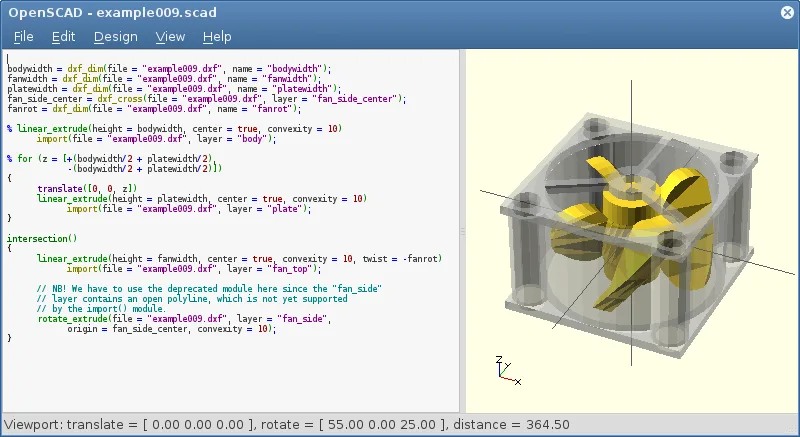
OpenSCAD is not a direct replacement for AutoCAD if you rely on interactive mouse-based drafting. It is a script-based solid modeler, meaning you write code to define geometry rather than clicking lines and arcs. It suits engineers who prefer parametric, code-driven design for mechanical parts. However, it lacks the 2D drafting workspace, layer management, and technical drawing generation that define typical AutoCAD workflows. If your work involves complex 2D schematics or architectural plans, OpenSCAD will feel restrictive. Use it only if you can adapt to a programming-centric approach for 3D solid modeling.
- License
- GPL-3.0+
- Price
- Free
- Latest version
- 2021.01 (January 31, 2021)
- Rating
- —
What works the same
- Parametric design capabilities allowing easy modification of model dimensions
- Support for importing DXF files for 2D path definitions
- Focus on precise, technical solid modeling rather than artistic rendering
- Cross-platform availability including major Linux distributions
What is different
- Non-interactive, script-based workflow instead of real-time mouse control
- No native 2D drafting environment with layers, blocks, or dimensioning
- Lacks technical drawing generation and annotation tools
- Limited file format support compared to AutoCAD's extensive ecosystem
Opening your AutoCAD files
OpenSCAD can import DXF files to extract 2D paths and parameters for extrusion. It does not support importing or exporting DWG files directly. You must convert DWG to DXF using a separate tool before using it in OpenSCAD. Export options are limited to STL and OFF formats for 3D models, with no native support for standard 2D CAD formats like DWG or DXF for final output.
Switching from AutoCAD to OpenSCAD, step by step
- Install OpenSCAD via your package manager or Flathub
- Learn basic OpenSCAD syntax for primitives and CSG operations
- Convert existing DWG files to DXF format using a converter
- Import DXF files into OpenSCAD scripts for extrusion
- Develop a script to generate your specific part geometry
- Export the final model as STL for 3D printing or further processing
Key features of OpenSCAD
- Parametric modeling via script-based design
- Constructive Solid Geometry (CSG) operations
- Extrusion of 2D DXF outlines
- Support for STL and OFF file formats
- Import of DXF files for 2D paths and parameters
- Non-interactive rendering process
- Available on Arch, Debian, Fedora, openSUSE, and Ubuntu
How to install OpenSCAD on Linux
flatpak install flathub org.openscad.OpenSCADsudo apt install openscadsudo apt install openscadsudo dnf install openscadsudo pacman -S openscadsudo zypper install openscadFrequently asked questions
Can OpenSCAD open DWG files directly?
No, OpenSCAD only reads DXF files. You must convert DWG to DXF first using a separate utility.
Is OpenSCAD good for architectural drawings?
No, it lacks 2D drafting tools, layers, and dimensioning features essential for architectural work.
Does OpenSCAD support scripting or API access?
Yes, the entire application is script-based. You define models using a text-based language, which offers full programmatic control.
4 other alternatives to AutoCAD
 FreeCADFreeCAD is an open‑source parametric 3D CAD modeler for design, engineering and 3D printing.Open sourceFreeFlatpakFreeCAD vs AutoCAD
 LibreCADLibreCAD is a free, open‑source 2D CAD program for creating precise drawings on Linux.Open sourceFreeFlatpakLibreCAD vs AutoCAD
 QCADQCAD is an open‑source 2D CAD program for creating technical drawings on Linux.Open sourceFreeQCAD vs AutoCAD
 BlenderBlender is a free, open-source 3D suite for modeling, animation, rendering, and video editing.Open sourceFreeFlatpakBlender vs AutoCAD