
 PlexLinux
vs
Pinnacle ShowCenterWindows
Plex as a Linux alternative to Pinnacle ShowCenter
Updated
Our verdict
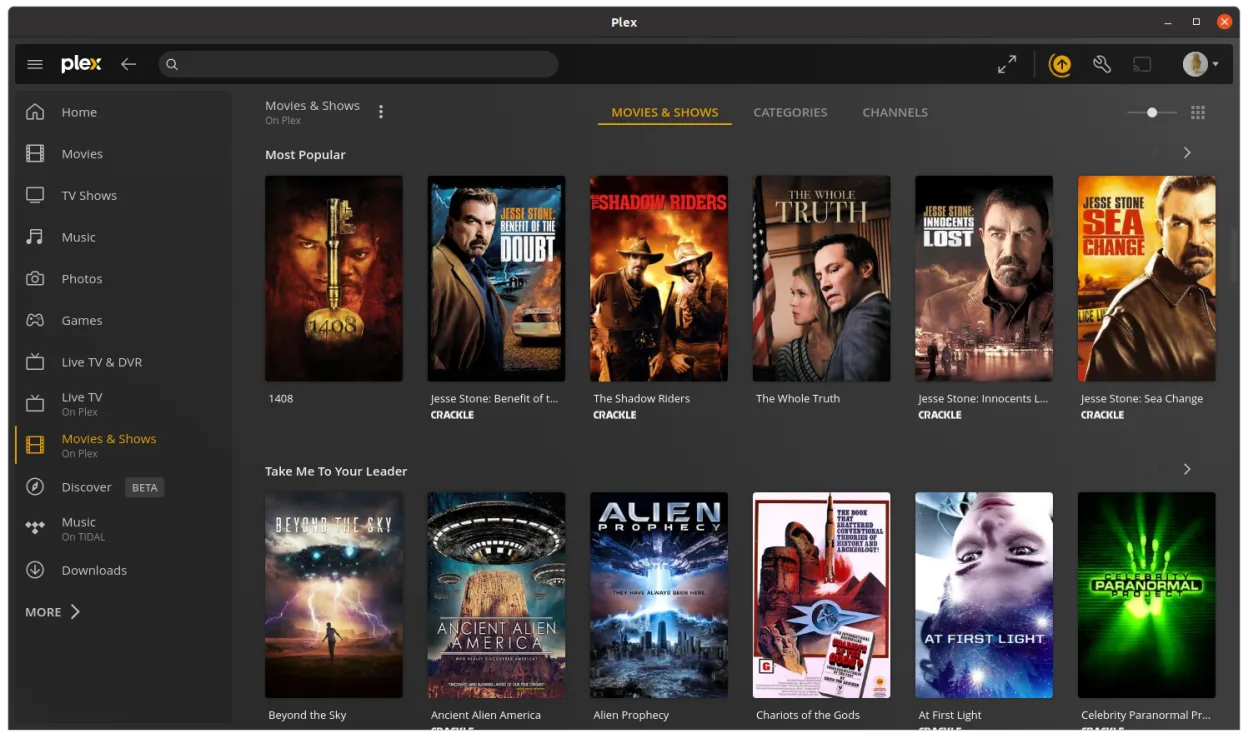
Plex is a reasonable replacement for Pinnacle ShowCenter if you're using a local Plex server to stream media to a Linux desktop connected to your TV. It offers a clean 10-foot interface, remote-friendly navigation, hardware-accelerated playback, and strong library management. However, it's not designed for direct DVD or CD playback out of the box—those need to be ripped and added to your library. If you're comfortable with that workflow and want a modern, account-synced experience, Plex works well. For pure local disc playback without setup, it's less ideal.
- License
- LicenseRef-proprietary=https://www.plex…
- Price
- freemium
- Latest version
- 1.115.0 (September 9, 2026)
- Rating
- —
What works the same
- 10-foot interface optimized for TV viewing
- Supports common video file formats via server
- Remote control navigation supported
- Local media library organization and playback
- Hardware acceleration for smooth video playback
What is different
- Plex requires a Plex server (or local library import), while Pinnacle ShowCenter played files directly
- No built-in DVD or CD ripping/playback—discs must be ripped first
- Plex relies on account sync and metadata from the web
- Plex interface is more modern but less focused on local-only use
- Plex does not natively support authoring or editing timelines like some Pinnacle tools
Opening your Pinnacle ShowCenter files
Plex does not open Pinnacle ShowCenter project files (.pxp or similar). Those were specific to Pinnacle's editing environment and are not supported. However, if you exported videos from Pinnacle ShowCenter to common formats like MP4, AVI, or MKV, Plex can play them without issue once added to your library. There is no migration path for playlists or metadata stored in Pinnacle’s format.
Switching from Pinnacle ShowCenter to Plex, step by step
- Rip DVDs and CDs to a local folder using tools like HandBrake or MakeMKV
- Set up a Plex Media Server on Linux or another machine
- Add your media folders to the Plex library
- Install the Plex desktop client from Flathub
- Use a remote control or keyboard to navigate and play content
- Enable hardware acceleration in Plex settings if supported
Key features of Plex
- Stream media from your Plex server to the Linux desktop
- Uses a native playback engine for smoother performance
- Includes a point-and-click interface similar to the web client
- Supports hardware acceleration where available
- Maintains watch progress and metadata across devices
- Runs as a standalone desktop application, not a browser tab
- Auto-syncs with your Plex account and other clients
How to install Plex on Linux
flatpak install flathub tv.plex.PlexDesktopFrequently asked questions
Can Plex play DVDs directly like Pinnacle ShowCenter?
No, Plex cannot play DVDs directly. You must rip the DVD to a file first using tools like MakeMKV or HandBrake, then add it to your library.
Does Plex work without an internet connection?
Yes, once your media is on the server and the client is set up, playback works offline. However, initial setup and metadata fetching require internet.
Can I use a remote control with Plex on Linux?
Yes, most infrared or Bluetooth remotes that emulate keyboards work. You can also use the official Plex mobile app as a remote.
3 other alternatives to Pinnacle ShowCenter
 KodiKodi is a free, open-source media center for playing video, music, and podcasts from local or network sources.Open sourceFreeFlatpakKodi vs Pinnacle ShowCenter
 Jellyfin DesktopJellyfin Desktop is a local media player for Jellyfin servers, built with Qt WebEngine and libmpv for smooth…Open sourceFreeFlatpakJellyfin Desktop vs Pinnacle ShowCenter
 mpvmpv is a free, open‑source, cross‑platform media player that plays almost any video or audio format.Open sourceFreeFlatpakmpv vs Pinnacle ShowCenter