
Windows · System Tools
Best Linux alternatives to PowerISO
PowerISO is a Windows utility for creating, editing, mounting and converting ISO and other disc image files.
Updated
Quick answer
The best Linux alternative to PowerISO is AcetoneISO. Other strong options: ISO Master.
2 Linux alternatives to PowerISO
-
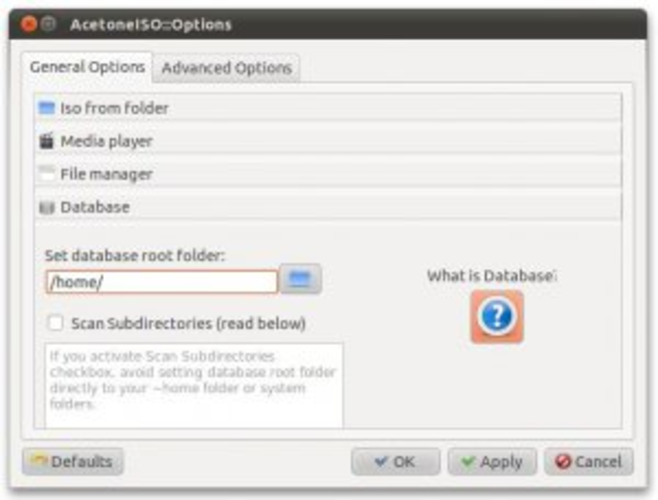
AcetoneISO is a free, open‑source Linux tool for mounting and managing CD/DVD image files.
AcetoneISO is a solid Linux alternative for most PowerISO tasks. It can create, edit, mount, convert and burn ISO‑related images, and it offers a simple GUI plus a CLI for scripting. Power users who rely heavily on proprietary formats or deep copy‑protection handling will miss some niche features…
Feature parity80% -
A lightweight GTK-based GUI for creating, editing, and converting ISO images, available in Fedora repositories.
ISO Master can replace PowerISO for most everyday tasks on Linux. It handles creating, editing and converting ISO files, mounting them via FUSE and even making bootable images, which covers the core workflow of typical PowerISO users. Power users who rely on command‑line scripting, USB‑boot…
Feature parity70%

What is PowerISO?
PowerISO is a popular Windows program used by home users and IT professionals to handle disc image files – creating ISO files from folders, editing existing images, mounting them as virtual drives, and converting between formats like ISO, BIN, and NRG. It is a commercial product with a trial version that limits some features, and a paid license is required for full functionality.
Because PowerISO is Windows‑only, Linux users who need similar capabilities must look for native tools that can manage image files without resorting to a Windows environment. Open‑source alternatives are attractive as they avoid licensing costs and integrate better with typical Linux desktop workflows.
The main reasons to switch are cost, stability on Linux, and the ability to script or automate tasks using command‑line tools. Native Linux apps also avoid the overhead and compatibility quirks of running PowerISO under Wine or a virtual machine.
What a replacement for PowerISO must do
- Create ISO images from directories
- Edit existing ISO or other image formats
- Mount image files as virtual drives
- Convert between common disc image formats (ISO, BIN, NRG, etc.)
- Burn images to physical media or write them to USB drives
- Support for command‑line operation for scripting
- Handle large images reliably
Can you run PowerISO on Linux?
PowerISO does not have a native Linux version and is not offered as a web service. It can be run under Wine, but functionality such as mounting virtual drives may be limited or require additional configuration. No official Proton or Bottles support is provided, so relying on Wine is the only workaround if you must use the original program.
Which alternative should you choose?
AcetoneISO is best for users who want a graphical tool focused on mounting and basic management, similar to Daemon Tools. ISO Master offers a simple GUI for creating and editing ISO files. Xarchiver provides a lightweight archive manager that can handle ISO extraction and creation. K3b is a full‑featured CD/DVD burning suite that also creates ISO images and is ideal for users who need robust burning capabilities.
Moving your PowerISO files and habits
All listed Linux tools work with standard ISO files, so you can simply open or import your existing images without conversion. If you have proprietary formats like NRG, most alternatives can convert them to ISO during the import process. No special export steps are required—just use the new tool to open, edit, or mount the image as you would in PowerISO.
Side-by-side comparison
| App | License | Flatpak | Latest version | Feature parity | Rating |
|---|---|---|---|---|---|
| AcetoneISO | GPL-3.0 | — | 2.4_7 | 80% | 5/5 |
| ISO Master | GPL-2.0 | — | 3.0.0 | 70% | — |
PowerISO: frequently asked questions
Can I mount ISO files without root privileges?
Yes, tools like AcetoneISO and the built‑in mount command can mount images in user space using FUSE, so no root is needed.
Is there a command‑line way to create ISO images?
The genisoimage/mkisofs utilities are standard on Linux and provide full command‑line control for ISO creation.
Do these alternatives support copy‑protected discs?
No open‑source Linux tool emulates copy protection; they handle standard image formats only.
Will my existing PowerISO project files open directly?
PowerISO project files are proprietary; you’ll need to export them as standard ISO files in Windows before opening them in Linux tools.
How important is PowerISO to you?
Know a better alternative? Suggest an alternative