
 RClone ManagerLinux
vs
Google Backup and SyncWindows
RClone ManagerLinux
vs
Google Backup and SyncWindows
RClone Manager as a Linux alternative to Google Backup and Sync
Updated
Our verdict
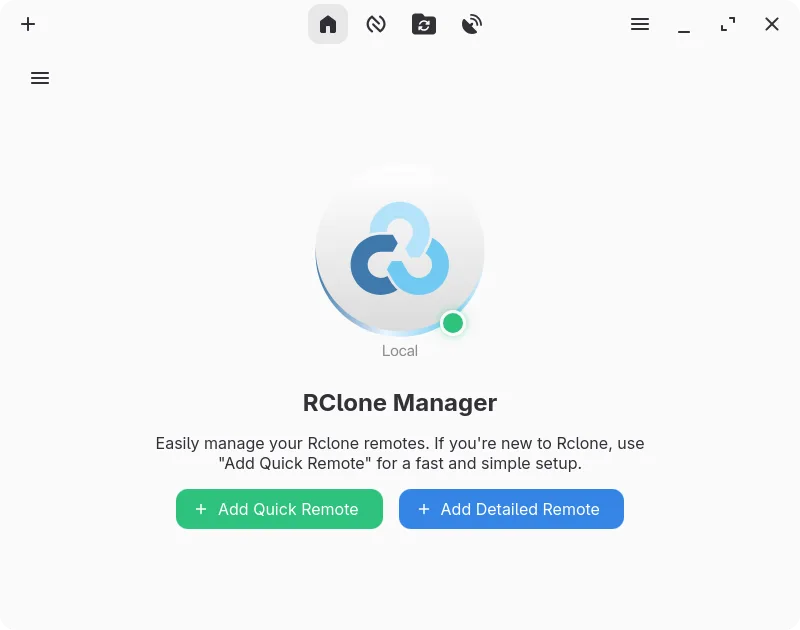
RClone Manager is a capable replacement for Google Backup and Sync if you're comfortable with slightly more manual setup and don't need deep Google Docs integration. It handles folder syncing, automatic backups, and selective sync well through rclone's powerful backend, with added flexibility via scheduling and automation. The desktop integration is functional with tray support and file manager access, but lacks the simplicity and tight OS integration of the Windows app. Best for intermediate to advanced Linux users who want control over their sync and backup workflows.
- License
- GPL-3.0-or-later
- Price
- Free
- Latest version
- 0.3.3 (September 23, 2026)
- Rating
- —
What works the same
- Both sync local folders with Google Drive and support selective sync
- Support automatic backups using schedules or file system triggers
- Offer system tray integration and run in the background
- Allow offline access by caching files locally before upload
- Handle conflict management through rclone's built-in mechanisms
What is different
- RClone Manager does not support viewing or editing Google Docs, Sheets, or Slides locally
- No native desktop integration for right-click context menus in all file managers
- Setup requires initial configuration of rclone remotes, more technical than Google's installer
- Lacks built-in version history browser; relies on Google Drive's web interface
- Automation is more powerful but complex compared to Google's simple sync-only approach
Opening your Google Backup and Sync files
RClone Manager syncs files as-is and does not convert Google Docs, Sheets, or Slides into editable local formats like .docx or .xlsx. These files remain in their Google-native format and appear as shortcuts or metadata unless exported manually via Google Drive's web interface. If you rely on editing Docs offline in a word processor, this workflow won't work. For regular files (PDFs, images, documents), compatibility is full since they sync directly. Exporting Google files must be handled separately.
Switching from Google Backup and Sync to RClone Manager, step by step
- Install rclone and RClone Manager from Flathub or your package manager
- Configure a Google Drive remote using rclone config or the app's backend setup
- Use the file manager or sync workflows to select local folders and remote paths
- Set up scheduled syncs using cron or file watchers for automatic backups
- Enable mount with VFS cache for offline access and seamless file browsing
- Test sync behavior with a small directory before migrating critical data
Key features of RClone Manager
- Visual workflow builder for multi-step automations
- Built-in file manager for browsing and editing remote files
- Mount cloud storage as a local drive with VFS cache
- Rich media preview for images, videos, PDFs, and code
- Schedule operations via cron or file system watchers
- System tray integration and power management controls
- Encrypted configuration storage with backup support
- Serves remote storage over HTTP or WebDAV
How to install RClone Manager on Linux
flatpak install flathub io.github.zarestia_dev.rclone-managersudo apt install rclonesudo apt install rclonesudo dnf install rclonesudo pacman -S rclonesudo zypper install rcloneFrequently asked questions
Can I use RClone Manager without installing rclone separately?
Yes, if you install RClone Manager from Flathub, it includes rclone. Otherwise, ensure rclone is installed and accessible in your PATH.
Does RClone Manager sync Google Photos like Backup and Sync?
No, it does not sync Google Photos. You'd need to use a separate tool like gphotos-sync for that.
Can I access my files without an internet connection?
Yes, if you mount the remote with VFS cache enabled, files are cached locally and available offline.
2 other alternatives to Google Backup and Sync
 SyncThingySyncThingy is a lightweight tray icon that controls Syncthing, letting you view status, stop, and manage the…Open sourceFreeFlatpakSyncThingy vs Google Backup and Sync
 KopiaKopia is a cross-platform backup tool with encryption, deduplication, and both GUI and command-line…Open sourceFreeFlatpakKopia vs Google Backup and Sync