
 Xournal++Linux
vs
Microsoft WhiteboardWindows
Xournal++Linux
vs
Microsoft WhiteboardWindows
Xournal++ as a Linux alternative to Microsoft Whiteboard
Updated
Our verdict
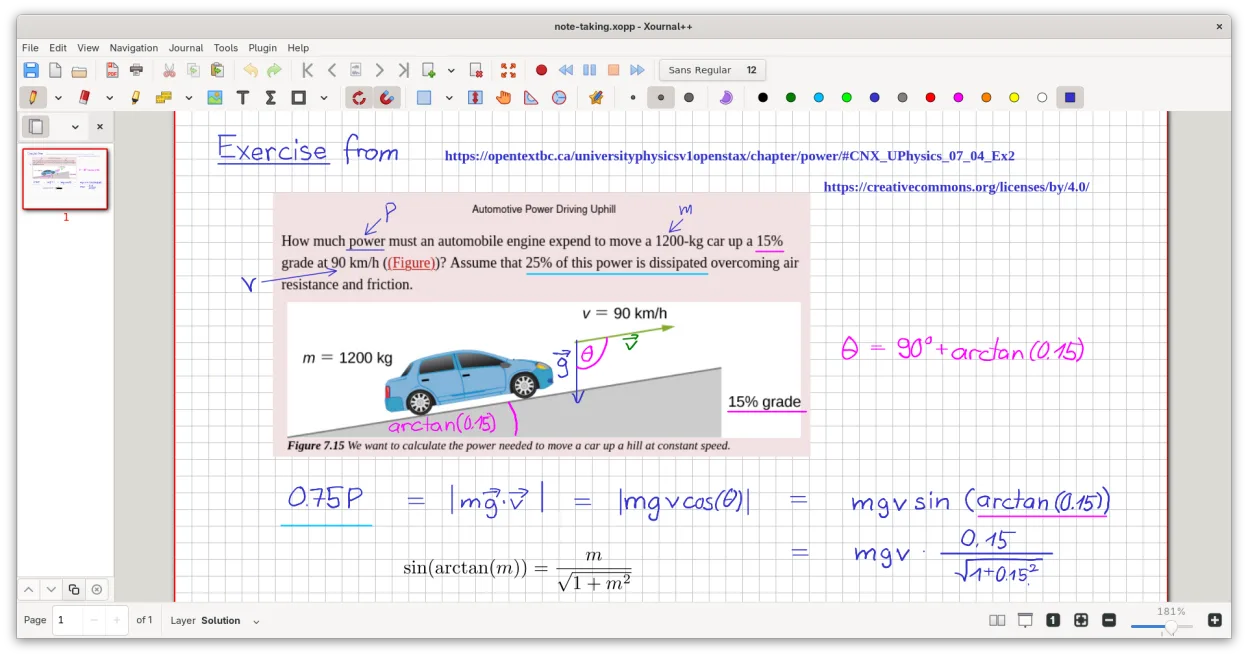
Xournal++ is a solid replacement for Microsoft Whiteboard if you prioritize handwriting, PDF annotation, and local whiteboarding over real-time collaboration. It excels with pen input, offers excellent stylus customization, and supports infinite canvas drawing with strong offline use. However, it lacks built-in cloud sync and live multi-user editing. It's ideal for students, researchers, or professionals using tablets for note-taking and sketching who don’t need team collaboration but want precise, responsive handwriting and export flexibility.
- License
- GPL-2.0
- Price
- Free
- Latest version
- 1.3.8 (September 25, 2026)
- Rating
- —
What works the same
- Freehand drawing and handwriting with pressure-sensitive stylus support
- Support for shapes, text annotations, and highlighters
- Infinite canvas for flexible note-taking and sketching
- Export capabilities to PDF, PNG, and SVG
- Offline usability with full local file control
What is different
- No real-time collaborative editing – Xournal++ is single-user only
- No built-in cloud sharing or Microsoft 365 integration
- No native support for importing Microsoft Whiteboard (.whiteboard) files
- Collaboration requires manual file sharing, not live sync
- Lacks sticky notes as a dedicated tool – use text boxes or layers instead
Opening your Microsoft Whiteboard files
Xournal++ cannot open Microsoft Whiteboard files (.whiteboard) directly, as that format is proprietary and unsupported. There is no known converter. However, if content from Microsoft Whiteboard is exported to PDF or PNG, Xournal++ can import and annotate those files. You can also start fresh in Xournal++ and recreate diagrams manually. Export from Xournal++ to PDF or PNG works well for sharing with others, regardless of platform.
Switching from Microsoft Whiteboard to Xournal++, step by step
- Install Xournal++ via your package manager or Flathub
- Export any existing Microsoft Whiteboard content to PDF or image format
- Import the exported files into Xournal++ for annotation or reference
- Customize toolbar and stylus settings for handwriting comfort
- Use layers and the text tool to simulate sticky notes and annotations
- Export finished work to PDF or PNG for sharing
Key features of Xournal++
- Pressure-sensitive stylus support for Wacom, Huion, and XP-Pen tablets
- Annotate, highlight, and strike through text on top of PDF files
- Export notes to PDF, PNG, and SVG via GUI or command line
- Drawing tools including pen, highlighter, shapes, and LaTeX support
- Input stabilization for smoother handwriting
- Customizable toolbar and tool mapping to stylus buttons
- Sidebar with page previews, PDF bookmarks, and layer management
How to install Xournal++ on Linux
flatpak install flathub com.github.xournalpp.xournalppsudo apt install xournalppsudo apt install xournalppsudo dnf install xournalppsudo pacman -S xournalppsudo zypper install xournalppFrequently asked questions
Can multiple people edit the same Xournal++ file at the same time?
No, Xournal++ does not support real-time collaboration. Multiple users can share and edit files manually by passing them back and forth, but not simultaneously.
Does Xournal++ work well with drawing tablets on Linux?
Yes. It supports Wacom, Huion, and XP-Pen tablets with full pressure sensitivity, tilt (where supported), and customizable stylus button mapping.
Is LaTeX support easy to set up in Xournal++?
It requires a working LaTeX installation (like TeX Live) and the 'poppler' and 'ghostscript' packages. Once installed, you can insert LaTeX via the text tool, but rendering happens on export.

