
Windows · Office
Best Linux alternatives to Adobe Acrobat Reader
Adobe Acrobat Reader is a standard PDF viewer for reading, annotating, and signing documents, with several free Linux alternatives available.
Updated
Quick answer
The best Linux alternative to Adobe Acrobat Reader is Okular. Other strong options: Evince, Xournal++, Master PDF Editor.
5 Linux alternatives to Adobe Acrobat Reader
-

Okular is a universal document viewer for KDE that handles PDF, EPUB, and comics with annotation support.
Okular is a strong, native Linux replacement for Adobe Acrobat Reader. It handles high-quality PDF rendering, text and shape annotations, and form filling effectively. The sidebar offers robust bookmark and navigation management. However, digital signature support is less mature than Adobe's…
Feature parity85% -

Evince is the standard GNOME document viewer for PDF, PostScript, and comic book archives, offering basic annotation and search.
Evince is a solid, lightweight replacement for casual PDF readers who value speed and native GNOME integration. It handles high-quality rendering and basic annotations like highlighting and text notes effectively. However, it is not a full replacement for power users relying on Adobe Acrobat…
Feature parity60% -
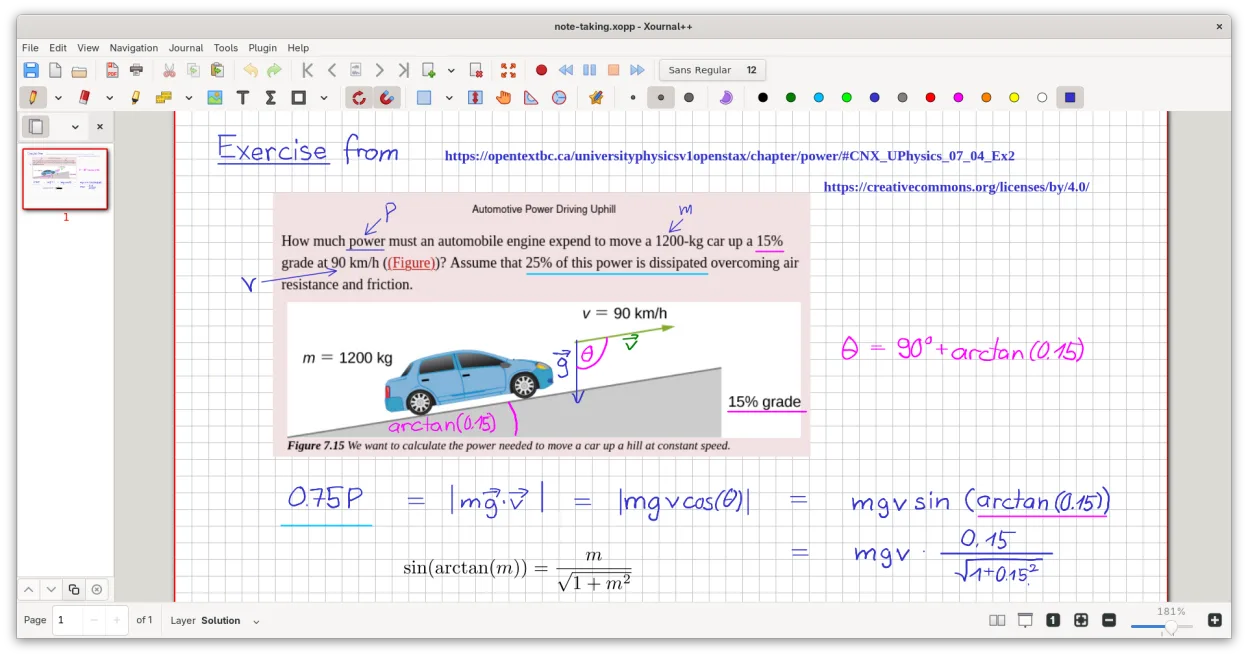
A cross-platform, open-source note-taking app for handwriting, PDF annotation, and whiteboarding with stylus support.
Xournal++ is a strong replacement if you prioritize annotation, handwriting, and visual markup over complex form handling or digital signing. It excels at highlighting, drawing, and adding text to PDFs with better stylus support than Acrobat. However, it is not a direct one-to-one swap for users…
Feature parity65% -

A proprietary PDF editor for Linux that handles text editing, forms, and digital signatures with a familiar interface.
Master PDF Editor is a strong replacement for Adobe Acrobat Reader if you need more than just viewing. While Acrobat Reader is primarily a viewer with limited free editing, Master PDF Editor allows direct text and image editing, which is a significant step up. It handles standard tasks like…
Feature parity90% -
Atril is a lightweight document viewer for the MATE desktop that handles PDFs and other formats with a simple, classic interface.
Atril is a solid, lightweight PDF viewer for MATE users who prioritize simplicity and low resource usage. It handles basic reading, zooming, and navigation well. However, it is not a full replacement for Adobe Acrobat Reader if you rely on advanced features like digital signatures, complex form…
Feature parity45%


What is Adobe Acrobat Reader?
Adobe Acrobat Reader is the default tool for many professionals and students to view PDF files. It handles everything from simple text documents to complex forms requiring digital signatures. Users rely on it to ensure documents look exactly as intended across different devices.
The software operates on a freemium model. The basic reader is free to download and use for viewing and basic annotation. Advanced features, such as creating PDFs from other formats or advanced editing, require a paid subscription to Adobe Acrobat Pro.
Many users seek Linux alternatives because the free Reader version is often seen as bloated or slow. Additionally, some users prefer open-source tools that integrate better with the Linux desktop environment and do not require a proprietary Adobe account for basic functionality.
What a replacement for Adobe Acrobat Reader must do
- High-quality PDF rendering
- Text and image annotation
- Digital signature support
- Form filling capabilities
- Bookmark and navigation management
- Print management
Can you run Adobe Acrobat Reader on Linux?
Adobe does not provide a native Linux version of Acrobat Reader. While you can run the Windows version using Wine or Proton, performance can be inconsistent and digital signature features may fail. Adobe offers a web-based version, but it requires an account and an internet connection, which is not ideal for offline work.
Which alternative should you choose?
For most users, Evince or Okular are sufficient for reading and basic annotation. If you need to write directly on PDFs, like on a tablet, Xournal++ is the best choice. For users who need to edit text or images within a PDF, Master PDF Editor is the closest functional match to Acrobat Pro, though it is not free.
Moving your Adobe Acrobat Reader files and habits
Migrating from Acrobat Reader is straightforward because PDF is an open standard. Your existing PDF files will open correctly in any of the listed alternatives. Annotations saved in standard PDF formats usually transfer well, though complex interactive forms might behave differently depending on the viewer's engine.
Side-by-side comparison
| App | License | Flatpak | Latest version | Feature parity | Rating |
|---|---|---|---|---|---|
| Okular | GPL-2.0+ and GFDL-1.3 | ✓ | 26.04.3 | 85% | — |
| Evince | GPL-2.0-or-later | ✓ | 48.4 | 60% | — |
| Xournal++ | GPL-2.0 | ✓ | 1.3.8 | 65% | — |
| Master PDF Editor | LicenseRef-proprietary | ✓ | 5.9.99 | 90% | — |
| Atril | GPL-2.0 | — | 1.28.7 | 45% | — |
Adobe Acrobat Reader: frequently asked questions
Can I edit PDF text in these Linux tools?
Only Master PDF Editor supports direct text editing. The others are primarily viewers and annotators.
Do these apps support digital signatures?
Okular and Evince support basic PAdES signatures. Xournal++ allows handwritten signatures. Master PDF Editor supports full digital signing workflows.
Is there a free alternative to Acrobat Pro?
Master PDF Editor is freemium. For free options, you can combine Evince for viewing with Xournal++ for annotation, but you lose direct text editing.
Which viewer is fastest?
Evince and Okular are generally lightweight and fast. Xournal++ is also efficient but optimized for writing. Master PDF Editor is heavier due to its editing capabilities.
How important is Adobe Acrobat Reader to you?
Know a better alternative? Suggest an alternative