
Windows · Games
Best Linux alternatives to Battle.net
Battle.net is Blizzard's platform for downloading, updating, and playing their games, along with social features and DRM.
Updated
Quick answer
The best Linux alternative to Battle.net is Lutris. Other strong options: Heroic Games Launcher, WineZGUI.
3 Linux alternatives to Battle.net
-

Lutris is a free, open‑source platform that centralises installation and launching of PC and console games on Linux.
Lutris is a practical replacement for Battle.net on Linux if you're comfortable with some setup. It doesn't run Battle.net natively but uses Wine to install and manage Blizzard's launcher, letting you download, update, and play games like World of Warcraft or Overwatch. Automatic updates work if…
Feature parity85% -
Heroic Games Launcher is an open‑source tool that lets Linux users install and launch games from Epic, GOG, Steam, and other stores.
Heroic Games Launcher is not a direct replacement for Battle.net on Linux, but it can be a good option if you're primarily interested in playing Blizzard games available through Wine/Proton compatibility layers. It supports launching and managing Epic, GOG, and Steam games natively, and with…
Feature parity60% -
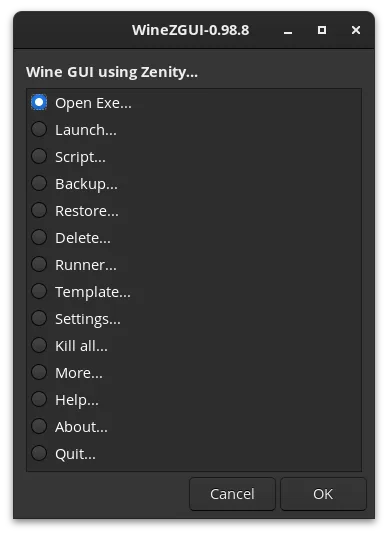
WineZGUI is a Bash-based frontend for Wine that simplifies running Windows games on Linux with Zenity-driven menus and prefix management.
WineZGUI is not a direct replacement for Battle.net in the traditional sense, but it can effectively run Blizzard games on Linux when used with the official Battle.net Windows client. It handles launching, prefix management, and desktop integration, making it usable for technically comfortable…
Feature parity60%


What is Battle.net?
Battle.net is primarily used by gamers to access Blizzard's titles like World of Warcraft, Overwatch, and Diablo. It serves as a launcher, update manager, and social hub, allowing players to connect, join groups, and chat. While designed for Windows, many users seek ways to run it on Linux to maintain access to their game libraries and communities.
The platform itself is free to download and use, but requires purchasing games or subscriptions for access to most content. Some titles offer in-game purchases or optional subscriptions. Blizzard uses the client to enforce digital rights management, tying game access to user accounts rather than local licenses.
People look for Linux alternatives because Blizzard does not provide a native Linux client. While some workarounds exist, they often require additional tools or compatibility layers. Users want reliable ways to play Blizzard games without dual-booting or relying on a separate Windows machine.
What a replacement for Battle.net must do
- Download and install Blizzard games
- Keep games updated automatically
- Launch and run games reliably
- Access online multiplayer and account sync
- Maintain friend lists and chat
- Handle game authentication and DRM
- Low maintenance and easy setup
Can you run Battle.net on Linux?
There is no native Linux version of Battle.net. It does not have a web-based launcher. However, it often runs via Wine or Proton through tools like Lutris or Heroic Games Launcher. Success varies by distribution and system setup. Some users report stable performance, while others face login issues or update failures. Protontricks and WineZGUI can help resolve compatibility problems, but results aren't guaranteed.
Which alternative should you choose?
Lutris is best for users who want a polished, all-in-one gaming interface with strong community support. Heroic Games Launcher suits those focused on Epic and Blizzard games with clean integration. WineZGUI helps advanced users manage custom Wine configurations. Protontricks is ideal for troubleshooting specific game issues when used alongside other launchers.
Moving your Battle.net files and habits
No direct data export exists from Battle.net to Linux launchers. Game progress is typically saved to your Blizzard account, so logging in on a new system restores most data. Local game files can't be reused across platforms. You'll need to redownload games on Linux. Configuration files and saves stored in the cloud sync automatically when supported by the game.
Side-by-side comparison
| App | License | Flatpak | Latest version | Feature parity | Rating |
|---|---|---|---|---|---|
| Lutris | GPL-3.0-or-later | ✓ | 0.5.23 | 85% | — |
| Heroic Games Launcher | GPL-3.0 | — | 2.22.4 | 60% | — |
| WineZGUI | GPL-3.0-or-later | ✓ | 0.99.16 | 60% | — |
Battle.net: frequently asked questions
Can I use my existing Blizzard account on Linux?
Yes, your Blizzard account works the same way. You log in through the client running under Wine or Proton.
Do all Blizzard games work on Linux this way?
Most do, but performance and stability vary. Anti-cheat systems in some games may cause issues.
Is it legal to run Battle.net on Linux using Wine?
Yes, using Wine to run Battle.net is legal. You still need to own the games and agree to Blizzard's terms.
Will I get banned for using Battle.net on Linux?
No, Blizzard does not ban users for running the client on Linux via compatibility layers.
How important is Battle.net to you?
Know a better alternative? Suggest an alternative