
 GNU EmacsLinux
vs
AtomWindows
GNU Emacs as a Linux alternative to Atom
Updated
Our verdict
GNU Emacs is a capable replacement for Atom, but the transition is steep. It offers superior extensibility through Emacs Lisp and excellent built-in tools, covering syntax highlighting, Git, and themes. However, it lacks Atom's modern, out-of-the-box UI and has a steeper learning curve. It is ideal for users willing to invest time in configuration or those who value a single, all-in-one environment. It is not recommended for users seeking a quick, low-friction switch without reading documentation.
- License
- GPL-3.0+ and GFDL-1.3+
- Price
- Free
- Latest version
- 31.1 (August 24, 2026)
- Rating
- —
What works the same
- Open-source and free to use
- Extensible via plugins or packages
- Syntax highlighting for many languages
- Integrated Git version control support
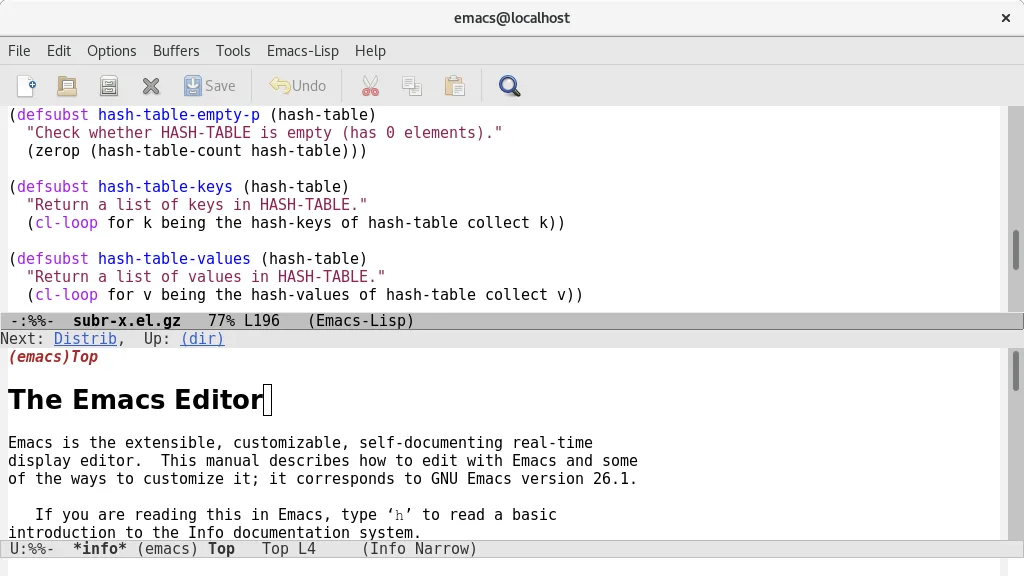
- Highly customizable interface and themes
What is different
- Emacs requires learning Emacs Lisp for deep customization, whereas Atom used JavaScript/HTML/CSS
- Emacs has a steeper initial learning curve with fewer default visual cues
- Atom is discontinued, while Emacs is actively maintained by the Free Software Foundation
- Emacs includes built-in mail, news, and calendar features not present in Atom
- Emacs startup can be slower if heavily loaded with packages, though core is fast
Opening your Atom files
Emacs opens standard text files, source code, and project directories directly, so your codebase remains accessible. Atom's configuration files (.atom directory) are not directly compatible and must be recreated. If you used specific Atom packages, you will need to find equivalent Emacs packages or write custom Lisp functions. There is no direct import tool for Atom settings.
Switching from Atom to GNU Emacs, step by step
- Install GNU Emacs via your distribution's package manager or Flathub.
- Install the Magit package for Git integration.
- Install a theme package like solarized or monokai to match your previous look.
- Install language-specific modes or packages for syntax highlighting if not built-in.
- Read the built-in Emacs tutorial to learn basic keybindings.
- Customize your init file to load packages and set preferences.
Key features of GNU Emacs
- Built-in Emacs Lisp interpreter for full customization
- Content-sensitive editing modes with syntax highlighting
- Integrated debugger interface and project management
- Full Unicode support for nearly all human languages
- Built-in mail and news reader
- Comprehensive built-in documentation and tutorial
- Highly customizable via code or graphical interface
How to install GNU Emacs on Linux
flatpak install flathub org.gnu.emacssudo apt install emacssudo apt install emacssudo dnf install emacssudo pacman -S emacs-waylandsudo zypper install emacsFrequently asked questions
Is Emacs difficult to learn?
Yes, it has a steep learning curve. The interface is minimal by default, and many features require understanding Emacs Lisp. However, the built-in tutorial helps new users get started.
Can I use Git in Emacs like in Atom?
Yes, via Magit, which is a powerful Git frontend for Emacs. It is highly regarded and offers more control than Atom's built-in Git tools.
Does Emacs have a plugin system like Atom?
Yes, Emacs uses a package manager (ELPA) to install extensions. These are written in Emacs Lisp, so they are more powerful but require knowledge of Lisp to modify or create new ones.
5 other alternatives to Atom
 Visual Studio CodeA lightweight, extensible code editor that supports debugging, Git, and many languages.FreeFlatpakVisual Studio Code vs Atom
 NeovimNeovim is a modern Vim fork that adds extensibility, advanced UI support, and powerful extensions while…Open sourceFreeFlatpakNeovim vs Atom
 KateKate is a feature-rich, programmer-focused text editor from KDE with support for 300+ languages and advanced…Open sourceFreeFlatpakKate vs Atom
 geditgedit is GNOME's lightweight, general-purpose text editor, suitable for notes, documents, and basic code…Open sourceFreeFlatpakgedit vs Atom
 GeanyGeany is a lightweight, fast IDE that supports many languages and plugins out of the box.Open sourceFreeFlatpakGeany vs Atom