

Linux · Sound & Video
Clementine Music Player
Clementine is a cross‑platform music player that plays local files, internet radio, and supports cloud libraries.
- License
- GPL-3.0+
- Latest version
- 1.4.0rc2 (April 23, 2020)
- Developer
- David Sansome, John Maguire & Arnaud Bienner
- Installs
- 2,632 (Flathub, 30 days)

What is Clementine Music Player?
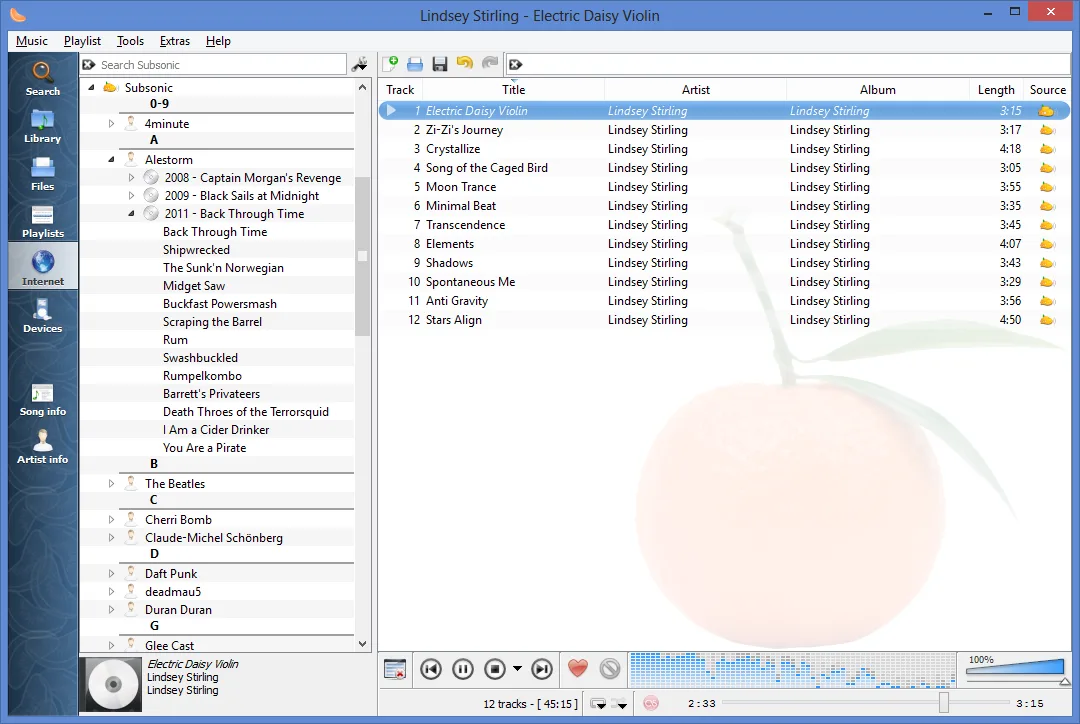
Clementine began as a fork of Amarok 1.4, aiming for a lightweight, fast interface. It has been updated regularly, with the latest release in 2020, and remains maintained on GitHub. The UI is tabbed, with a side panel for playlists and a search bar that can query local files, online services, or cloud storage.
It targets users who want a full‑featured player without the bloat of commercial software. The experience is similar to MusicBee or MediaMonkey but with a more minimalist design and fewer built‑in services.
Compared to the Windows tools, Clementine feels more streamlined; it lacks some advanced library‑management features of MusicBee, but it offers a solid set of playback, tagging, and streaming options that work well on Linux.
Best for: Users who need a lightweight, feature‑rich player that works across Windows, macOS, and Linux.
Key features of Clementine Music Player
- Search and play local library
- Internet radio from Spotify, Soundcloud, Icecast, Subsonic
- Cloud integration (Box, Dropbox, Google Drive, OneDrive)
- Smart and dynamic playlists
- Tag editing and transcode to MP3/Ogg/FLAC/AAC
- Lyrics, album art, and visualisations
- M3U/XSPF/PLS/ASX import/export
- Remote control via MPRIS or Android
Pros
- Cross‑platform with native Linux support
- Free and open source
- Extensive media format support
- Good integration with cloud services
- Customizable playlists
- MPRIS support for media keys
Cons
- No native Spotify streaming (requires separate app)
- Interface can feel dated compared to newer players
- Occasional bugs with cloud sync
- Limited podcast management compared to dedicated apps
Windows programs Clementine Music Player replaces
How to install Clementine Music Player on Linux
flatpak install flathub org.clementine_player.ClementineTips for Windows users
When moving from MusicBee or MediaMonkey, export your playlists as M3U or XSPF and import them into Clementine. The keyboard shortcuts differ: use Ctrl+P for play/pause, Ctrl+N for next track, and Ctrl+Shift+N for previous. Tag editing is done via the right‑click context menu. Cloud services require separate login steps in the settings panel.
Recent releases
- 1.4.0rc2 —
- 1.3.1 —
Fixes a bug where ratings are deleted when upgrading from older versions.
Clementine Music Player: frequently asked questions
Can I play Spotify in Clementine?
Clementine can stream Spotify playlists if you have a Spotify account, but it requires the official Spotify client to be installed and logged in. The player will then access the stream via the local client.
Does Clementine support podcasts?
Yes, you can discover and download podcasts directly from the app, and they appear in your library like any other audio file.
How do I add a new internet radio station?
Use the "Add Internet Radio" dialog, enter the stream URL, and give it a name. The station will then appear in the radio list.
Is there a way to control Clementine from the command line?
Clementine supports MPRIS, so you can use tools like mpc or playerctl to send play/pause/next commands.
Updated