

Linux · Graphics
draw.io
Create and share diagrams of all kinds, from flowcharts to UML, using a privacy‑focused, production‑grade tool.
- License
- Apache-2.0
- Latest version
- 32.6.1 (October 23, 2026)
- Developer
- JGraph
- Installs
- 8,428 (Flathub, 30 days)
What is draw.io?
draw.io, now known as diagrams.net, has been around since 2013 and has grown into a mature, web‑based diagramming solution that runs in any browser or as a desktop app via Electron or Flatpak. It was built to replace proprietary diagramming tools like Visio and Axure RP, offering a free, open‑source core with a rich set of shapes and templates.
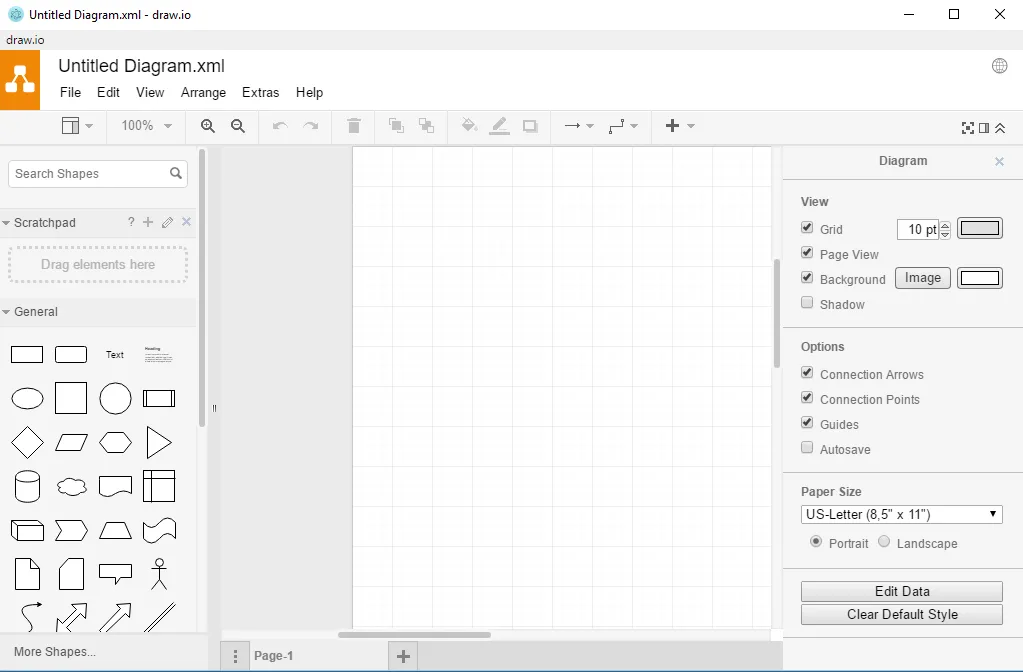
The application targets designers, developers, project managers, and educators who need to produce clear visual representations of processes, systems, or data models. Its interface is intentionally minimal, with a toolbar on the left, a canvas in the center, and a properties panel on the right, mirroring the layout of many Windows diagramming suites.
Compared with Windows tools such as Axure RP, draw.io feels lighter and faster. It lacks some of the advanced prototyping features of Axure but compensates with a broader shape library, real‑time collaboration, and the ability to save diagrams directly to cloud services like Google Drive or OneDrive.
Best for: Teams needing a free, collaborative diagramming tool that integrates with cloud storage and supports a wide variety of diagram types.
Key features of draw.io
- Web‑based and desktop versions via Flatpak
- Supports a wide range of diagram types (UML, ER, network, flowchart)
- Real‑time collaboration with Google Drive, OneDrive, GitHub
- Export to PNG, SVG, PDF, XML, and native draw.io format
- Custom shape libraries and templates
- Offline editing when using the desktop app
- Keyboard shortcuts for common actions
- Version history for each diagram
Pros
- Free and open source
- Cross‑platform (Linux, Windows, macOS)
- Strong privacy focus
- Large shape library
- Real‑time collaboration
- Easy import/export of common formats
Cons
- No native support for advanced prototyping features of Axure
- Occasional performance lag on very large diagrams
- Limited offline collaboration features
- Learning curve for advanced shape libraries
Windows programs draw.io replaces
How to install draw.io on Linux
flatpak install flathub com.jgraph.drawio.desktopTips for Windows users
When moving from Axure RP, export your existing diagrams as XML or SVG and import them into draw.io. The file format is compatible with many diagramming tools, and you can also open Axure’s .rp files directly if you have the legacy version. Keyboard shortcuts differ; for example, Ctrl+Z for undo, Ctrl+S for save, and Ctrl+Shift+S for export. Collaboration works through cloud services, so set up a Google Drive or OneDrive folder and share the link with teammates. The workflow is more linear: create, edit, and export, rather than the iterative prototyping loop in Axure.
Recent releases
- 32.6.1 —
- 32.5.5 —
- 32.4.1 —
- 32.3.0 —
draw.io: frequently asked questions
Is draw.io available on Linux?
Yes, it can be installed via Flatpak from Flathub or run in any browser on Linux.
Can I use draw.io offline?
The desktop Flatpak version works offline, but real‑time collaboration requires an internet connection.
Does draw.io support UML diagrams?
Yes, it includes a comprehensive UML shape set and can export to XMI.
Is the tool free?
The core application is free and open source; no paid tier is required for standard use.
Updated