

Linux · Programming
Git Cola
Git Cola is a lightweight, feature‑rich graphical Git client for Linux.
- License
- GPL-2.0
- Latest version
- 4.19.0 (July 12, 2026)
- Developer
- David Aguilar
- Installs
- 475 (Flathub, 30 days)
What is Git Cola?
Git Cola is a simple yet powerful GUI for Git that has been around for many years, with its latest release 4.19.0 in July 2026. It is packaged in the major distributions like Debian, Fedora, openSUSE and Ubuntu, which shows it is mature and well‑maintained. The tool aims to make common Git operations accessible without sacrificing advanced functionality.
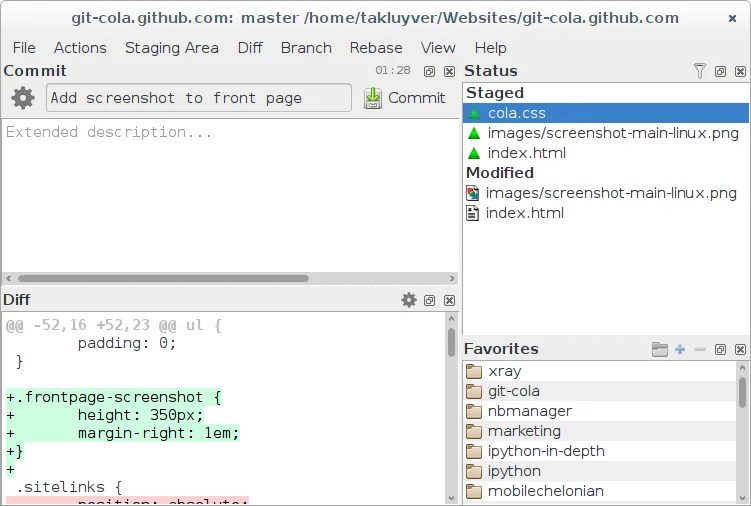
The application targets developers who prefer a visual interface over the command line but still want fine‑grained control. It works well for both newcomers learning Git and seasoned users who need quick access to branches, commits, and stash operations. Its layout is straightforward, with panes for history, file changes and a built‑in diff viewer.
Compared with Windows‑only tools like GitHub Desktop, Git Cola feels more configurable and less opinionated. It doesn’t lock you into a specific workflow; you can invoke any Git command from the terminal alongside the GUI. The experience is more akin to a traditional Linux desktop app, using native menus and keyboard shortcuts familiar to GNOME or KDE users.
Best for: Developers who want a fast, configurable Git GUI without leaving the Linux desktop.
Key features of Git Cola
- Visual commit graph and history browsing
- Integrated diff and merge tool
- Branch, tag, and stash management
- Support for custom Git commands
- Searchable file tree and change list
- Undo/redo for staging actions
- Configurable shortcuts and themes
- Export patches and apply them
Pros
- Free and open source under GPL‑2.0
- Available in all major Linux distro repositories
- Lightweight and starts quickly
- Highly configurable for power users
Cons
- Interface looks dated compared to modern Windows GUIs
- Limited built‑in collaboration features (e.g., pull‑request handling)
- Some advanced Git actions still require the terminal
Windows programs Git Cola replaces
How to install Git Cola on Linux
flatpak install flathub com.github.git_cola.git-colasudo apt install git-colasudo apt install git-colasudo dnf install git-colasudo zypper install git-colaTips for Windows users
When moving from GitHub Desktop, note that Git Cola stores no proprietary project files; it works directly on your existing Git repositories. Most shortcuts (Ctrl+Z for undo, Ctrl+F for search) are similar, but you may need to relearn menu locations for pull, fetch, and rebase. Keep a terminal handy for any Git commands the GUI doesn’t expose, and you can drag‑and‑drop files into the staging area just like in Windows tools.
Recent releases
- 4.19.0 —
- 4.18.2 —
- 4.18.1 —
- 4.18.0 —
Git Cola: frequently asked questions
How do I install Git Cola on Ubuntu?
Use the package manager: sudo apt install git-cola. It is also available as a Flatpak from Flathub.
Can Git Cola handle large repositories?
Yes, it works with repositories of any size, though very large histories may load slower than the command line.
Is there a way to customize the keyboard shortcuts?
Yes, shortcuts can be edited in the Preferences → Keyboard section.
Does Git Cola support SSH keys for remote operations?
It relies on the underlying Git configuration, so any SSH keys set up for Git work automatically.
Updated