

Linux · Graphics
MyPaint
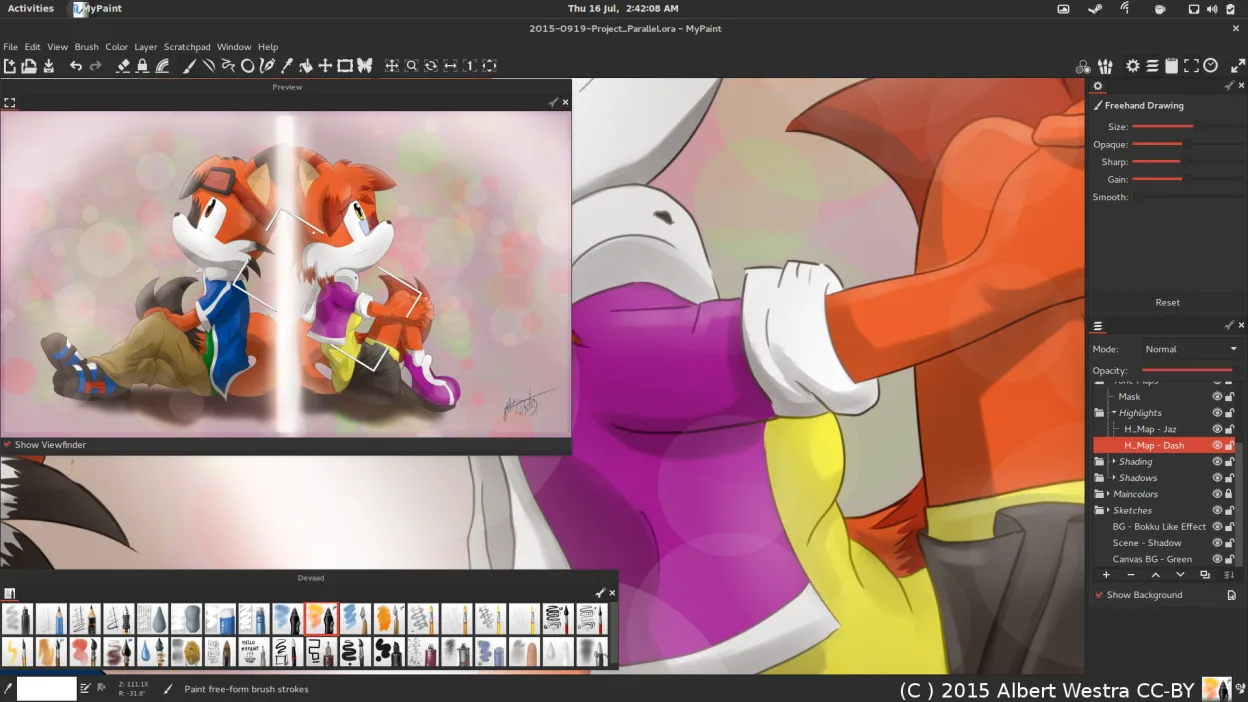
MyPaint is a fast, free, open‑source raster painting program focused on brush dynamics and tablet use.
- License
- GPL-2.0+
- Latest version
- 2.0.1 (May 29, 2020)
- Developer
- MyPaint Developers
- Installs
- 1,401 (Flathub, 30 days)
What is MyPaint?
MyPaint originated in the early 2000s as a lightweight alternative to heavyweight raster editors. It has matured through community contributions and is now packaged in most major Linux distributions. The latest stable release, 2.0.1, came out in 2020 and the project remains actively maintained.
The program is aimed at digital painters who prefer a minimal interface and a highly configurable brush engine. It works best with a graphics tablet, but can be used with a mouse for quick sketches. Its UI hides toolbars until needed, letting you concentrate on the canvas.
Compared with Clip Studio Paint on Windows, MyPaint lacks built‑in comic‑specific features like panel layout tools and vector layers, but its brush engine is comparable in flexibility. The workflow is more straightforward: you start drawing, bring up the brush palette when required, and save your work in standard image formats.
Best for: Artists who want a fast, brush‑centric painting app without the overhead of full‑featured image editors.
Key features of MyPaint
- Brush engine with hundreds of configurable parameters
- Supports pressure sensitivity and tilt on graphics tablets
- Simple, distraction‑free canvas‑only interface
- Layer support with basic blending modes
- Export to PNG, JPEG, OpenRaster and other common formats
- Extensible via Python plugins
- Pre‑installed brush packs from professional artists
- Undo/redo history with unlimited steps
Pros
- Very responsive even with large brushes
- Minimal UI keeps focus on drawing
- Excellent tablet integration
- Free and open source
- Available in all major distro repos
Cons
- No built‑in vector tools or comic layout features
- Limited text handling and layer effects
- Interface can feel too sparse for beginners
Windows programs MyPaint replaces
How to install MyPaint on Linux
flatpak install flathub org.mypaint.MyPaintsudo apt install mypaintsudo apt install mypaintsudo dnf install mypaintsudo pacman -S mypaintsudo zypper install mypaintTips for Windows users
MyPaint reads and writes standard raster formats like PNG, JPEG and OpenRaster, so you can open files exported from Clip Studio Paint without conversion. Keyboard shortcuts differ; most common actions use the space‑bar for panning and the bracket keys for brush size. Expect a more minimal UI—toolbars appear only when you press ‘t’, so spend a few minutes customizing your brush presets to match your previous workflow.
Recent releases
- 2.0.1 —
For those who primarily use the 2.x mode (the default mode), this is an important upgrade. A color conversion function in the v2.0.0 release has an error that can (and usually will) cause image degradation over multiple save/load cycles. Big thanks to gwojcik…
- 2.0.0 —
MyPaint 2.0 adds a new layer mode and uses a different compositing method than before (by default, this is configurable), which means that you can create files in 2.0 that will not look the same when opened in earlier versions. Additionally, changes to the…
- 1.2.1 —
Maintenance release of 1.2.x. - Make sure layer clones get selected immediately - Fix hypersensitive tab drags - Fix accelerator mapping sort order - Fix exceptions when loading a corrupt thumbnail during thumb updates - Fix GTK removing the main canvas…
MyPaint: frequently asked questions
Can MyPaint open .clip files from Clip Studio Paint?
No, MyPaint cannot read Clip Studio's proprietary .clip format; export to PNG or OpenRaster first.
Does MyPaint support pressure sensitivity on my Wacom tablet?
Yes, pressure and tilt are fully supported when the tablet driver is correctly installed.
Is there a way to save layered files for later editing?
Save as OpenRaster (.ora) to preserve layers and edit them again in MyPaint or other compatible programs.
Can I install MyPaint on a headless server for batch rendering?
MyPaint is primarily an interactive GUI app; it does not provide a command‑line rendering mode.
Updated