

Linux · Sound & Video
Natron
Natron is a free, open‑source node‑based video compositing tool for creating VFX and motion graphics.
- License
- GPL-2.0-or-later
- Latest version
- 2.5.0 (November 26, 2022)
- Developer
- Natron
- Installs
- 866 (Flathub, 30 days)
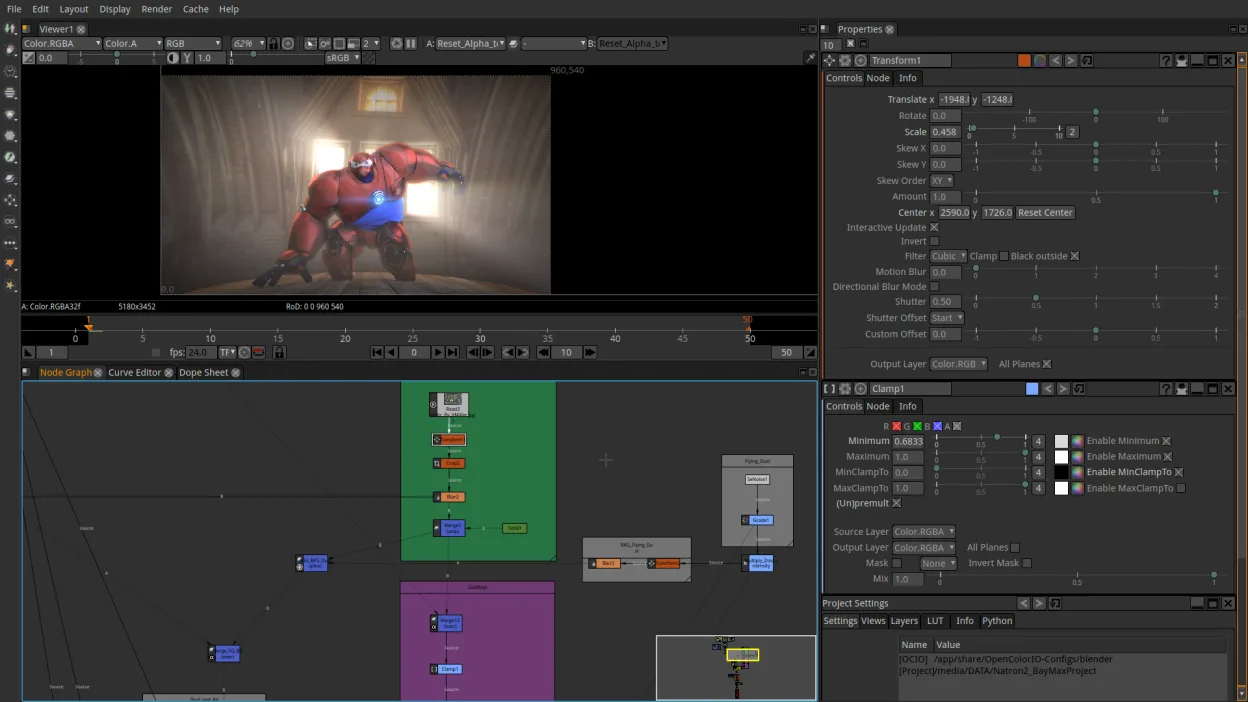
What is Natron?
Natron began in 2010 as a fork of the open‑source Natron project, aiming to provide a free alternative to commercial compositors. Over the years it has grown to support a wide range of plugins and a robust node editor, making it suitable for both hobbyists and small studios.
It is aimed at users who need advanced visual effects, color grading, and motion graphics without the cost of Adobe After Effects, Nuke, or Blackmagic Fusion. The learning curve is steeper than basic editors, but the node‑based workflow is powerful once mastered.
Compared to the Windows tools, Natron feels more like a lightweight, scriptable environment. It lacks some of the polished UI polish and plug‑in ecosystem of After Effects, but it offers full control over the compositing pipeline and is fully scriptable with Python.
Best for: Small studios and hobbyists needing a cost‑effective VFX and motion graphics tool.
Key features of Natron
- Node‑based compositing engine
- Python scripting support
- Native OpenFX plugin support
- Color grading tools
- Timeline and keyframe editing
- Export to common video formats
Pros
- Free and GPL licensed
- Cross‑platform (Linux, macOS, Windows)
- Extensible via OpenFX and Python
- Active community and documentation
- Regular releases
Cons
- UI is less polished than commercial counterparts
- Limited native plug‑in library
- Learning curve for node workflow
- Occasional stability issues on older hardware
Windows programs Natron replaces
How to install Natron on Linux
flatpak install flathub fr.natron.NatronTips for Windows users
When moving from After Effects, be prepared to learn the node‑based paradigm; most effects translate to nodes, but keyframe shortcuts differ (e.g., use Ctrl+K for keyframes). Export files from After Effects as .aep and use the Natron AE import plugin if available, otherwise export as .mov or .exr and re‑import. Natron works with common formats like .mov, .mp4, .exr, and .png sequences. Remember that the timeline is linear, so complex pre‑compositions must be flattened into nodes.
Recent releases
- 2.5.0 —
Changes: - Use Python 3 rather than Python 2 (which is not maintained anymore). - Use QtPy rather than PySide. QtPy is an abstraction layer for PyQt5/PyQt4/PySide2/PySide (newer versions support PyQt6/PySide6). Known Issues: - Rendering sometimes silently…
- 2.4.4 —
- 2.4.3 —
Natron: frequently asked questions
Is Natron still maintained?
Yes, the latest release is 2.5.0 from November 2022, and the project continues to receive updates.
Can I use Nuke plugins in Natron?
Many Nuke plugins are OpenFX and can run in Natron, but not all proprietary Nuke plugins are supported.
Does Natron support 3D compositing?
Natron has basic 3D node support, but it is not as advanced as Fusion or Nuke.
How do I install Natron on Ubuntu?
You can install it from the official PPA or via Flathub; the command is 'sudo apt install natron' or 'flatpak install flathub org.natron.Natron'.
Updated