
Linux · Science & Education
PyCharm OSS
PyCharm Community Edition is a free, open‑source IDE for Python development on Linux.
- License
- Apache-2.0
- Latest version
- 2026.3 (November 5, 2026)
- Developer
- JetBrains s.r.o.
- Installs
- 3,906 (Flathub, 30 days)



What is PyCharm OSS?
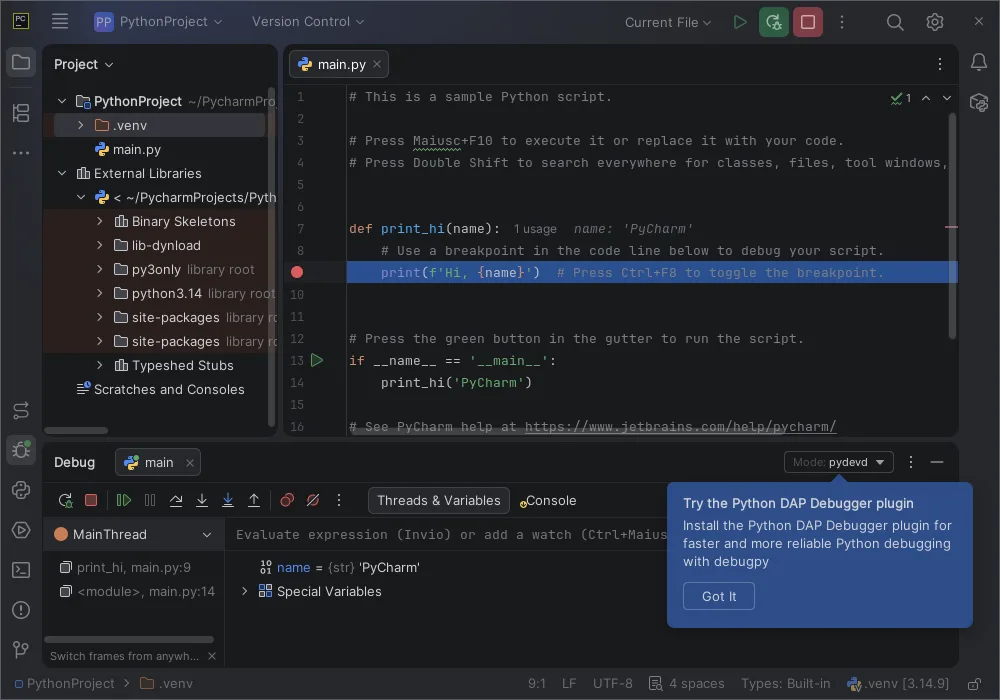
PyCharm Community Edition (OSS) has been maintained by JetBrains for many years and is packaged for Arch Linux. It offers the core editing, debugging and testing tools that make Python coding efficient, and it integrates with scientific packages like NumPy and Matplotlib. The IDE is mature, with regular releases; the latest is 2026.3 as of November 2026.
The editor targets developers who need more than a simple text editor but don’t require the full commercial feature set of PyCharm Professional. It works well for pure Python projects, small web frameworks, and data‑science notebooks via its IPython integration. If you’re used to Windows tools like Jupyter Notebook, PyCharm gives you a traditional IDE experience while still letting you run notebooks inside the IDE.
Compared with the Windows‑only Jupyter Notebook interface, PyCharm feels more like a conventional development environment: you have a project view, code navigation, refactorings and a built‑in terminal. The learning curve is a bit steeper than a notebook, but the workflow is faster for larger code bases, and the shortcuts are largely the same as other JetBrains products, which eases the transition.
Best for: Python developers who want a full‑featured IDE without paying for the commercial edition.
Key features of PyCharm OSS
- Smart code completion and on‑the‑fly error highlighting
- Integrated debugger and test runner
- Support for scientific libraries (NumPy, Matplotlib, Anaconda)
- IPython Notebook integration
- Built‑in terminal and VCS support
- Framework awareness for Django, Flask, etc.
Pros
- Free and open‑source under Apache‑2.0
- Rich code‑analysis tools reduce bugs early
- Cross‑platform consistency with Windows version
- Good integration with common scientific packages
Cons
- Missing advanced web‑framework features of the Professional edition
- No built‑in database tools
- Heavy on resources for older hardware
Windows programs PyCharm OSS replaces
How to install PyCharm OSS on Linux
flatpak install flathub com.jetbrains.PyCharm-Communitysudo pacman -S pycharm-community-editionTips for Windows users
Your .ipynb notebooks can be opened directly in PyCharm via the IPython integration; just drag the file into the project. Most Windows shortcuts (Ctrl+Shift+F for search, Ctrl+Alt+L for reformat) work the same, but Linux uses the Super key for some system shortcuts, so you may need to adjust. Export any existing Jupyter notebooks to .py scripts if you prefer a linear workflow, and use the built‑in terminal to run conda or pip commands just as you did in CMD.
Recent releases
- 2026.3 —
This major release introduces JetBrains Air – a new layer for agentic development that lets you run, track, and verify multi-agent workflows inside your IDE. Alongside Air, version 2026.3 delivers major updates across workspace tooling, Python 3.15 support…
- 2026.2.4 —
This update fixes security issues. Oracle's fixes for CVE-2026-91403 and CVE-2026-114820 were integrated into JBR.
- 2026.2.3 —
This update fixes several type-checking false positives along with issues in Ruff, Jupyter, Databricks, and interpreter setup: - Get correct type inference from Numpy-style docstrings, including favoring type annotations over docstring types and handling…
- 2026.2.2 —
- Fixed a freeze during dictionary type comparison - PyCharm now shows relevant control flow elements using sticky-lines - Proper type resolutions for __slots__ in enums - Inlay hints for enum auto() - Generic bounds are displayed in parameter info -…
PyCharm OSS: frequently asked questions
Can I run Jupyter notebooks inside PyCharm on Linux?
Yes, the Community edition can open and edit .ipynb files using the built‑in IPython Notebook support.
Is PyCharm Community Edition available as a flatpak?
It is available on Flathub; the flatpak package includes the same core features as the distro package.
How do I install plugins for additional language support?
Use the Settings → Plugins menu; you can browse the JetBrains repository and install plugins directly from within the IDE.
Does PyCharm support virtual environments on Linux?
Yes, it detects virtualenv, venv, conda and pipenv environments and lets you select them per project.
Updated