

Linux · Science & Education
calibre
Calibre is a full‑featured e‑book manager that catalogs, converts, reads, and shares books.
- License
- GPL-3.0
- Latest version
- 9.17.0 (October 23, 2026)
- Developer
- Kovid Goyal
- Installs
- 11,166 (Flathub, 30 days)


What is calibre?
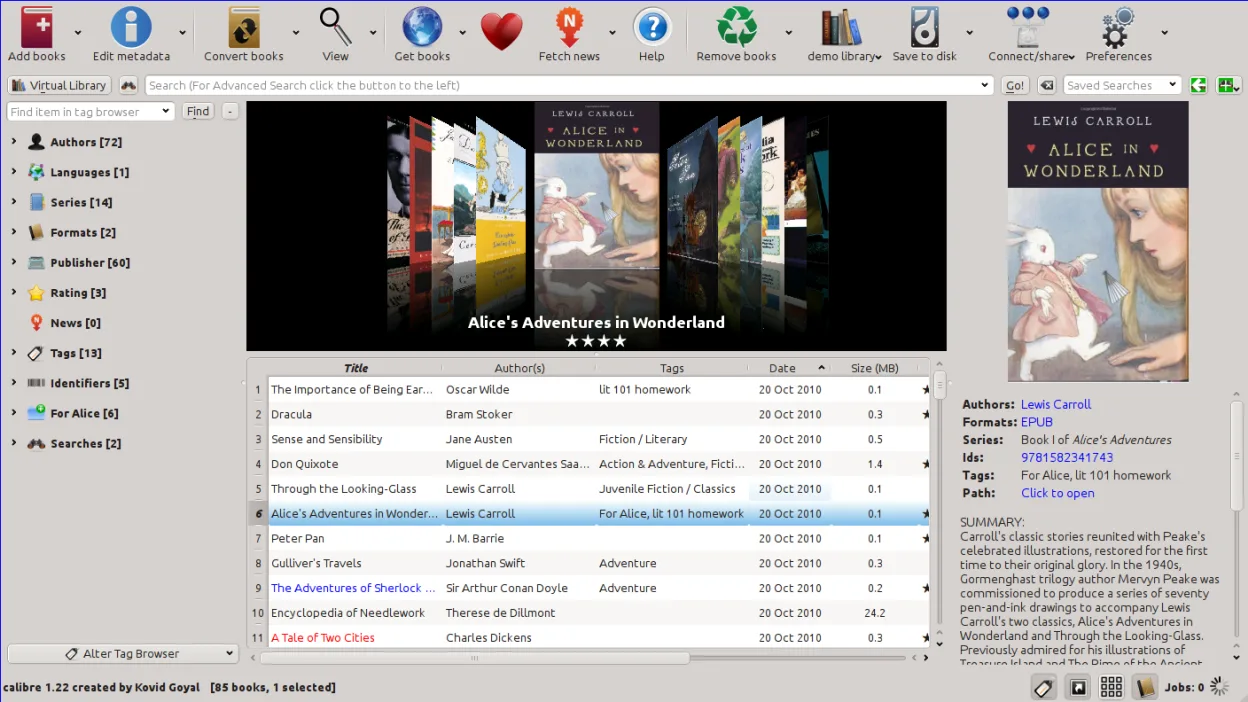
Calibre was first released in 2006 and has grown into a mature, community‑driven project with regular updates. It runs on Linux, Windows, and macOS, and the Linux port is well supported across major distributions. The interface is a mix of a library view, a book editor, and a built‑in content server.
It targets readers, authors, and anyone who collects e‑books in multiple formats. The learning curve is moderate: you’ll need to learn the library filters and conversion options, but the UI is straightforward.
Compared to Windows‑only tools, Calibre feels more integrated. It replaces several separate utilities—cataloguing, conversion, reader, and server—into one application, so you don’t need extra programs for most tasks.
Best for: Users who want a single, free tool to manage, convert, read, and share e‑books across devices.
Key features of calibre
- Library management with metadata lookup
- Format conversion (EPUB, MOBI, PDF, AZW3, etc.)
- Built‑in e‑book reader
- Integrated e‑book editor
- Content server for network sharing
- News & periodical downloader
- Device sync (Kindle, Kobo, etc.)
- Customizable keyboard shortcuts
Pros
- All‑in‑one solution
- Open source and free
- Cross‑platform
- Extensible with plugins
- Regular updates
Cons
- UI can feel cluttered for beginners
- Conversion quality varies for some formats
- Large library may slow down on low‑end hardware
Windows programs calibre replaces
How to install calibre on Linux
flatpak install flathub com.calibre_ebook.calibresudo apt install calibresudo apt install calibresudo dnf install calibresudo pacman -S calibresudo zypper install calibreTips for Windows users
When moving from a Windows e‑book manager, start by exporting your library to an OPF or CSV file if the tool supports it, then import into Calibre. Most common formats (EPUB, MOBI, PDF) are natively supported, so you can drop them into Calibre’s library. Keyboard shortcuts differ: for example, Ctrl+O opens a book, Ctrl+E edits metadata, and Ctrl+Shift+S sends to a device. The conversion wizard is a one‑click process, but you may need to tweak the output profile for the best result on your reader.
Recent releases
- 9.17.0 —
New features: - Conversion: Add support for reading images in the JPEG XL format - Conversion: Add support for CSS Level 4 selectors - Edit book: Check book: Add a check for dangling ARIA references and update ARIA references when auto fixing invalid ids…
- 9.16.0 —
New features: - Read aloud: Add the high quality Kokoro voices, which sound much more natural than the Piper voices, especially for English (To use them, select the Neural engine backend in the Read aloud configuration and choose one of the Kokoro voices. The…
- 9.15.0 —
New features: - A "Create your own adventure" writing game -- interactive storytelling with an AI managing the world you create (This is a little different from the usual run of calibre features. It started out as a way to test the AI backends in calibre but…
- 9.14.0 —
New features: - Allow generating book covers using AI with different cover styles such as romance, sci-fi, pulp fiction etc. (To use it select a book and click Edit metadata and then the "AI Generate" button. Note that you will have to configure an image…
calibre: frequently asked questions
Can I keep my existing library in Calibre?
Yes, import your existing books by dragging them into the library or using the Import option. Calibre will read metadata automatically if the files are named correctly.
How do I sync my Kindle with Calibre?
Connect the device via USB, then use the "Send to device" button or the device icon in the toolbar. Calibre will convert the book to MOBI or AZW3 if necessary.
Is Calibre safe to use?
It is open source and widely used; the only risk is from third‑party plugins. Stick to the official plugin repository.
Can I use Calibre on a server?
Yes, the built‑in Content server can be accessed from any browser on the network once you enable it in Preferences > Sharing.
Updated