
 ShotwellLinux
vs
Adobe BridgeWindows
ShotwellLinux
vs
Adobe BridgeWindows
Shotwell as a Linux alternative to Adobe Bridge
Updated
Our verdict
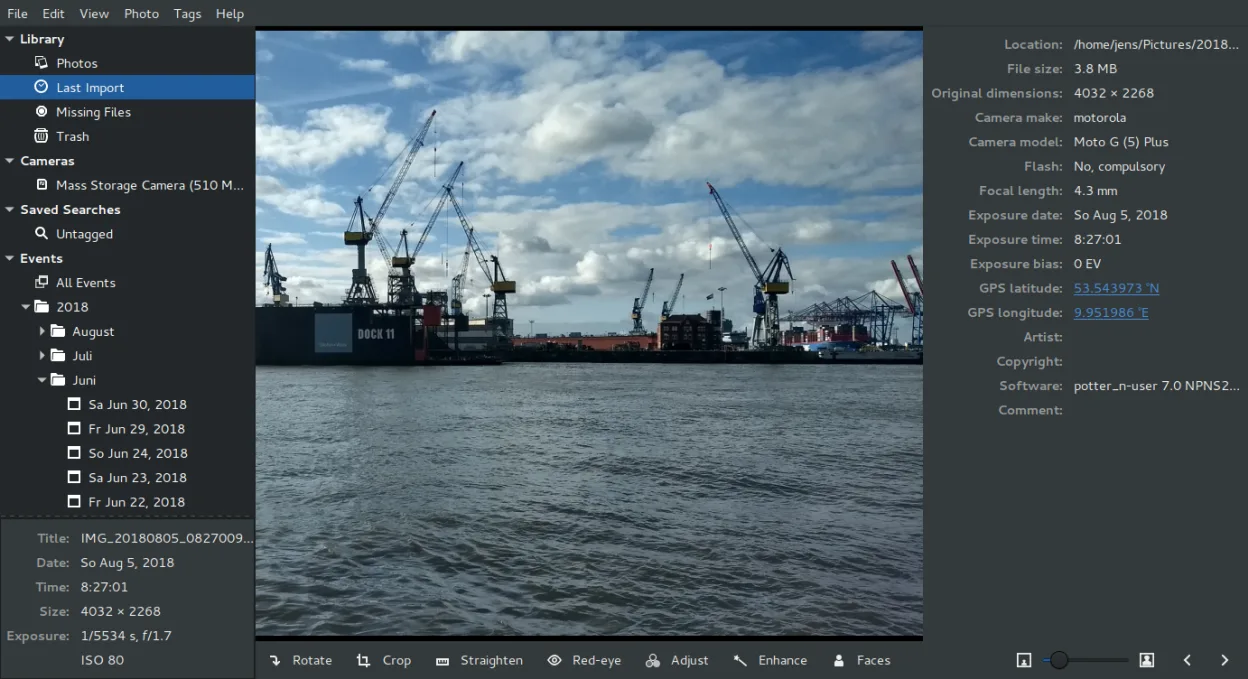
Shotwell is not a suitable replacement for Adobe Bridge. It is a lightweight, consumer-grade organizer for basic photo management, lacking the professional workflow tools Bridge provides. You cannot manage large libraries efficiently, edit IPTC/EXIF metadata directly, or perform complex batch renaming. If you rely on smart collections, RAW preview workflows, or PDF handling, Shotwell will feel like a step backward. Use it only if you strictly need simple, date-based organization without advanced metadata control or batch processing capabilities.
- License
- LGPL-2.1+
- Price
- Free
- Latest version
- 33.0 (September 13, 2026)
- Rating
- —
What works the same
- Organizes photos by date and tags
- Supports RAW and JPEG file formats
- Provides basic non-destructive editing
- Allows importing photos from disk or camera
What is different
- No direct IPTC/EXIF metadata editing interface
- Lacks advanced batch renaming and processing tools
- No support for PDF preview or handling
- Limited filtering and smart collection capabilities compared to Bridge
Opening your Adobe Bridge files
Shotwell opens standard image files (JPEG, PNG, TIFF, RAW) directly. It does not read Adobe Bridge catalog files (.cat) or sidecar XMP files as a primary organizational structure. While it can display images that Bridge manages, it does not import Bridge’s specific metadata structures or collections. You would need to point Shotwell at the original image folders rather than a Bridge catalog.
Switching from Adobe Bridge to Shotwell, step by step
- Export your photo library from Adobe Bridge to a folder structure on disk.
- Ensure all sidecar XMP files are saved alongside the original images.
- Launch Shotwell and use the Import function to select the root folder.
- Review imported photos to verify dates and basic tags are correct.
- Manually re-apply any complex ratings or tags if they did not transfer.
Key features of Shotwell
- Import photos from camera or disk
- Organize by date, tags, ratings
- Non‑destructive crop, red‑eye, color, straighten
- Support for RAW, JPEG, PNG, TIFF
- Upload to Flickr, Google Photos, etc.
- Fast, lightweight UI
- Integrated with GNOME file manager
How to install Shotwell on Linux
flatpak install flathub org.gnome.Shotwellsudo apt install shotwellsudo apt install shotwellsudo dnf install shotwellsudo pacman -S shotwellsudo zypper install shotwellFrequently asked questions
Can Shotwell edit IPTC keywords?
No, Shotwell does not provide a direct interface for editing IPTC or EXIF metadata fields like keywords, copyright, or artist. You will need a dedicated tool for that.
Does Shotwell support batch renaming?
No, Shotwell lacks built-in batch renaming tools. You must use command-line utilities or other file managers for bulk renaming tasks.
Is Shotwell suitable for professional photo workflows?
Generally, no. It is designed for casual users. Professionals needing robust metadata management and batch processing should consider digiKam or RawTherapee instead.
2 other alternatives to Adobe Bridge
 digiKamdigiKam is a comprehensive KDE photo manager for organizing, tagging, and editing digital photos with strong…Open sourceFreeFlatpakdigiKam vs Adobe Bridge
 darktabledarktable is a free, open‑source photo editor that manages raw files and offers a full non‑destructive…Open sourceFreeFlatpakdarktable vs Adobe Bridge