
 ShotwellLinux
vs
Adobe LightroomWindows
ShotwellLinux
vs
Adobe LightroomWindows
Shotwell as a Linux alternative to Adobe Lightroom
Updated
Our verdict
Shotwell is not a viable replacement for Adobe Lightroom if you rely on professional RAW editing or large-scale cataloging. It is a lightweight GNOME tool for casual users who need basic organization and simple, non-destructive tweaks like cropping or color adjustments. If your workflow involves complex tone mapping, batch processing hundreds of files, or advanced metadata management, Shotwell will feel restrictive. It serves personal photo management well but lacks the depth for serious photographers. Choose it only if you want a simple, fast organizer and do not need pro-grade editing tools.
- License
- LGPL-2.1+
- Price
- Free
- Latest version
- 33.0 (September 13, 2026)
- Rating
- —
What works the same
- Non-destructive editing that preserves original files
- Support for importing and organizing photos by date and tags
- Ability to handle RAW, JPEG, PNG, and TIFF formats
- Basic color adjustments and straightening tools
What is different
- Lacks advanced tone mapping and detailed color correction controls
- No support for plugins or extensible workflows
- Limited batch processing capabilities compared to Lightroom
- No robust metadata management or custom field creation
- Simpler interface designed for casual use, not professional libraries
Opening your Adobe Lightroom files
Shotwell does not use Adobe Lightroom’s .xmp sidecar or .lrdata catalog structures for its own database. It can open standard RAW, JPEG, and TIFF files directly, but it will not import Lightroom catalogs (.lrcat) or preserve Lightroom-specific edit history. If you have edited photos in Lightroom, you should export them as DNG or JPEG with embedded metadata before importing them into Shotwell, as Shotwell will not recognize Lightroom’s proprietary edit instructions.
Switching from Adobe Lightroom to Shotwell, step by step
- Export your Lightroom catalog as a DNG or JPEG archive with embedded metadata.
- Install Shotwell from your distribution’s repository or Flathub.
- Launch Shotwell and use the import function to select the exported files.
- Review the imported library and re-apply any critical edits using Shotwell’s basic tools.
- Tag and rate photos in Shotwell to rebuild your organization structure.
Key features of Shotwell
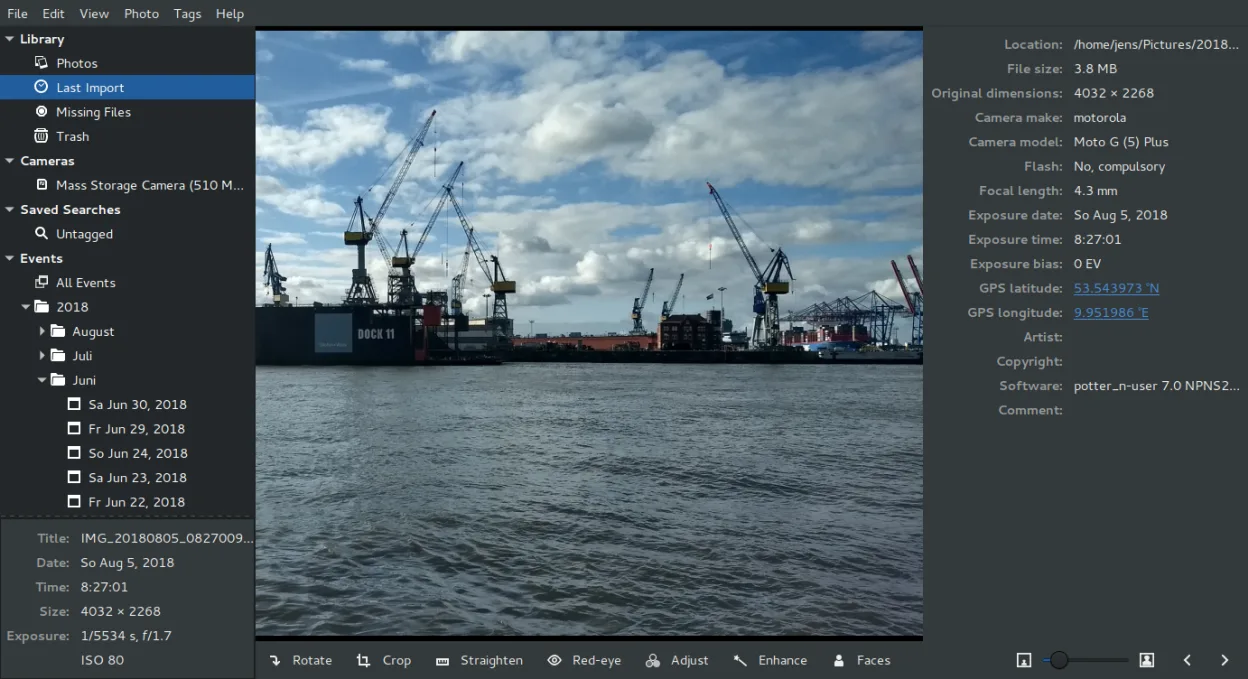
- Import photos from camera or disk
- Organize by date, tags, ratings
- Non‑destructive crop, red‑eye, color, straighten
- Support for RAW, JPEG, PNG, TIFF
- Upload to Flickr, Google Photos, etc.
- Fast, lightweight UI
- Integrated with GNOME file manager
How to install Shotwell on Linux
flatpak install flathub org.gnome.Shotwellsudo apt install shotwellsudo apt install shotwellsudo dnf install shotwellsudo pacman -S shotwellsudo zypper install shotwellFrequently asked questions
Can Shotwell handle large photo libraries like Lightroom?
Shotwell is lightweight and fast for personal collections, but it is not designed for the massive, complex libraries that professional photographers manage in Lightroom. Performance may degrade with tens of thousands of high-resolution files.
Does Shotwell support RAW files from all cameras?
Shotwell supports a variety of RAW formats, but it relies on underlying libraries for decoding. If your camera’s RAW format is not supported by the system’s image libraries, Shotwell may not be able to open it. Always test with a sample file from your specific camera model.
Is there a way to sync Shotwell with cloud services?
Shotwell offers direct upload options to services like Flickr and Google Photos. It does not provide the same level of automated, real-time cloud synchronization or backup features that Adobe Lightroom Cloud offers.
4 other alternatives to Adobe Lightroom
 darktabledarktable is a free, open‑source photo editor that manages raw files and offers a full non‑destructive…Open sourceFreeFlatpakdarktable vs Adobe Lightroom
 RawTherapeeRawTherapee is an open‑source, cross‑platform raw photo development program.Open sourceFreeFlatpakRawTherapee vs Adobe Lightroom
 GIMPGIMP is a free, open-source raster graphics editor for photo editing, digital painting, and image composition.Open sourceFreeFlatpakGIMP vs Adobe Lightroom
 digiKamdigiKam is a comprehensive KDE photo manager for organizing, tagging, and editing digital photos with strong…Open sourceFreeFlatpakdigiKam vs Adobe Lightroom