
 ThunderbirdLinux
vs
Microsoft Outlook CalendarWindows
Thunderbird as a Linux alternative to Microsoft Outlook Calendar
Updated
Our verdict
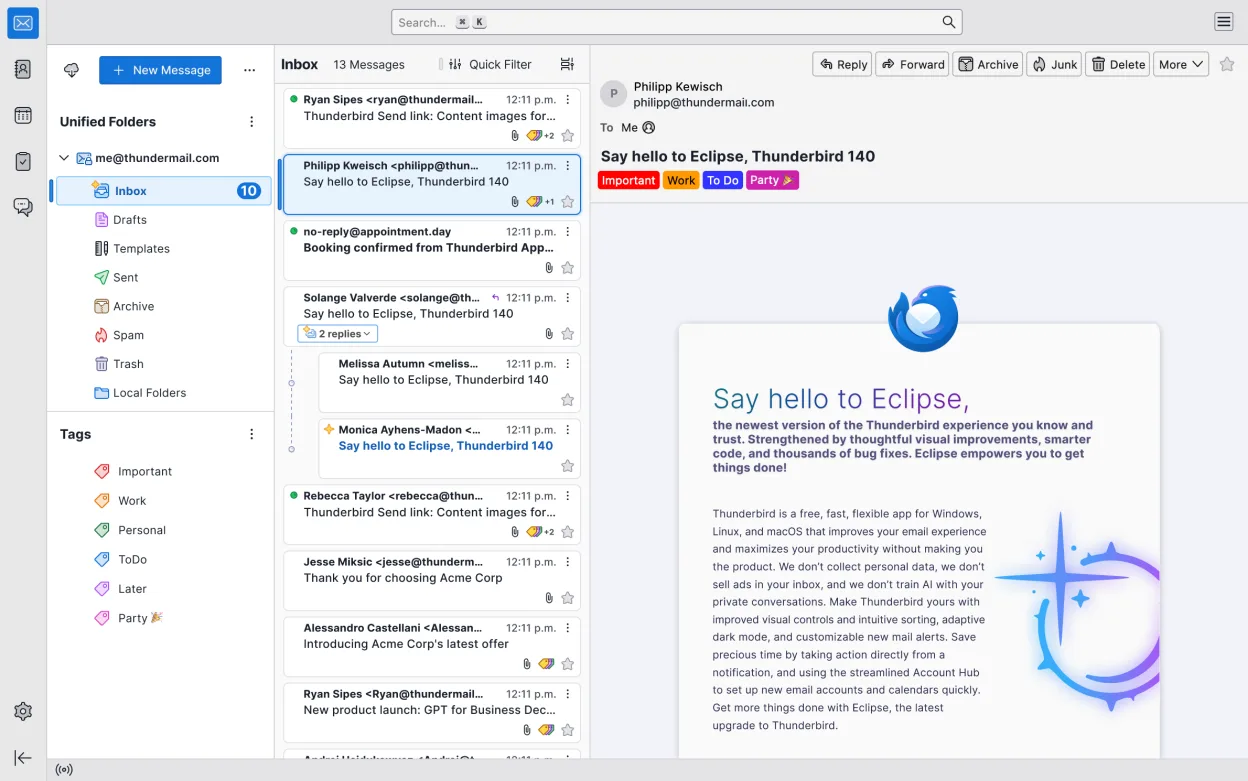
Thunderbird is a strong, free alternative for users who need calendar and task management integrated with email, particularly if you rely on CalDAV or standard IMAP/SMTP. It handles daily appointments, meeting invites, reminders, and recurring events effectively through its Lightning extension. However, it does not replace deep Microsoft Exchange Server integration or modern Teams-based scheduling. If your workflow depends heavily on proprietary Microsoft 365 features or complex corporate Exchange policies, you will hit limitations. For home users, small businesses, or those using open standards, it covers the core needs of Outlook Calendar without the subscription cost or vendor lock-in.
- License
- MPL-2.0
- Price
- Free
- Latest version
- 160.0 (November 7, 2026)
- Rating
- —
What works the same
- Integrated calendar, contact, and email management in a single interface
- Support for scheduling meetings, sending invites, and managing recurring events
- Task and to-do list integration alongside calendar items
- Ability to share calendars and manage multiple accounts simultaneously
- Customizable interface with support for extensions to enhance functionality
What is different
- Lacks native, deep integration with Microsoft Exchange Server and Microsoft 365 services
- No built-in support for Microsoft Teams scheduling or real-time collaboration features
- Calendar functionality relies on the Lightning extension rather than being a core, standalone module
- Does not support proprietary Microsoft file formats natively without conversion tools
- Interface and workflow differ significantly from the modern Outlook web and desktop clients
Opening your Microsoft Outlook Calendar files
Thunderbird does not natively open Microsoft Outlook .pst or .ost files directly. To migrate calendar data, you must first export events from Outlook to a standard format like .ics (iCalendar) or .csv. Thunderbird can then import these files into its local calendar or sync them via CalDAV. For contacts, Outlook .csv exports are generally compatible, but complex contact fields may require manual adjustment. There is no direct 'open Outlook file' feature, so an intermediate export step is mandatory for any data transfer.
Switching from Microsoft Outlook Calendar to Thunderbird, step by step
- Export your Outlook calendar events to a .ics file via File > Open & Export > Import/Export
- Export your Outlook contacts to a .csv file, ensuring the correct field mapping is selected
- Install Thunderbird and the Lightning extension if not already present
- In Thunderbird, go to File > Import and select the .ics file to add events to a local calendar
- Import the .csv contact file into Thunderbird's address book
- Configure your email account and link your CalDAV or Exchange account for ongoing sync
Key features of Thunderbird
- Support for multiple email accounts and protocols (IMAP, POP3, SMTP)
- Integrated calendar and address book management
- Built-in chat and IRC client
- News feed (RSS) reader
- Lightning extension for advanced calendar features
- Customizable interface with add-ons
- Strong encryption support (PGP/S-MIME)
- Cross-platform compatibility
How to install Thunderbird on Linux
flatpak install flathub org.mozilla.thunderbirdsudo apt install thunderbirdsudo apt install thunderbirdsudo dnf install thunderbirdsudo pacman -S thunderbird-i18n-elsudo zypper install MozillaThunderbirdFrequently asked questions
Does Thunderbird support Microsoft Exchange?
Thunderbird supports basic Exchange connectivity via the EAS protocol for some accounts, but it does not offer the deep, native integration found in Microsoft Outlook. For complex Exchange environments, using CalDAV or standard IMAP/SMTP is often recommended for stability.
Can I share my calendar with others?
Yes, Thunderbird supports sharing calendars via CalDAV. You can publish a calendar link for others to subscribe to, or share it within an organization using a CalDAV server. Direct sharing via Microsoft Outlook or Teams is not supported.
Is the calendar feature built-in or an add-on?
The calendar functionality is provided by the Lightning extension. While it is often pre-installed or easily added, it is technically an extension to the core email client, which means updates to calendar features may depend on the extension's release cycle.
4 other alternatives to Microsoft Outlook Calendar
 EvolutionEvolution is a full‑featured personal information manager that combines email, calendar, contacts and tasks…Open sourceFreeFlatpakEvolution vs Microsoft Outlook CalendarOrageA lightweight, KDE-based calendar application for managing events, reminders, and to-do lists with a simple…Open sourceFreeOrage vs Microsoft Outlook Calendar