
Windows · System Tools
Best Linux alternatives to UltraISO
UltraISO creates, edits, and converts ISO images for Windows users.
Updated
Quick answer
The best Linux alternative to UltraISO is Brasero. Other strong options: K3b, Xfburn, ISO Master.
6 Linux alternatives to UltraISO
-
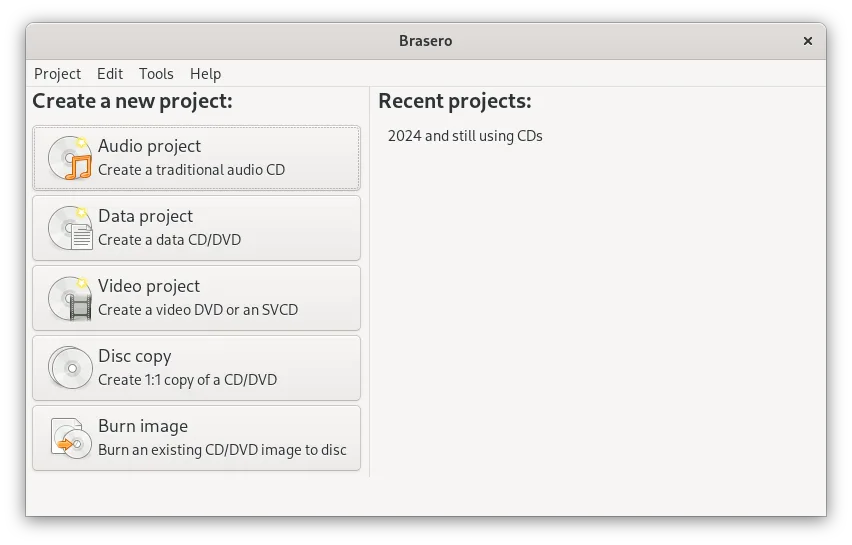
Brasero is a simple GNOME tool for creating, copying, and burning data and audio CDs and DVDs.
Brasero is a solid replacement for the burning and creating aspects of UltraISO, but it is not a direct functional match. It handles standard data and audio CD/DVD creation, copying, and multisession burning well within the GNOME environment. However, it lacks the deep ISO editing and conversion…
Feature parity45% -

K3b is KDE’s comprehensive CD/DVD/Blu‑ray burning tool for Linux.
K3b is a solid replacement for UltraISO if your primary goal is burning discs and managing ISO images on Linux. It handles creating, ripping, and burning ISOs with a straightforward interface that integrates well with the KDE file manager. However, it is less focused on heavy-duty ISO editing or…
Feature parity75% -
Xfburn is a lightweight, GTK+ CD/DVD/BD burning application for Linux.
Xfburn is a solid, lightweight replacement for the burning and basic creation aspects of UltraISO, but it is not a full feature match. It handles creating discs from files, burning ISOs, and making bootable media well. However, it lacks the deep ISO editing and format conversion tools that make…
Feature parity60% -
A lightweight GTK-based GUI for creating, editing, and converting ISO images, available in Fedora repositories.
ISO Master can replace UltraISO for users who mainly need to create, edit, and convert ISO images on Linux. It covers the core tasks of making new ISOs, modifying existing ones, and converting between ISO, BIN, and other formats. Users who require advanced multi‑track burning, UDF support, or a…
Feature parity80% -
GNOME Disk Utility is a native Linux tool for managing disks, partitions, and creating ISO images.
GNOME Disk Utility is a solid replacement for basic ISO tasks but lacks UltraISO's depth. It handles creating, mounting, and burning ISOs well, which satisfies most casual users. However, it does not support direct ISO-to-IMG or BIN conversions, a key UltraISO feature. If you only need to create…
Feature parity60% -
AcetoneISO is a free, open‑source Linux tool for mounting and managing CD/DVD image files.
AcetoneISO is a strong, free replacement for UltraISO's core functions. It handles creating, editing, and converting ISO, BIN, and IMG files effectively. The interface is simple and intuitive, avoiding the clutter of commercial software. It covers essential tasks like burning discs and managing…
Feature parity85%



What is UltraISO?
UltraISO is a Windows application that lets users create, edit, and convert ISO image files for optical discs. It is used mainly by home users and small businesses that need to burn discs or prepare installation media. The software is sold as a paid license, with a free trial that limits features.
Linux users look for alternatives because they want the same ISO manipulation capabilities without the Windows cost or licensing restrictions. Open‑source tools offer similar functionality and run natively on Linux.
Finding a Linux replacement that matches UltraISO’s full feature set is important for users who rely on ISO editing, conversion, and burning in their workflow.
What a replacement for UltraISO must do
- Create ISO images from files and folders
- Edit existing ISO files
- Convert ISO to other formats (e.g., IMG, BIN)
- Burn ISO to CD/DVD/USB
- Support for multi‑track and ISO 9660/UDF formats
- User‑friendly interface
- No licensing cost
Can you run UltraISO on Linux?
None of the UltraISO binaries run natively on Linux. Users can run it under Wine, but stability varies and some features (e.g., ISO editing) may not work reliably. There is no official web version or Proton support. For a native solution, Linux alternatives must be used.
Which alternative should you choose?
If you need a simple, free tool for burning and basic ISO creation, Brasero or Xfburn are suitable. For more advanced editing and conversion, ISO Master or AcetoneISO are better. K3b offers a full-featured burning suite, while GNOME Disk Utility is good for quick disk imaging tasks.
Moving your UltraISO files and habits
All alternatives read and write standard ISO files, so you can transfer your ISO images directly. No special export or import steps are required; just copy the ISO files to your Linux system and open them with the chosen tool.
Side-by-side comparison
| App | License | Flatpak | Latest version | Feature parity | Rating |
|---|---|---|---|---|---|
| Brasero | GPL-2.0-or-later | ✓ | 3.12.4 | 45% | — |
| K3b | GPL-3.0 | — | 26.08.3 | 75% | — |
| Xfburn | GPL-2.0 | — | 0.8.0 | 60% | — |
| ISO Master | GPL-2.0 | — | 3.0.0 | 80% | — |
| GNOME Disk Utility | GPL-3.0 | — | 46.1 | 60% | — |
| AcetoneISO | GPL-3.0 | — | 2.4_7 | 85% | 5/5 |
UltraISO: frequently asked questions
Does UltraISO support editing ISO files?
Yes, it can edit files inside an ISO image, but the feature is limited in the trial version.
Can I burn an ISO created by UltraISO on Linux?
Yes, any standard ISO image can be burned with Linux tools like Brasero or K3b.
Is there a free alternative that matches all features?
ISO Master and AcetoneISO provide most editing and conversion features for free, but they may lack some advanced options found in UltraISO.
Will Wine run UltraISO reliably on Linux?
Wine can launch UltraISO, but some functions, especially ISO editing, may not work consistently.
How important is UltraISO to you?
Know a better alternative? Suggest an alternative