
 ZimLinux
vs
Microsoft OneNote (UWP)Windows
Zim as a Linux alternative to Microsoft OneNote (UWP)
Updated
Our verdict
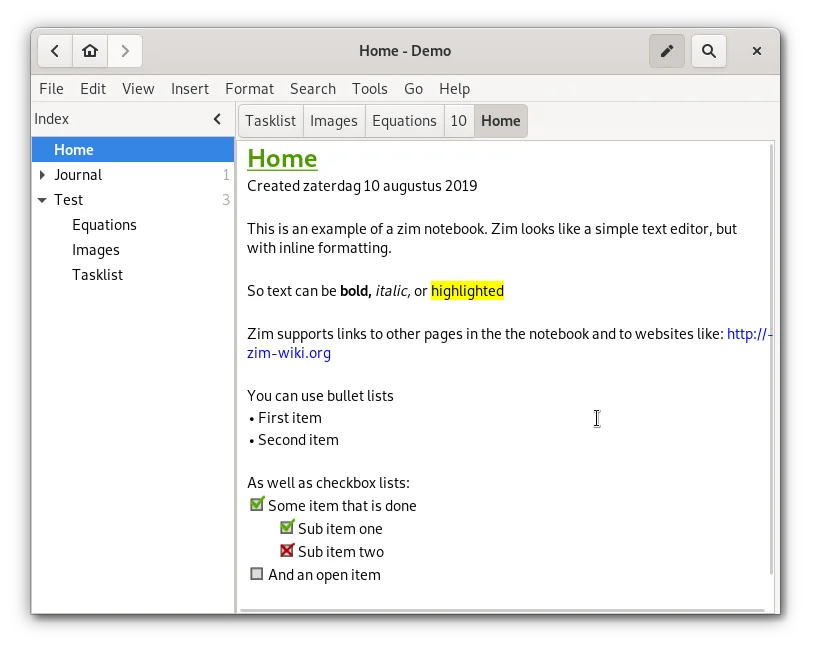
Zim is a solid replacement for OneNote if you prioritize local control and plain-text storage over cloud collaboration. It handles hierarchical organization, attachments, and basic media well. However, it lacks real-time multi-user editing and native cloud sync, which are core OneNote features. Choose Zim if you want a structured, offline-first wiki that exports cleanly to standard formats. Avoid it if you rely on heavy drawing, audio recording, or simultaneous editing with colleagues.
- License
- GPL-2.0+
- Price
- Free
- Latest version
- 0.77.2 (July 26, 2026)
- Rating
- —
What works the same
- Hierarchical organization of notes via sidebar trees
- Support for linking between pages and attaching files
- Ability to include images and rich text content
- Export capabilities to standard formats like HTML and PDF
What is different
- No built-in cloud synchronization; requires manual setup or external tools
- Lacks real-time multi-user collaboration features
- Stores data as plain text files with wiki markup rather than a proprietary binary format
- No native support for audio recording or free-form canvas drawing
Opening your Microsoft OneNote (UWP) files
Zim does not natively open Microsoft OneNote (.one) files. You must export your OneNote notebooks to HTML or PDF from Windows first, then import or manually copy the content into Zim pages. Direct file conversion is not supported, so expect some manual reformatting of complex layouts or embedded media.
Switching from Microsoft OneNote (UWP) to Zim, step by step
- Export your OneNote notebooks to HTML or PDF on Windows
- Install Zim via your distribution's package manager or Flathub
- Create a new notebook in Zim with a suitable directory structure
- Import HTML files or copy-paste content into new Zim pages
- Re-attach any necessary images or documents manually
- Configure a version control plugin if you need backup or history
Key features of Zim
- Hierarchical sidebar tree for page organization
- Automatic plain‑text file storage with wiki markup
- Linking between pages and attachments
- Plugins for tasks, equations, tray icon, and VCS
- Cross‑platform keyboard shortcuts
- Export to HTML, PDF, and plain text
How to install Zim on Linux
flatpak install flathub org.zim_wiki.Zimsudo apt install zimsudo apt install zimsudo dnf install Zimsudo pacman -S zimsudo zypper install zimFrequently asked questions
Can Zim sync my notes automatically?
No, Zim does not have built-in cloud sync. You can use a version control system like Git via the VCS plugin, or manually copy files to a sync folder like Syncthing or Nextcloud.
Is Zim free to use?
Yes, Zim is free and open-source software licensed under GPL-2.0+.
Does Zim support drawing or handwriting?
Zim is primarily a text-based wiki. It does not offer a free-form canvas for drawing or handwriting like OneNote. You can attach image files of drawings, but cannot create them directly in the note.
3 other alternatives to Microsoft OneNote (UWP)
 JoplinJoplin is an open‑source, cross‑platform note‑taking and to‑do app that stores data in Markdown.Open sourceFreeFlatpakJoplin vs Microsoft OneNote (UWP)
 Standard NotesStandard Notes is a cross‑platform, end‑to‑end encrypted notes app that syncs securely across devices.Open sourceFreeFlatpakStandard Notes vs Microsoft OneNote (UWP)
 SimplenoteSimplenote is a free, cross‑platform note‑taking app that syncs Markdown notes via the cloud.Open sourceFreeFlatpakSimplenote vs Microsoft OneNote (UWP)