
 GitKrakenLinux
vs
GitHub DesktopWindows
GitKrakenLinux
vs
GitHub DesktopWindows
GitKraken as a Linux alternative to GitHub Desktop
Updated
Our verdict
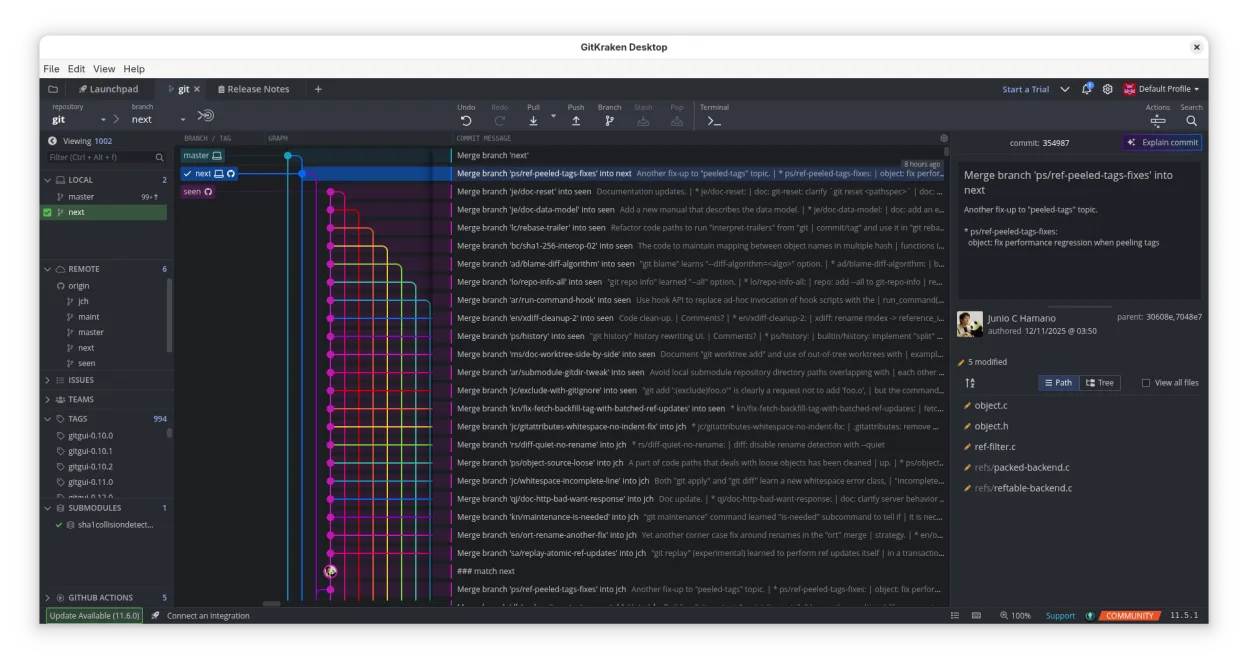
GitKraken is a strong, feature-rich replacement for GitHub Desktop on Linux, particularly if you want more visual control over complex Git operations. It handles cloning, branching, committing, and pushing with a more intuitive drag-and-drop interface than GitHub Desktop. The main drawback is that it is proprietary and requires a license for full functionality, whereas GitHub Desktop is free. For developers who need integrated issue tracking or advanced history visualization, GitKraken is an excellent choice, though casual users might find it overkill compared to the simpler GitHub Desktop.
- License
- LicenseRef-proprietary
- Price
- freemium
- Latest version
- 12.6.0 (October 1, 2026)
- Rating
- —
What works the same
- Cross-platform GUI for cloning, branching, and pushing repositories
- Visual commit history with diff viewing capabilities
- Integrated support for GitHub, GitLab, and Bitbucket
- Built-in merge conflict resolution within the application
What is different
- GitKraken is proprietary with a paid license for full features, while GitHub Desktop is free
- GitKraken includes Glo Boards for integrated issue tracking, which GitHub Desktop lacks
- GitKraken offers a built-in code editor with syntax highlighting, whereas GitHub Desktop relies on external editors
- GitKraken supports multiple profiles for separating work and personal projects
Opening your GitHub Desktop files
GitKraken does not directly import or open GitHub Desktop configuration files or local repository states as a single package. However, since both applications operate on standard Git repositories, any repository cloned or managed by GitHub Desktop can be opened in GitKraken by pointing it to the existing local directory. No special conversion is needed for the Git data itself, but you will need to reconfigure remote URLs and credentials if they were stored in GitHub Desktop's keychain or credential manager.
Switching from GitHub Desktop to GitKraken, step by step
- Install GitKraken via your Linux package manager or Flatpak
- Open GitKraken and log in to your GitHub account to authorize access
- Use the 'Add Repository' option to select your existing local GitHub Desktop repository folder
- Verify that remote URLs are correctly set in GitKraken's repository settings
- Test a simple commit and push to ensure credentials and permissions work
Key features of GitKraken
- Visual Git history with dark/light themes
- Drag‑and‑drop merge, rebase, push
- Built‑in code editor with diff and syntax highlighting
- Glo Boards for issue tracking across services
- Multiple profiles for work and personal projects
- Gitflow, LFS, submodules support
How to install GitKraken on Linux
flatpak install flathub com.axosoft.GitKrakenFrequently asked questions
Is GitKraken free on Linux?
GitKraken is proprietary. While there is a free tier with limited features, full functionality including unlimited repos and advanced features requires a paid license.
Can I use GitKraken with GitLab or Bitbucket?
Yes, GitKraken integrates with GitHub, GitLab, Bitbucket, and VSTS, allowing you to manage repositories and pull requests across these platforms.
Does GitKraken replace the command line entirely?
For most daily tasks like committing, branching, and merging, yes. However, for advanced scripting or complex repository surgery, you may still need to use the command line.
4 other alternatives to GitHub Desktop
 gitgGitg is a lightweight graphical interface for Git that visualizes commit history and manages repositories.Open sourceFreeFlatpakgitg vs GitHub Desktop
 Git ColaGit Cola is a lightweight, feature‑rich graphical Git client for Linux.Open sourceFreeFlatpakGit Cola vs GitHub Desktop
 GitKrakenGitKraken is a cross‑platform Git client with visual history, built‑in editor and integrated issue board.FlatpakGitKraken vs GitHub Desktop