

Linux · Graphics
KolourPaint
KolourPaint is a lightweight KDE raster graphics editor for quick drawing and simple image touch-ups.
- License
- BSD-2-Clause and LGPL-2.0+ and GFDL-1.2
- Latest version
- 26.04.3 (July 2, 2026)
- Developer
- KDE
- Installs
- 6,433 (Flathub, 30 days)
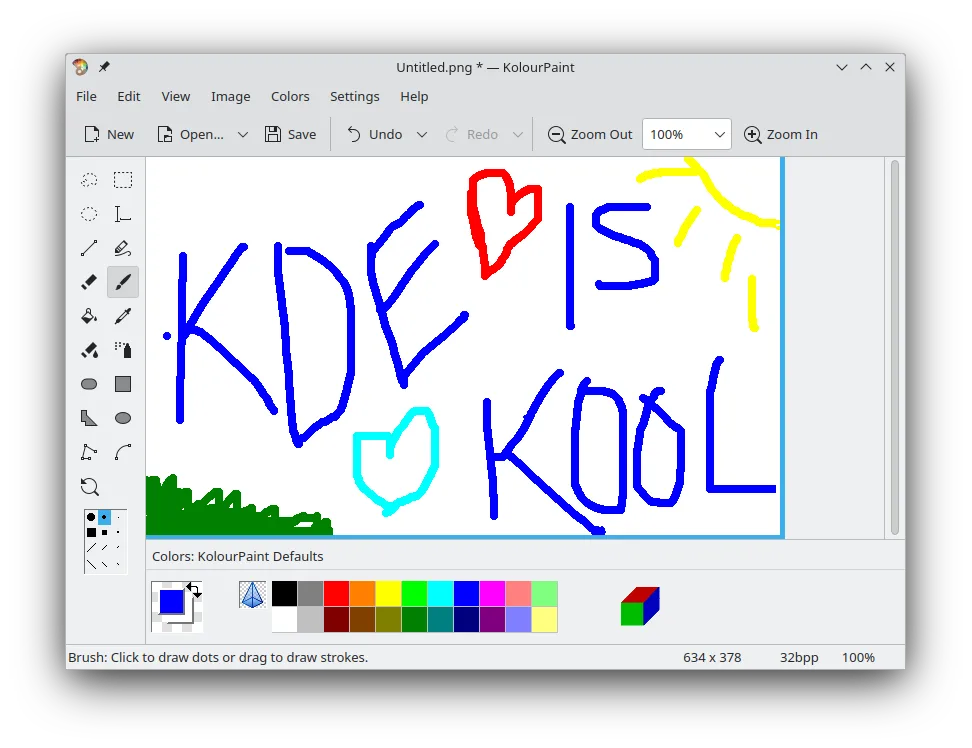
What is KolourPaint?
KolourPaint is a long-standing part of the KDE ecosystem, designed to be a straightforward raster editor. It has been maintained for years as a stable, no-frills tool for basic graphic tasks. It handles standard drawing operations without the complexity of full-featured suites like GIMP or Krita, making it a reliable choice for quick edits.
This tool is ideal for users who need to annotate screenshots, create simple diagrams, or perform minor photo adjustments. It suits both casual users and professionals who occasionally need a fast, lightweight alternative to heavier software. If you just need to draw a line or crop an image, it gets out of your way.
Compared to MS Paint, KolourPaint feels more robust but still simple. It offers more advanced features like better selection tools and effects, yet retains the familiar interface of a basic paint program. The transition is easy, as the core workflow of selecting tools and drawing on a canvas remains intuitive and consistent.
Best for: Quickly creating simple raster images or performing minor touch-ups on existing graphics.
Key features of KolourPaint
- Drawing shapes: lines, rectangles, ovals, polygons
- Curve and freehand line tools
- Text insertion and editing
- Color picker for precise sampling
- Selection tools for moving and editing parts of an image
- Rotation and monochrome effects
- Support for standard raster image formats
Pros
- Extremely lightweight and fast to launch
- Simple, uncluttered interface
- Part of the KDE ecosystem, ensuring good integration
- Available in major Linux distributions
Cons
- Lacks advanced layers and filters found in GIMP or Krita
- Interface may feel dated to users of modern Windows apps
- Limited support for vector graphics
Windows programs KolourPaint replaces
How to install KolourPaint on Linux
flatpak install flathub org.kde.kolourpaintsudo apt install kolourpaintsudo apt install kolourpaintsudo dnf install kolourpaintsudo pacman -S kolourpaintsudo zypper install kolourpaintTips for Windows users
If you are used to MS Paint, you will find KolourPaint familiar. Your BMP, PNG, and JPEG files will open without issue. Shortcuts are similar for basic tools, though you may need to adjust to KDE-specific keybindings for actions like save (Ctrl+S) and undo (Ctrl+Z). The workflow is direct: open an image, select a tool, and draw. There are no hidden menus or complex panels to navigate.
Recent releases
- 26.04.3 —
- 26.04.2 —
- 26.04.1 —
- 26.04.0 —
KolourPaint: frequently asked questions
Can KolourPaint open PNG and JPEG files?
Yes, it supports common raster formats like PNG, JPEG, BMP, and GIF. You can open, edit, and save these files directly.
Is KolourPaint better than GIMP for simple tasks?
For simple tasks, yes. KolourPaint is faster to load and has a simpler interface. Use GIMP only if you need layers or advanced filters.
Does KolourPaint support layers?
No, KolourPaint does not support multiple layers. It is a single-layer raster editor designed for simplicity.
Where can I download KolourPaint?
It is available in the official repositories of most major Linux distributions, including Fedora, Debian, Ubuntu, and Arch. You can also install it via Flathub.
Updated