

Linux · System Tools
QDirStat
QDirStat is a graphical tool that shows disk usage in tree and treemap views, letting you locate and delete large files.
- License
- GPL-2.0-only
- Latest version
- 2.0 (January 18, 2026)
- Developer
- Stefan Hundhammer
- Installs
- 2,261 (Flathub, 30 days)
What is QDirStat?
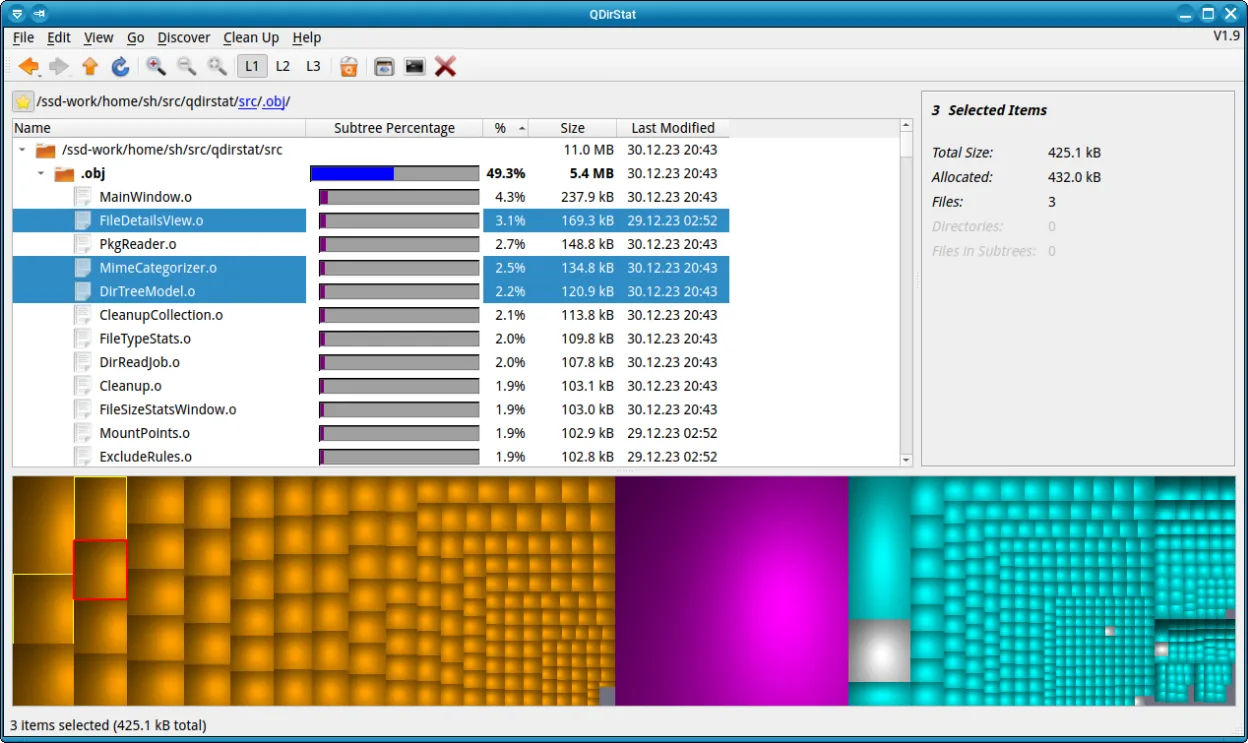
QDirStat has been around since the early 2000s, written in Qt by Stefan Hundhammer. It has a stable release cycle and is available in major distributions. The interface is straightforward: a tree view on the left and a treemap on the right, with color coding for file types.
It is aimed at users who need a visual way to audit disk space, from sysadmins to home users. The tool is lightweight, runs on any modern Linux desktop, and requires no external dependencies beyond Qt.
Compared to Windows utilities like TreeSize Free, QDirStat offers a similar treemap view but with more customization options. The experience feels native to Linux, with keyboard shortcuts and file handling that match the desktop environment.
Best for: Users who need a quick, visual way to identify and clean up disk space on Linux.
Key features of QDirStat
- Tree view of directories and files
- Treemap graphic with color coding
- Click to navigate and delete to trash
- Search and filter options
- Customizable color schemes
- Export statistics to text or CSV
- Keyboard shortcuts for navigation
- Cross‑platform (Debian, Fedora, openSUSE, Ubuntu)
Pros
- Free and open source
- Active maintenance and recent releases
- Clear visual representation
- Integrates with desktop trash
- No need for external plugins
Cons
- No support for network shares out of the box
- Limited scripting integration
- Occasional lag on very large filesystems
- Requires Qt installation
Windows programs QDirStat replaces
How to install QDirStat on Linux
flatpak install flathub io.github.shundhammer.qdirstatsudo apt install qdirstatsudo apt install qdirstatsudo dnf install qdirstatsudo zypper install qdirstatTips for Windows users
If you come from TreeSize Free, you’ll find the treemap layout familiar, but the toolbar is replaced by a menu bar and context menus. File deletion is done via the context menu or by dragging to the trash. Shortcuts differ: use Ctrl+F to search, Ctrl+N for a new scan, and Ctrl+S to save statistics. The application works with standard Linux file paths; no special file formats are needed.
Recent releases
- 2.0 —
- 1.9 —
- 1.8.1 —
- 1.8 —
QDirStat: frequently asked questions
Does QDirStat support network file systems?
It can scan any mounted filesystem, including NFS and SMB shares, as long as you have read access.
Can I export the statistics?
Yes, you can export the tree data to a plain text file or CSV from the File menu.
Is it safe to delete files from QDirStat?
Files are moved to the trash, giving you a chance to recover them if needed.
What are the keyboard shortcuts?
Common shortcuts include Ctrl+F (search), Ctrl+N (new scan), Ctrl+S (save), and Ctrl+Q (quit).
Updated