
Windows · System Tools
Best Linux alternatives to Logi Options+
Logi Options+ customizes Logitech mice and keyboards; on Linux, use Solaar or libratbag for similar control.
Updated
Quick answer
The best Linux alternative to Logi Options+ is libratbag. Other strong options: Solaar, Interception Tools, xbindkeys.
4 Linux alternatives to Logi Options+
-
libratbag is a Linux library and CLI tool that manages gaming mice profiles, replacing Logitech G Hub.
libratbag is a solid replacement for Logi Options+ if you primarily need hardware-level control over Logitech mice. It handles button remapping, DPI adjustments, and macros effectively via a CLI or simple GUI. However, it is not a complete 1:1 swap. It lacks support for keyboards and advanced…
Feature parity65% -
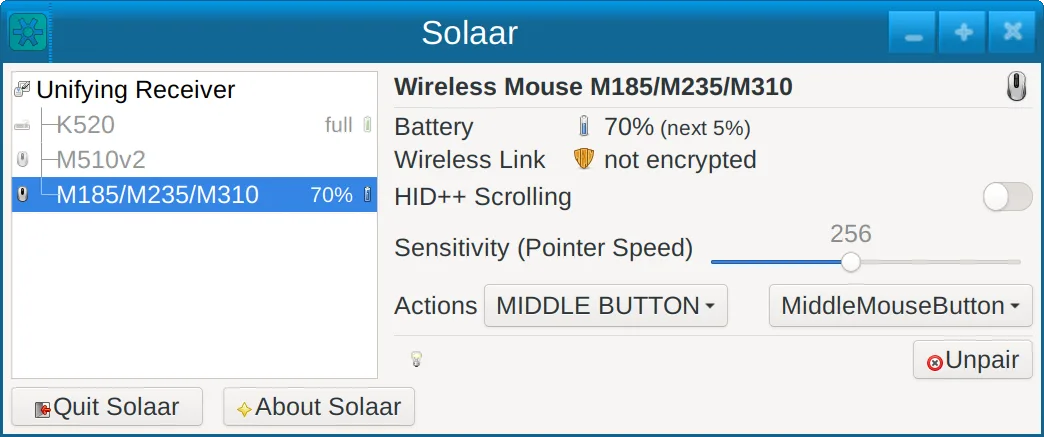
Solaar is a Linux tool that manages Logitech keyboards, mice, and trackpads, handling pairing, battery status, and some device settings.
Solaar is a solid replacement for basic Logi Options+ tasks on Linux, specifically for managing Logitech hardware. It handles pairing, battery monitoring, and simple settings like smooth scrolling and function key behavior. However, it is not a full feature match. If you rely on advanced…
Feature parity60% -
A low-level library and daemon for intercepting and modifying input events from keyboards and mice on Linux.
Interception Tools is not a direct drop-in replacement for Logi Options+ because it lacks a graphical interface and specific Logitech device drivers. It is a low-level library for modifying raw input events, not a device manager. For typical users wanting easy DPI changes or button remapping for…
Feature parity15% -
A lightweight utility to bind keyboard shortcuts and mouse buttons to arbitrary commands or key sequences.
xbindkeys is not a direct replacement for Logi Options+ because it lacks device-specific control. It remaps buttons to commands, but cannot adjust DPI, battery status, or Unifying receiver features. It is useful only if you want to trigger scripts from mouse buttons. For actual Logitech device…
Feature parity15%

What is Logi Options+?
Logi Options+ is the primary utility for configuring Logitech peripherals on Windows and macOS. Users rely on it to remap buttons, adjust DPI settings, and manage device-specific features like scroll speed or gesture controls. It is essential for anyone using Logitech hardware who wants to tailor the device to their workflow rather than using default factory settings.
The software is free to download and use, though it requires an account for some cloud-synced features. It is proprietary, meaning the source code is not available, and it only supports the two major desktop operating systems. This exclusivity leaves Linux users without an official tool from the manufacturer, forcing them to seek community-developed alternatives to maintain full functionality of their hardware.
People look for a Linux alternative because Logi Options+ does not run natively on Linux. While the hardware itself works out of the box via standard drivers, the ability to customize button mappings, DPI curves, and other advanced settings is locked behind the proprietary software. Without a replacement, users are stuck with default behaviors or must switch operating systems to reconfigure their devices.
What a replacement for Logi Options+ must do
- Remapping mouse and keyboard buttons
- Adjusting DPI and pointer speed
- Configuring device-specific features
- Managing multiple connected devices
- Support for Logitech Unifying receivers
- Non-intrusive background operation
Can you run Logi Options+ on Linux?
There is no official native Linux version of Logi Options+. It does not run reliably under Wine or Proton because it relies on specific system-level hooks and drivers that are difficult to emulate. The standard approach on Linux is to use third-party tools like Solaar or libratbag, which interact directly with the hardware or kernel drivers to provide similar functionality without needing the proprietary Windows application.
Which alternative should you choose?
For most users with Logitech Unifying or Bolt devices, Solaar is the best starting point as it handles pairing and basic configuration. If you need deep control over button remapping and DPI for supported mice, libratbag is a powerful option, often used alongside Solaar. Interception Tools and xbindkeys are more niche; use them if you need to intercept input events at a low level or bind specific keys to commands, but they require more manual setup and are less user-friendly for general device configuration.
Moving your Logi Options+ files and habits
There is no direct file export from Logi Options+ to Linux tools. Configuration profiles are stored in proprietary formats or cloud accounts that Linux utilities cannot read. You will need to manually recreate your settings, such as button mappings and DPI levels, in the new Linux application. Your hardware remains paired with the receiver, so you do not need to re-pair devices, but all customizations must be re-entered by hand.
Side-by-side comparison
| App | License | Flatpak | Latest version | Feature parity | Rating |
|---|---|---|---|---|---|
| libratbag | GPL-3.0 | — | 0.18 | 65% | — |
| Solaar | GPL-2.0-only | ✓ | 1.1.20 | 60% | — |
| Interception Tools | MIT | — | 0.6.8 | 15% | — |
| xbindkeys | GPL-2.0 | — | 1.8.7 | 15% | — |
Logi Options+: frequently asked questions
Does Solaar replace all features of Logi Options+?
No, Solaar covers most basic needs like DPI and button remapping for supported devices, but it lacks some advanced features like smart scrolling or device-specific profile switching found in Logi Options+.
Can I use Logi Options+ via Wine?
It is generally not recommended. The software often fails to detect devices or apply settings correctly under Wine due to driver and system hook incompatibilities. Native Linux tools are more stable.
Do I need to re-pair my mouse to the receiver?
No. If your device is already paired with a Logitech Unifying or Bolt receiver, it will work on Linux without re-pairing. You only need to install the appropriate software to change settings.
Which tool is better for keyboard remapping?
libratbag supports many Logitech keyboards for button remapping. For more complex key bindings or system-wide shortcuts, xbindkeys or other general input tools might be necessary, depending on your specific needs.
How important is Logi Options+ to you?
Know a better alternative? Suggest an alternative