
Windows · Internet
Best Linux alternatives to Microsoft Teams (newest version with AI integration)
Microsoft Teams is a collaboration platform for chat, video meetings, file sharing, and AI-assisted workflows, mainly used in business environments.
Updated
Quick answer
The best Linux alternative to Microsoft Teams (newest version with AI integration) is Jitsi Meet. Other strong options: Element, Delta Chat.
3 Linux alternatives to Microsoft Teams (newest version with AI integration)
-

Jitsi Meet is an open-source video conferencing client that connects to any Jitsi server for secure, account-free calls.
Jitsi Meet is a solid replacement for Microsoft Teams if your primary need is video conferencing with chat and screen sharing. It excels in simplicity, privacy, and ease of access—no accounts required, works in browsers, and supports end-to-end encryption. However, it lacks AI features, persistent…
Feature parity65% -

Element is an open‑source, matrix‑based chat and video‑conference client for Linux.
Element is a viable replacement for Microsoft Teams only if your organization is open to switching ecosystems entirely. It excels in secure, persistent chat and decentralized communication via Matrix, with solid video conferencing and screen sharing. However, it lacks deep integration with…
Feature parity60% -
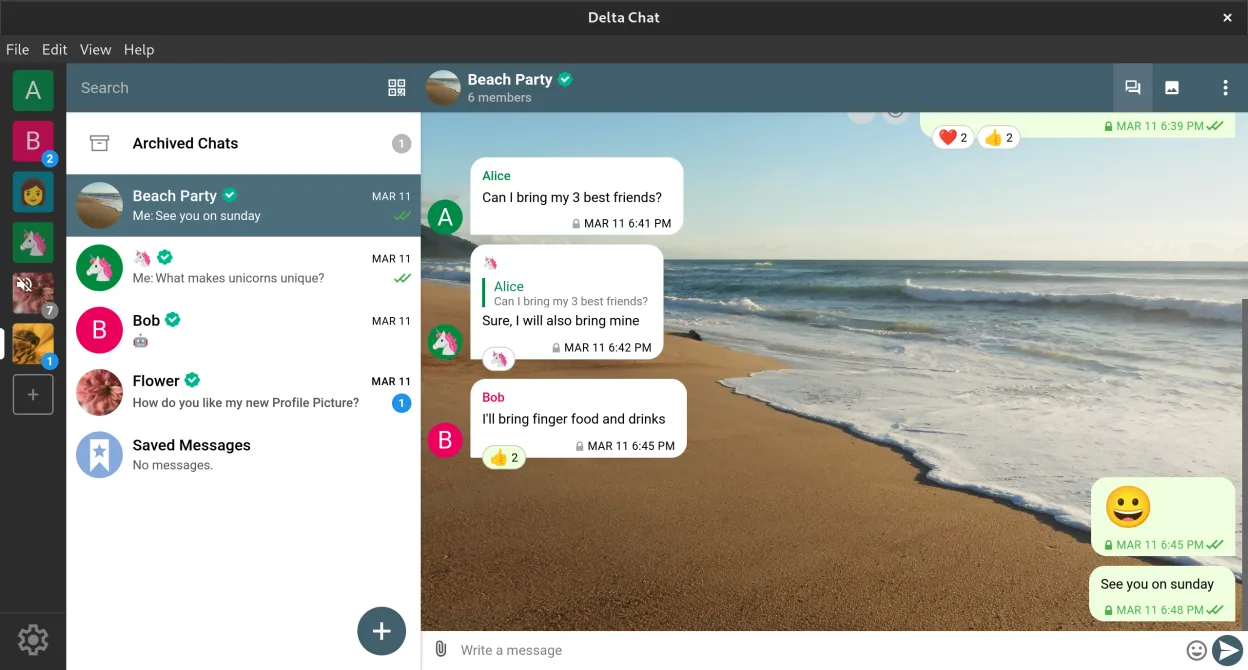
Delta Chat is a decentralized, email-based instant messenger with end-to-end encryption and chat-embedded tools.
Delta Chat is not a direct replacement for Microsoft Teams, especially in business environments relying on AI features, video conferencing, and deep calendar integration. It excels in secure, decentralized messaging and works well for small teams or individuals prioritizing privacy and email-based…
Feature parity40%



What is Microsoft Teams (newest version with AI integration)?
Microsoft Teams is widely used by organizations for internal communication, combining chat, video conferencing, file collaboration, and AI-driven features like meeting summaries. It integrates tightly with Microsoft 365, making it common in enterprise and education settings. Users rely on it daily for team coordination, virtual meetings, and document collaboration.
Teams is part of Microsoft 365 and typically requires a subscription—either through a business, school, or paid plan. There is a free version with limited features, but full functionality, including advanced AI tools and cloud storage, demands a paid license. This ties usage to Microsoft's ecosystem.
People seek Linux alternatives because Teams lacks a fully-featured native Linux client, and its web version has limitations. Users on Linux often face performance issues, missing features, or lack of support. With growing interest in open platforms and privacy, many prefer decentralized or open-source tools that work reliably on Linux.
What a replacement for Microsoft Teams (newest version with AI integration) must do
- Group chat and direct messaging
- High-quality video and audio conferencing
- Screen sharing and virtual meetings
- File sharing and collaboration
- Integration with calendars and email
- Cross-platform availability
- Reliable performance on Linux
Can you run Microsoft Teams (newest version with AI integration) on Linux?
Teams has a web version that works in browsers on Linux, and Microsoft offers a basic Electron-based desktop app for Linux. However, it lacks many features found in the Windows version, including some AI integrations, and performance can be inconsistent. It does not run reliably under Wine or Bottles, and Proton is not applicable since it's not a game. The experience is generally subpar compared to Windows or macOS.
Which alternative should you choose?
For secure, decentralized video meetings, Jitsi Meet works well without accounts. Element suits teams wanting persistent chat and full federation via Matrix. Delta Chat is ideal for email-integrated messaging but lacks real-time video. Wireshark is not a collaboration tool—it's for network analysis and irrelevant here. Choose based on whether you prioritize video (Jitsi), chat (Element), or email integration (Delta Chat).
Moving your Microsoft Teams (newest version with AI integration) files and habits
Exporting Teams data requires Microsoft's compliance tools or admin access; chat history and files can be archived but not easily ported. Jitsi and Element don't import Teams data directly. Calendar and email data from Outlook can be exported as .ics or .pst files, though .pst requires conversion for use with Linux clients. Plan migration around manual data export and re-onboarding.
Side-by-side comparison
| App | License | Flatpak | Latest version | Feature parity | Rating |
|---|---|---|---|---|---|
| Jitsi Meet | Apache-2.0 | ✓ | 2026.8.0 | 65% | — |
| Element | AGPL-3.0-only OR… | ✓ | 1.12.32 | 60% | — |
| Delta Chat | GPL-3.0+ | ✓ | v2.62.0 | 40% | — |
Microsoft Teams (newest version with AI integration): frequently asked questions
Can I use Microsoft Teams on Linux?
Yes, via a limited desktop app or the web browser, but features like AI summaries may not work fully and performance varies.
Is there a native Linux alternative to Teams with video calling?
Jitsi Meet is a native web and self-hostable option with strong video conferencing support directly in Linux browsers.
Can I sync Teams meetings with a Linux calendar?
Yes, if meetings are scheduled via Outlook or Microsoft 365, they can be synced using CalDAV or .ics imports in Linux calendar apps.
Does Element support file sharing like Teams?
Yes, Element allows file uploads and sharing within rooms, though storage depends on the server's configuration and limits.
How important is Microsoft Teams (newest version with AI integration) to you?
Know a better alternative? Suggest an alternative