
 Pencil2DLinux
vs
PaintTool SAIWindows
Pencil2D as a Linux alternative to PaintTool SAI
Updated
Our verdict
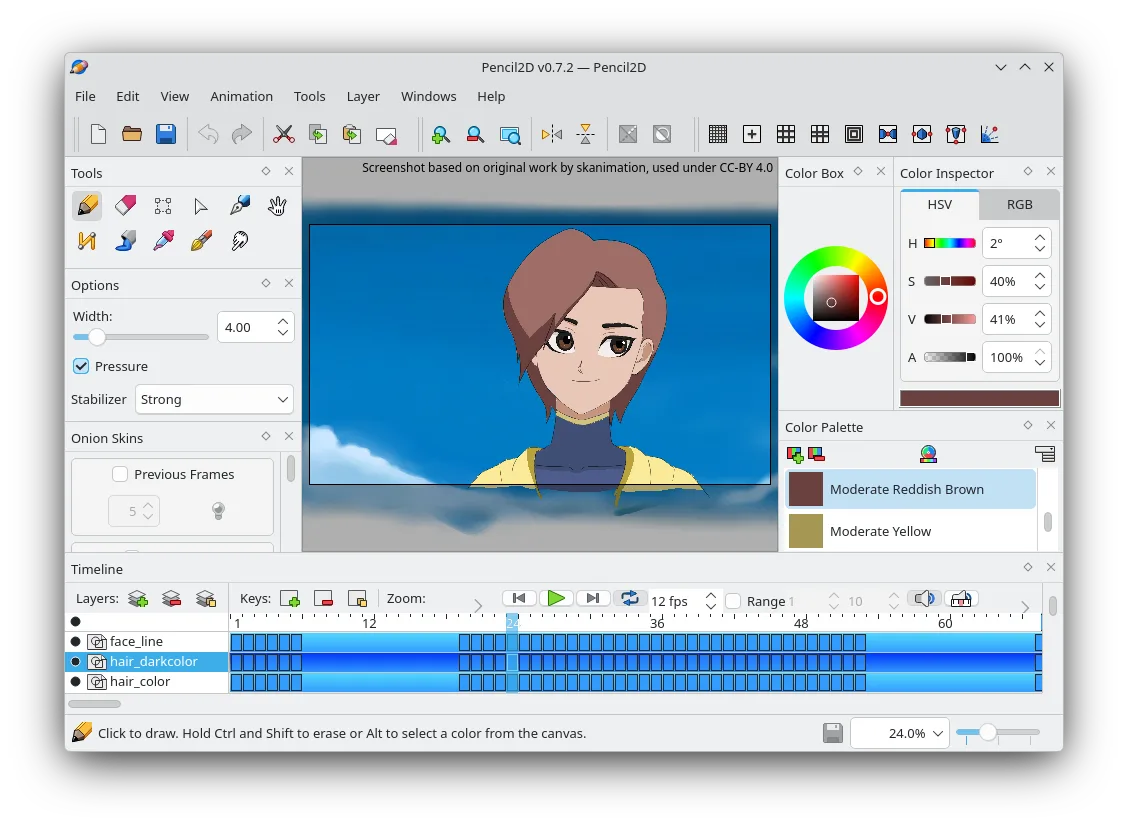
Pencil2D is not a direct replacement for PaintTool SAI. SAI is a static raster editor focused on line art stability and coloring, while Pencil2D is a dedicated 2D animation tool. If you only need to draw single images, Pencil2D feels clunky due to its timeline-centric interface. However, if your SAI workflow involves creating short animations or you specifically want a lightweight, open-source tool for hand-drawn motion graphics, Pencil2D is a solid choice. It lacks the advanced stabilization and layer blending depth of SAI, so it suits animators more than illustrators.
- License
- GPL-2.0-only
- Price
- Free
- Latest version
- 0.7.2 (March 13, 2025)
- Rating
- —
What works the same
- Both support pressure-sensitive input for natural brush strokes.
- Both handle bitmap and vector graphics, though SAI is primarily raster.
- Both are lightweight compared to heavy suites like Photoshop.
- Both allow customizable brush settings for line art and coloring.
- Both support layer management for separating elements.
What is different
- Pencil2D is animation-first, requiring a timeline even for static images; SAI is image-first.
- SAI has superior line stabilization and brush smoothing specifically tuned for static illustration.
- Pencil2D lacks the extensive blending modes and advanced masking tools found in SAI.
- SAI offers more refined color management and selection tools for detailed painting.
- Pencil2D exports to video formats (GIF, AVI) natively, which SAI does not.
Opening your PaintTool SAI files
Pencil2D cannot open PaintTool SAI (.psa) files directly. You must export your work from SAI as a standard image format like PNG or TIFF before importing it into Pencil2D. Pencil2D exports to PNG, GIF, and video formats, but it does not save to SAI's native format. This means you lose layer information if you export as a flattened image, so you should export layers individually if you plan to continue working in a different editor.
Switching from PaintTool SAI to Pencil2D, step by step
- Export your current SAI projects as layered PNG files or PSDs if you need to preserve layers.
- Install Pencil2D via your package manager or Flathub.
- Configure your tablet drivers to ensure pressure sensitivity works correctly in Pencil2D.
- Import your PNG layers into Pencil2D's timeline as bitmap layers.
- Adjust brush settings to match your preferred line width and opacity.
- Test export settings to ensure your final output format meets your requirements.
Key features of Pencil2D
- Timeline with keyframes and onion‑skin
- Supports bitmap and vector layers
- Export to PNG, GIF, and video formats
- Customizable brushes and tools
- Cross‑platform (Linux, Windows, macOS)
- Open‑source and community‑maintained
How to install Pencil2D on Linux
flatpak install flathub org.pencil2d.Pencil2Dsudo apt install pencil2dsudo apt install pencil2dsudo dnf install Pencil2Dsudo pacman -S pencil2dFrequently asked questions
Can I use Pencil2D for static illustration?
Yes, but it is less efficient. You will be working within an animation timeline, which adds unnecessary steps for single-frame drawings. It is better suited for motion graphics.
Does Pencil2D support vector graphics?
Yes, Pencil2D supports both bitmap and vector layers. You can draw with vector tools that remain scalable, which is a feature SAI does not natively offer in the same way.
Is Pencil2D suitable for beginners?
It is designed to be easy to use for animation, but if you are coming from SAI for static art, the interface may feel restrictive. It is ideal for beginners interested in 2D animation.
3 other alternatives to PaintTool SAI
 KritaKrita is a full‑featured open‑source digital painting and illustration program.Open sourceFreeFlatpakKrita vs PaintTool SAI
 MyPaintMyPaint is a fast, free, open‑source raster painting program focused on brush dynamics and tablet use.Open sourceFreeFlatpakMyPaint vs PaintTool SAI
 GIMPGIMP is a free, open-source raster graphics editor for photo editing, digital painting, and image composition.Open sourceFreeFlatpakGIMP vs PaintTool SAI