
Windows · System Tools
Best Linux alternatives to Process Lasso
Process Lasso keeps Windows PCs responsive by auto‑adjusting process priorities and limiting CPU/memory usage.
Updated
Quick answer
The best Linux alternative to Process Lasso is System Monitoring Center. Other strong options: htop, btop.
3 Linux alternatives to Process Lasso
-
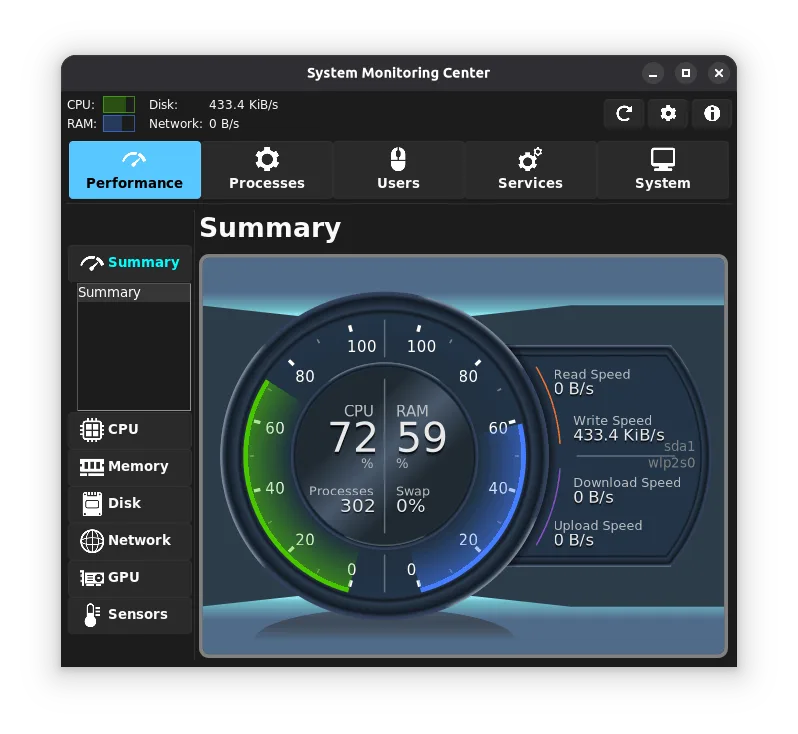
System Monitoring Center is a low‑resource, multi‑feature monitor for CPU, RAM, disk, network, and GPU, with process and service control.
System Monitoring Center can replace Process Lasso for users who need real‑time monitoring and basic process control on Linux. It shows CPU, RAM, disk, network and GPU usage, lets you adjust priorities and affinity, and has a low‑overhead GUI. It is best suited for desktop users who want a single…
Feature parity70% -
htop is an interactive process viewer for Unix-like systems, replacing the older top command with a more user-friendly interface.
htop is a useful tool for Linux users who need real‑time monitoring of CPU, memory, and process hierarchy. It covers most of the monitoring features of Process Lasso, but it does not provide automatic priority or affinity adjustment, nor does it throttle CPU or memory usage. It is best suited for…
Feature parity40% -
btop is a terminal-based system monitor that visualises CPU, memory, disk, and network usage in real time.
btop can replace Process Lasso for users who need a quick, terminal‑based view of CPU, memory, and process control. It shows real‑time stats, lets you renice or kill processes with shortcuts, and works on any Linux distro. It is best for developers, sysadmins, or power users who prefer a…
Feature parity60%

What is Process Lasso?
Process Lasso is a Windows utility that monitors running processes and automatically changes their priorities, affinities, and limits to keep the system responsive. It is mainly used by power users, gamers, and small‑business IT staff who need to keep critical applications running smoothly while preventing background tasks from hogging resources.
The software is sold as a paid license with a free trial; the license is per‑user and can be upgraded to a professional edition for additional features. The cost is modest compared to enterprise‑grade tools.
Linux users look for an alternative because many of the same problems—process starvation, CPU over‑commitment, and memory leaks—also occur on Linux, and they want a native solution that integrates with the Linux toolchain.
What a replacement for Process Lasso must do
- Real‑time monitoring of CPU and memory per process
- Automatic priority and affinity adjustment
- Process limiting and throttling
- User‑friendly GUI
- Scripting or automation hooks
- Cross‑platform consistency
- Low overhead
Can you run Process Lasso on Linux?
There is no native Linux version of Process Lasso. Users who want to run it on Linux typically use Wine or a compatibility layer, but stability can vary and some features may not work correctly. No official web or containerised version exists.
Which alternative should you choose?
For users who need a simple, interactive monitor, htop or btop are good choices. If you need system‑wide control of process priorities and limits, systemd provides native support through cgroups and the systemd-run command. System Monitoring Center offers a GUI with some automation features but is less mature than htop or systemd.
Moving your Process Lasso files and habits
Process Lasso stores settings in a proprietary configuration file that is not readable by Linux tools. There is no direct export format; you will need to re‑configure the equivalent settings manually in the chosen Linux replacement. No data files are transferred.
Side-by-side comparison
| App | License | Flatpak | Latest version | Feature parity | Rating |
|---|---|---|---|---|---|
| System Monitoring Center | GPL-3.0 | ✓ | 3.4.1 | 70% | — |
| htop | GPL-2.0 | — | 3.5.3 | 40% | — |
| btop | GPL-3.0 | — | 1.4.8 | 60% | — |
Process Lasso: frequently asked questions
Can I run Process Lasso on Linux via Wine?
Yes, but not all features work reliably; priority adjustments may be limited by the Wine layer.
Is there a free alternative that offers the same automation?
htop and btop provide interactive monitoring, while systemd offers native process control; neither provides the exact same GUI automation but cover core functionality.
What about licensing for the Linux alternatives?
All listed alternatives are free and open source; no paid versions exist.
Do I need to reinstall my applications after switching?
No, you only need to re‑configure process limits and priorities in the new tool; your applications remain unchanged.
How important is Process Lasso to you?
Know a better alternative? Suggest an alternative