
Windows · Graphics
Best Linux alternatives to Sketch
Sketch is a macOS-only vector design tool for UI and icons; Linux users need alternatives like Inkscape or Penpot for similar workflows.
Updated
Quick answer
The best Linux alternative to Sketch is Inkscape. Other strong options: Penpot Desktop, Krita.
3 Linux alternatives to Sketch
-

Inkscape is a free, open‑source vector graphics editor that rivals Adobe Illustrator and CorelDRAW.
Inkscape can serve as a replacement for Sketch for users who need a general‑purpose vector editor on Linux. It handles bezier path editing, layers, symbols, and SVG export well, making it suitable for icon work and simple UI mock‑ups. However, it lacks Sketch's built‑in layout constraints and the…
Feature parity65% -
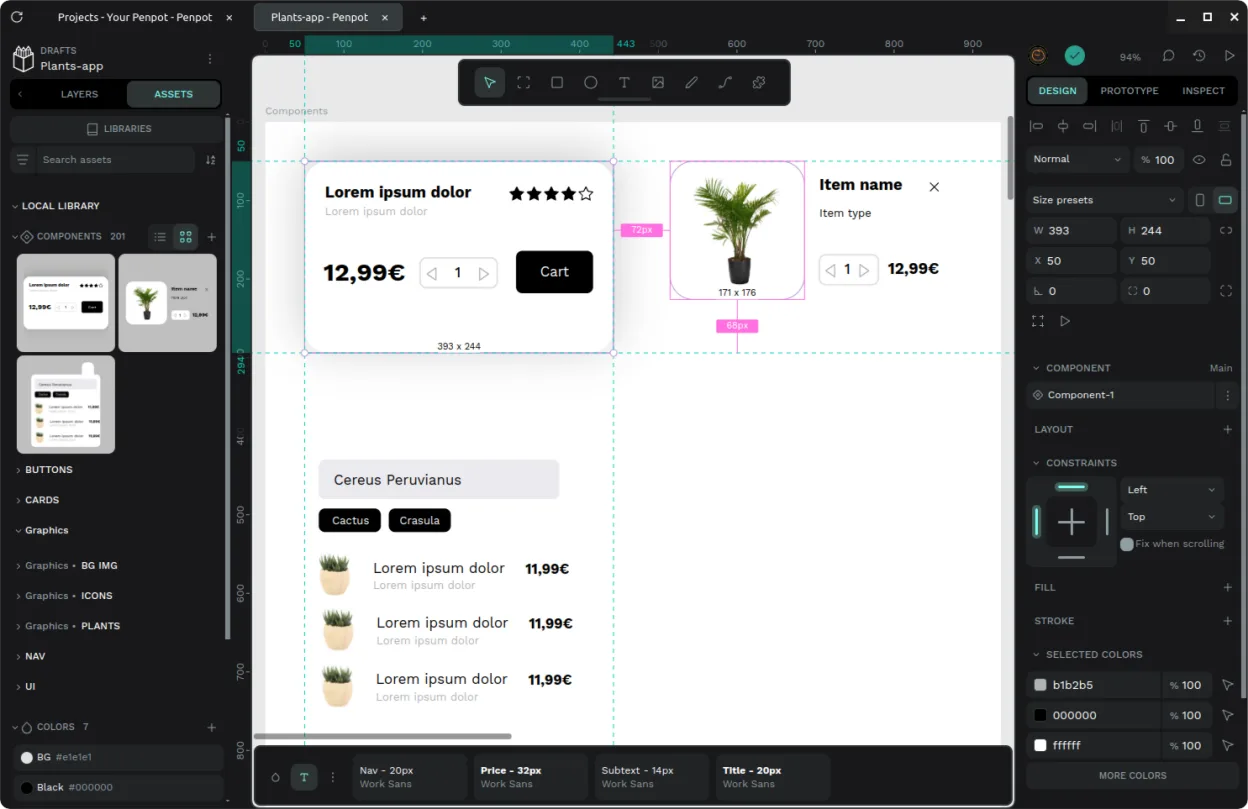
Unofficial desktop wrapper for the open-source Penpot design tool, offering native window management and offline instance support.
Penpot Desktop can serve as a practical Sketch replacement for users who need a Linux‑native UI design tool with vector editing, component reuse and basic collaboration. It works well for freelancers or small teams that are comfortable with a web‑based workflow wrapped in a desktop window. Power…
Feature parity65% -

Krita is a full‑featured open‑source digital painting and illustration program.
Krita can replace Sketch for users who mainly need vector path editing, layer management, and export to common formats, but it is primarily a raster painting tool. It offers vector layers and basic UI layout features, yet lacks Sketch’s advanced UI constraint system, component reuse, and native…
Feature parity65%


What is Sketch?
Sketch is a vector graphics editor primarily used by product designers, UI/UX professionals, and developers to create user interfaces, icons, and web assets. It focuses on digital product design rather than traditional illustration, making it a staple in modern tech companies for prototyping and final asset production.
The software is developed by Sketch B.V. and operates on a subscription-based pricing model. It is proprietary and exclusive to macOS, meaning it does not run natively on Linux or Windows. Users pay for access to the desktop application and associated web services for file sharing and collaboration.
Linux users often seek alternatives because they prefer open-source ecosystems or use Linux for development environments. Since Sketch is unavailable on Linux, designers need tools that handle vector paths, layers, and export formats compatible with web and mobile development standards to maintain their workflow without switching operating systems.
What a replacement for Sketch must do
- Vector path editing with bezier controls
- Layer management and grouping
- UI layout tools with constraints
- Export to SVG, PNG, and PDF
- Symbol or component reuse
- Collaboration or file sharing capabilities
Can you run Sketch on Linux?
There is no native Linux version of Sketch. It is strictly a macOS application. While you can technically run it via virtualization or remote desktop solutions, it does not run natively on Linux. There is no official support for Wine or Proton, and attempting to run it through compatibility layers is unlikely to work due to its reliance on macOS-specific frameworks. Do not expect it to function directly on a Linux desktop.
Which alternative should you choose?
If you need a direct, open-source replacement for general vector work, Inkscape is the most mature choice. For UI-specific design with components and collaboration, Penpot Desktop is the closest functional match. GIMP and Krita are raster-based and better suited for pixel art or digital painting, so they are poor substitutes for vector UI design unless you only need to edit final raster assets.
Moving your Sketch files and habits
Sketch files (.sketch) are proprietary zip archives containing JSON and image data. They do not open directly in Linux tools. You must export assets from Sketch to SVG, PNG, or PDF before migrating. For vector work, SVG is the best format to preserve editability in Inkscape. If you are moving to Penpot, check if their importer supports SVG or specific Sketch exports, as direct .sketch import is not guaranteed.
Side-by-side comparison
| App | License | Flatpak | Latest version | Feature parity | Rating |
|---|---|---|---|---|---|
| Inkscape | GPL-2.0-or-later | ✓ | 1.4.4 | 65% | — |
| Penpot Desktop | AGPL-3.0-or-later | ✓ | v1.0.0 | 65% | — |
| Krita | GPL-3.0-only | ✓ | 5.3.4.1 | 65% | — |
Sketch: frequently asked questions
Can I open .sketch files in Inkscape?
No, Inkscape cannot open .sketch files directly. You must first export your designs as SVG or other standard vector formats from Sketch on a Mac, then import those files into Inkscape.
Is Penpot a good Sketch alternative?
Yes, Penpot is the closest Linux-native alternative for UI design. It supports components, symbols, and vector editing, making it suitable for the specific workflows Sketch is known for.
Does GIMP replace Sketch for UI design?
No. GIMP is a raster editor. While you can edit images, it lacks the native vector path tools, component systems, and layout constraints that make Sketch efficient for UI work.
Can I use Sketch via Wine?
It is highly unlikely to work. Sketch relies heavily on macOS-specific APIs. Wine does not support these, so you should not plan on running Sketch on Linux through compatibility layers.
How important is Sketch to you?
Know a better alternative? Suggest an alternative