
Windows · System Tools
Best Linux alternatives to TreeSize Free
TreeSize Free is a Windows tool that scans folders and displays disk usage in a tree view.
Updated
Quick answer
The best Linux alternative to TreeSize Free is Baobab. Other strong options: Filelight, QDirStat, ncdu.
5 Linux alternatives to TreeSize Free
-
Baobab is a disk usage analyzer for GNOME that visualises folder sizes in a treemap.
Baobab is a solid Linux alternative for most TreeSize Free users. It scans local and mounted filesystems, shows folder sizes in a tree view and a treemap, and lets you drill down for details. It lacks a built‑in command‑line interface and native export formats, so power users who need scripting or…
Feature parity78% -

Filelight visualises disk usage with concentric rings, letting you spot and delete large files easily.
Filelight is a solid visual alternative to TreeSize Free for KDE users who prefer graphical disk analysis over text-based trees. It excels at quickly identifying space hogs through its concentric ring interface and allows direct file deletion. However, it lacks the explicit hierarchical tree view…
Feature parity75% -
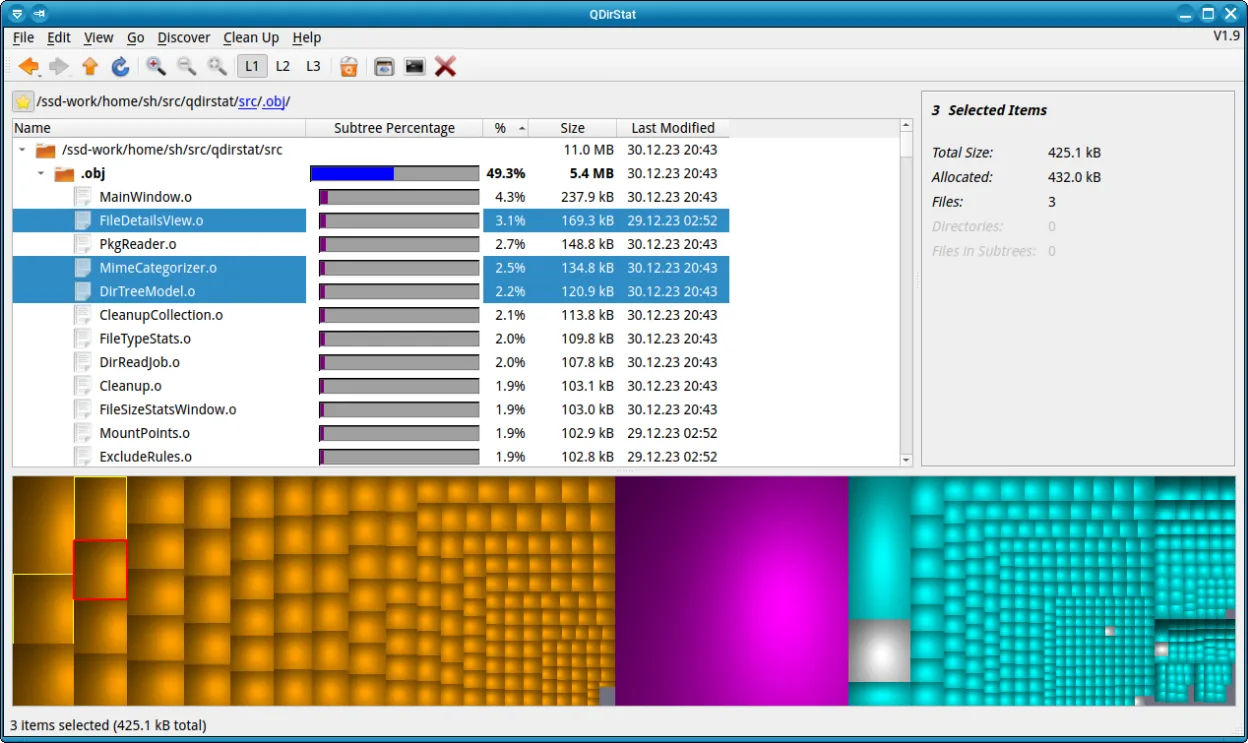
QDirStat is a graphical tool that shows disk usage in tree and treemap views, letting you locate and delete large files.
QDirStat is a solid Linux alternative to TreeSize Free for users who need a graphical overview of disk usage and occasional cleanup. It offers a tree view and a treemap, lets you delete files to trash, and can export data, which covers most everyday tasks. Power users who rely on extensive…
Feature parity85% -
A fast, interactive command-line tool for analyzing disk usage with a tree-like interface.
ncdu is a solid replacement for TreeSize Free for users who are comfortable with the terminal. It provides an interactive, keyboard‑driven tree view, sorts by size automatically, and can save scans for later. It is ideal for system administrators, developers, and power users who need quick…
Feature parity80% -
xdu is a command‑line disk‑usage analyzer for Linux, similar to Windows TreeSize Free.
xdu is a solid replacement for TreeSize Free if you're comfortable with the terminal and don't need a GUI. It delivers fast, hierarchical disk usage analysis with human-readable output and supports filtering by depth and symbolic links. While it lacks export formats like CSV or HTML, its output can…
Feature parity75%


What is TreeSize Free?
TreeSize Free lets users quickly see how much space each folder occupies, helping to spot large files and clean up storage. It’s popular among system administrators, power users, and anyone who needs to manage disk space on Windows PCs. The program is free for personal use, with a paid version offering extra features like network scanning and scheduled reports. The free license allows unlimited use on a single machine. Because Windows is not the user’s primary OS, they look for a Linux equivalent that can perform the same directory‑size analysis without relying on Windows emulation layers.
What a replacement for TreeSize Free must do
- Scan local file systems for folder sizes
- Display results in a tree or hierarchical view
- Allow sorting and filtering by size
- Export or copy results to a file
- Provide a quick, command‑line option for scripting
Can you run TreeSize Free on Linux?
None of the listed tools are native Windows binaries, so TreeSize Free cannot run directly on Linux. Users can run it under Wine, but stability varies and network scanning is unreliable. No official web or cross‑platform version exists.
Which alternative should you choose?
For a graphical tree view, Baobab or Filelight are suitable; QDirStat offers a more detailed text‑based interface; ncdu is ideal for terminal use and scripting; xdu provides a quick size summary in the shell.
Moving your TreeSize Free files and habits
TreeSize Free does not export data to a standard format. Users typically copy the textual output manually or use the built‑in export to CSV. Linux tools can import CSV or plain text, but no direct import is available.
Side-by-side comparison
TreeSize Free: frequently asked questions
Can I use TreeSize Free on Linux?
Only via Wine or similar compatibility layers, and performance may be inconsistent.
Is there a free Linux alternative?
Yes, Baobab, Filelight, QDirStat, ncdu, and xdu are all free.
Do these alternatives support network drives?
Baobab and QDirStat can scan mounted network shares; ncdu can only scan local mounts.
Can I export results from Linux tools?
Baobab and Filelight can export to CSV; QDirStat can write to a plain text file; ncdu can output to a file with the -o option.
How important is TreeSize Free to you?
Know a better alternative? Suggest an alternative