
Windows · System Tools
Best Linux alternatives to Wise Memory Optimizer
Linux manages RAM automatically; use htop or btop to monitor usage instead of forcing cache clears.
Updated
Quick answer
The best Linux alternative to Wise Memory Optimizer is htop. Other strong options: btop, GNOME System Monitor, sysstat.
5 Linux alternatives to Wise Memory Optimizer
-
htop is an interactive process viewer for Unix-like systems, replacing the older top command with a more user-friendly interface.
htop is a functional replacement for monitoring, but not for optimization. Linux automatically manages RAM, so forcing cache clears like Wise does is unnecessary and often counterproductive. htop provides the real-time, visual, and process-level data Wise users want to see, but it does not actively…
Feature parity70% -
btop is a terminal-based system monitor that visualises CPU, memory, disk, and network usage in real time.
btop is a strong replacement for Wise Memory Optimizer, but with a key philosophical shift. Linux manages RAM automatically, so you do not need to 'optimize' or clear cache; doing so can actually hurt performance. btop provides the monitoring and process control you need to see what is using…
Feature parity85% -
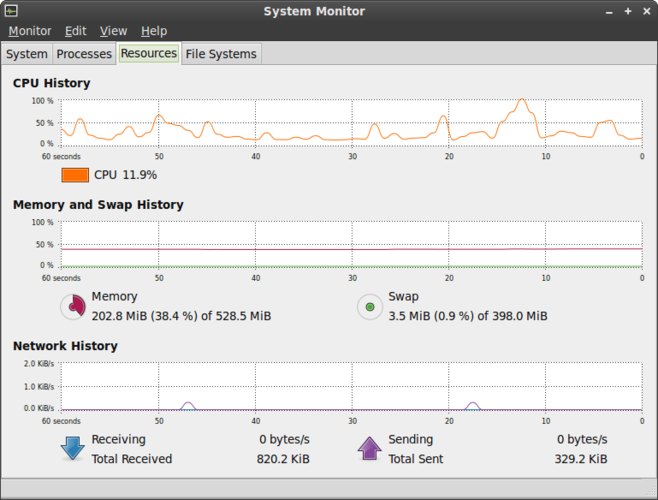
GNOME System Monitor is the standard Linux utility for viewing running processes, CPU, memory, and system resource usage.
GNOME System Monitor can replace Wise Memory Optimizer for users who need a quick view of current memory usage and process details. It shows real‑time RAM consumption, lets you kill processes, and provides a visual bar chart of memory usage. However, it does not automatically clear cache or offer…
Feature parity70% -
Sysstat is a collection of performance monitoring tools for Linux, providing real‑time and historical data on CPU, memory, I/O, and network usage.
sysstat is a solid replacement for Wise Memory Optimizer if you are comfortable with command‑line tools and need detailed historical data. It provides real‑time and logged memory usage, per‑process stats, and a system‑wide overview, but it lacks a graphical interface and the automatic…
Feature parity75% -
atop is a terminal‑based performance monitor that records and displays CPU, memory, disk, and network usage over time.
atop is a strong replacement for Wise Memory Optimizer if you accept that Linux does not need manual memory clearing. It provides the real-time monitoring and historical logging Wise users want, but it is a terminal tool. It is ideal for users comfortable with command-line interfaces who need…
Feature parity65%

What is Wise Memory Optimizer?
Wise Memory Optimizer is a Windows utility designed to clear cached data from RAM to free up memory for active applications. It targets users who believe that manually emptying the system cache improves performance, often driven by the misconception that unused RAM is wasted RAM. The tool provides a simple interface to trigger these memory flushes on demand.
The software is typically distributed as a freemium product. The basic memory clearing functions are often free, while advanced features like startup optimization or deeper system cleaning may require a paid license. It is proprietary software developed by WiseCleaner, a company known for various Windows system maintenance utilities.
People look for Linux alternatives because the underlying premise of the tool is largely unnecessary on modern operating systems. The Linux kernel is designed to use available RAM for caching to speed up file access, and it reclaims this memory instantly when applications need it. Users seeking a Linux equivalent are usually just trying to monitor memory usage or understand why their system feels slow, rather than needing to force a cache clear.
What a replacement for Wise Memory Optimizer must do
- Real-time memory usage monitoring
- Visual representation of RAM allocation
- Process-level memory consumption details
- System-wide resource overview
- Historical performance logging
- User-friendly interface for non-experts
Can you run Wise Memory Optimizer on Linux?
There is no native Linux version of Wise Memory Optimizer. It is a Windows-only application. While it might technically run under Wine, it would be pointless because the Windows-specific memory management APIs it relies on do not function as intended on a Linux kernel. Furthermore, the core function of clearing cache is handled automatically by the Linux kernel, making any such tool redundant. Do not attempt to run this via Wine or Proton; it will not provide the expected benefits and may cause confusion.
Which alternative should you choose?
For most users, GNOME System Monitor is the best fit as it is pre-installed on many desktops and offers a clean, graphical view of memory and processes. If you prefer a terminal-based solution with more detailed per-process statistics, htop is a lightweight and powerful choice. For users who want a modern, visually appealing interface with advanced graphs and widget support, btop is an excellent alternative. sysstat and atop are better suited for administrators or power users who need to log historical data and analyze long-term system performance trends rather than just checking current usage.
Moving your Wise Memory Optimizer files and habits
There is no data to migrate. Wise Memory Optimizer does not store user data, preferences, or logs that are valuable on a Linux system. You do not need to export anything. Simply install your chosen Linux monitoring tool via your package manager. If you were using the tool to identify specific memory-hungry processes, you will now identify them using the process lists in htop, btop, or GNOME System Monitor. No file format conversion is required.
Side-by-side comparison
| App | License | Flatpak | Latest version | Feature parity | Rating |
|---|---|---|---|---|---|
| htop | GPL-2.0 | — | 3.5.3 | 70% | — |
| btop | GPL-3.0 | — | 1.4.8 | 85% | — |
| GNOME System Monitor | GPL-2.0 | — | 51.1 | 70% | 5/5 |
| sysstat | GPL-2.0 | — | 12.8.0 | 75% | — |
| atop | GPL-2.0 | — | 2.13.0 | 65% | — |
Wise Memory Optimizer: frequently asked questions
Do I need to clear RAM on Linux?
No. The Linux kernel automatically manages memory caching. It uses free RAM to cache files for faster access and releases it immediately when an application needs it. Manually clearing the cache is generally unnecessary and can even slow down your system by forcing it to re-read data from disk.
Why does my Linux system use so much RAM?
High RAM usage is often due to cached data, not active applications. This is normal and beneficial. Check the 'buff/cache' column in your monitoring tool to see how much memory is being used for caching versus active processes.
Can I force the Linux kernel to drop caches?
Yes, but it is rarely recommended. You can use commands like 'sync; echo 3 > /proc/sys/vm/drop_caches' as root, but this is a troubleshooting step for specific issues, not a routine optimization. It will not improve general performance.
Which tool is best for checking if an app is leaking memory?
htop or btop are best for this. Sort the process list by memory usage to see which application is consuming the most RAM. If a specific process's memory usage grows continuously over time without a reason, it may be leaking memory.
How important is Wise Memory Optimizer to you?
Know a better alternative? Suggest an alternative