
 GitKrakenLinux
vs
SourceTreeWindows
GitKrakenLinux
vs
SourceTreeWindows
GitKraken as a Linux alternative to SourceTree
Updated
Our verdict
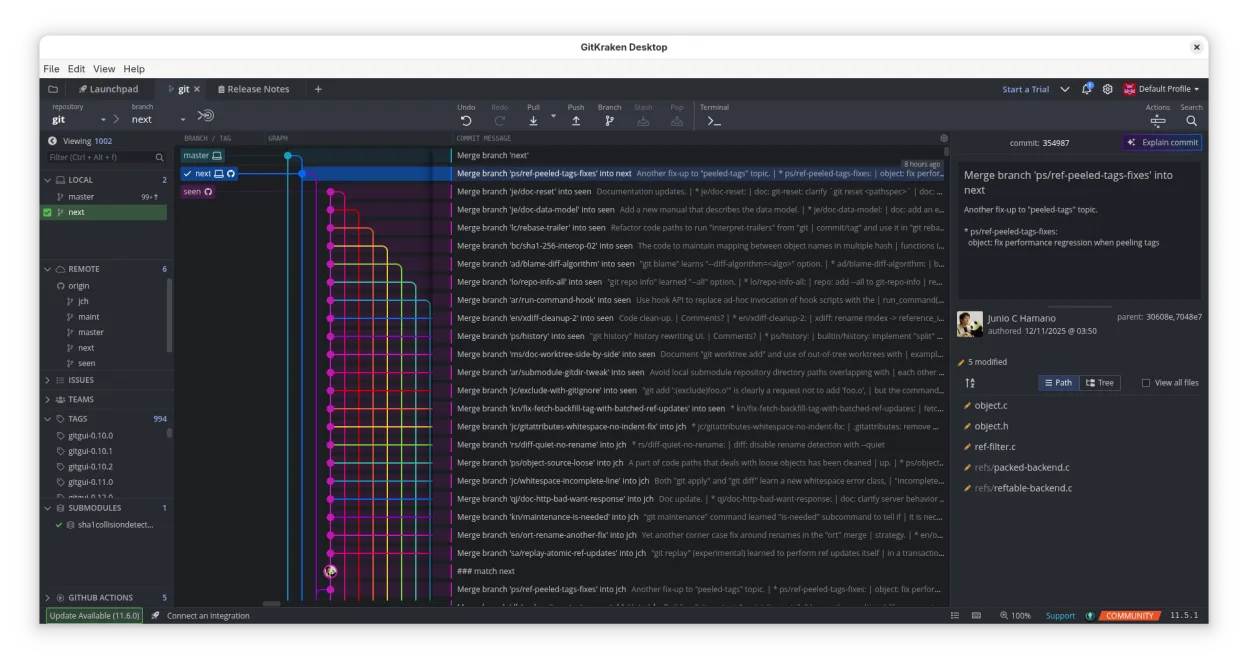
GitKraken is a strong replacement for SourceTree on Linux, offering a polished GUI for visualizing history, managing branches, and resolving conflicts. It handles the core needs of typical SourceTree users well, including drag-and-drop operations and integrated hosting support. The main drawback is that it is proprietary and requires a subscription for full features, unlike the free SourceTree. For developers who value a modern interface and integrated issue tracking over strict open-source licensing, GitKraken is a viable and capable choice.
- License
- LicenseRef-proprietary
- Price
- freemium
- Latest version
- 12.6.1 (October 19, 2026)
- Rating
- —
What works the same
- Visual graph for branch and commit history
- Built-in diff and merge conflict resolution tools
- Support for Git workflows like rebase, merge, and push
- Integration with GitHub, GitLab, and Bitbucket
- Repository management and organization features
What is different
- GitKraken is proprietary and subscription-based, while SourceTree is free
- GitKraken does not support Mercurial, only Git
- GitKraken includes integrated issue tracking (Glo Boards) and code editing
- GitKraken is cross-platform with a different UI design philosophy
- GitKraken offers multiple user profiles for work/personal separation
Opening your SourceTree files
GitKraken does not import SourceTree configuration files directly. Since both are Git clients, they interact with the same .git directories in your repositories. Your repository data, history, and branches remain fully accessible and unchanged. You will need to manually reconfigure remote URLs, user identity, and any specific Git hooks or aliases in GitKraken's settings, as these are not automatically transferred from SourceTree's local configuration.
Switching from SourceTree to GitKraken, step by step
- Install GitKraken via the official AppImage or Flathub package
- Clone or open your existing Git repositories in GitKraken
- Configure your user name and email in GitKraken settings
- Set up remote connections for GitHub, GitLab, or Bitbucket
- Verify that your branches and commit history display correctly
- Test a simple commit and push to ensure connectivity works
Key features of GitKraken
- Visual Git history with dark/light themes
- Drag‑and‑drop merge, rebase, push
- Built‑in code editor with diff and syntax highlighting
- Glo Boards for issue tracking across services
- Multiple profiles for work and personal projects
- Gitflow, LFS, submodules support
How to install GitKraken on Linux
flatpak install flathub com.axosoft.GitKrakenFrequently asked questions
Does GitKraken support Mercurial like SourceTree?
No, GitKraken is a Git-only client. If you rely heavily on Mercurial, GitKraken is not a suitable replacement.
Is GitKraken free to use?
GitKraken is proprietary software. While there may be a free tier for basic use, advanced features and team collaboration typically require a paid subscription.
Can I use GitKraken offline?
Yes, GitKraken allows you to view history, edit code, and manage local branches without an internet connection, though pushing and pulling require connectivity.

