
Windows · Office
Best Linux alternatives to Microsoft Office 365
Microsoft 365 is a subscription suite for documents, spreadsheets, and email, with Linux users seeking open-source replacements.
Updated
Quick answer
The best Linux alternative to Microsoft Office 365 is LibreOffice. Other strong options: ONLYOFFICE Desktop Editors, Gnumeric, Calligra.
4 Linux alternatives to Microsoft Office 365
-
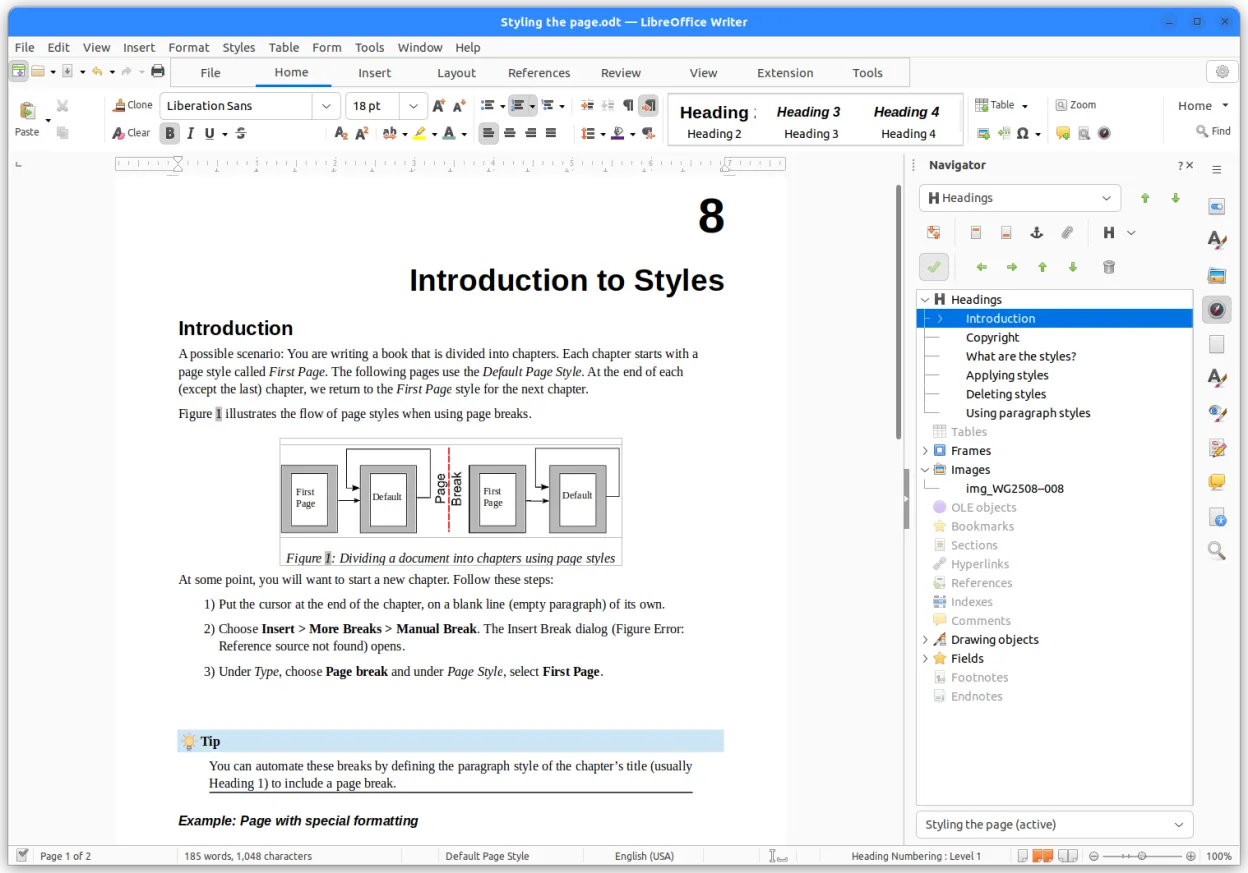
LibreOffice is a free, open‑source office suite with Writer, Calc, Impress, Draw, Base and Math.
LibreOffice is a solid, free replacement for the core document, spreadsheet, and presentation tools in Microsoft 365. It handles daily tasks like writing reports, managing budgets, and creating slides without issue. However, it is not a drop-in replacement for the entire 365 ecosystem. You lose the…
Feature parity80% -

ONLYOFFICE Desktop Editors is a free, open‑source office suite for Linux that edits Word, Excel, PowerPoint, PDF and more.
ONLYOFFICE Desktop Editors is a solid, free replacement for the core productivity components of Microsoft 365, specifically Word, Excel, and PowerPoint. It handles standard document creation and editing well, with strong .docx, .xlsx, and .pptx compatibility. However, it is not a complete 1:1 swap…
Feature parity75% -

Gnumeric is a lightweight, open-source spreadsheet program focused on accuracy and scientific analysis.
Gnumeric is a solid spreadsheet replacement for Linux users who mainly need data analysis and calculation. It handles .xls and .xlsx files and offers accurate formulas, charts, and statistical tools. However, it does not provide word processing, presentation, or email capabilities, so it cannot…
Feature parity35% -

Calligra is a free, open-source office suite for Linux offering word processing, spreadsheets, presentations, and vector graphics.
Calligra can replace most of the core Office 365 functions for users who need basic word processing, spreadsheets, and presentations on Linux. It works well for small‑to‑medium projects, document sharing, and collaborative editing via cloud services. However, it lacks the full feature set of Office…
Feature parity70%




What is Microsoft Office 365?
Microsoft 365 is the standard for business and personal productivity, offering Word, Excel, PowerPoint, and Outlook. Professionals, students, and home users rely on it for creating documents, analyzing data, and managing email. It integrates tightly with cloud services like OneDrive and Teams for collaboration, making it a central hub for daily digital work.
The service operates on a subscription model, requiring monthly or annual fees for access to desktop apps, cloud storage, and online services. While a perpetual license for older Office versions exists, the current focus is on recurring revenue. This costs money and ties users to Microsoft’s ecosystem, which can be a barrier for those preferring one-time purchases or open standards.
Users look for Linux alternatives to avoid subscription fees, support open-source ecosystems, or because their primary operating system is Linux. Some seek better privacy by using self-hosted solutions, while others want software that runs natively without Wine or virtual machines. The goal is to maintain similar functionality for documents, spreadsheets, and email without the Windows dependency.
What a replacement for Microsoft Office 365 must do
- Word processor for .docx compatibility
- Spreadsheet with formulas and charts
- Presentation software for .pptx
- Email client with IMAP/POP3 support
- Cloud sync or file sharing capability
- PDF export and import
- Cross-platform file compatibility
Can you run Microsoft Office 365 on Linux?
Microsoft 365 does not have a native Linux desktop client. The web version works in any modern browser, but features are limited compared to the desktop apps. You can run the Windows desktop apps via Wine or Proton, but performance and stability vary, and Microsoft does not officially support this. For most users, relying on the web version or switching to native Linux apps is more practical than trying to force the Windows suite to run.
Which alternative should you choose?
LibreOffice is the best all-around choice for most users, offering strong compatibility with Microsoft formats and a wide range of features. ONLYOFFICE Desktop Editors is a good alternative if you prioritize a modern interface and tighter compatibility with newer Office files. Thunderbird is the standard for email. Nextcloud Desktop Client replaces OneDrive for file sync. Gnumeric is a lightweight spreadsheet option if you do not need full LibreOffice Calc power. Calligra is less common but offers a complete suite if you prefer its specific workflow.
Moving your Microsoft Office 365 files and habits
Export your documents, spreadsheets, and presentations from Microsoft 365 as .docx, .xlsx, and .pptx files. These formats are well-supported by LibreOffice and ONLYOFFICE. For email, export your data from Outlook using the .pst file format, then import it into Thunderbird. If you use OneDrive, download all files locally and set up Nextcloud or another sync solution. Test a few complex files to ensure formatting and formulas remain intact after conversion.
Side-by-side comparison
| App | License | Flatpak | Latest version | Feature parity | Rating |
|---|---|---|---|---|---|
| LibreOffice | MPL-2.0 | ✓ | 26.8.2.2 | 80% | — |
| ONLYOFFICE Desktop Editors | AGPL-3.0-only | ✓ | 10.0.0 | 75% | — |
| Gnumeric | GPL-2.0 or GPL-3.0 | ✓ | 1.12.62 | 35% | — |
| Calligra | GPL-2.0-or-later | ✓ | 26.08.3 | 70% | — |
Microsoft Office 365: frequently asked questions
Will my .docx files open correctly in LibreOffice?
Yes, LibreOffice has excellent support for .docx. Most documents open without issues, though complex layouts or macros may need minor adjustments. Always keep a backup of the original file.
Can I use the Microsoft 365 web version on Linux?
Yes, the web version works in any browser. However, it lacks some advanced desktop features and requires a constant internet connection. It is a good stopgap but not a full replacement for offline work.
Is ONLYOFFICE better than LibreOffice for compatibility?
ONLYOFFICE often handles newer Office features slightly better, but LibreOffice is more mature and has a larger community. Both are good choices; try both to see which interface you prefer.
How do I migrate my Outlook emails to Thunderbird?
Export your Outlook data as a .pst file. Use a conversion tool to convert the .pst to .mbox, then import the .mbox file into Thunderbird. This process can be tedious but is reliable.
How important is Microsoft Office 365 to you?
Know a better alternative? Suggest an alternative