
Windows · System Tools
Best Linux alternatives to Microsoft Remote Desktop
Microsoft Remote Desktop lets users connect to Windows machines via RDP from a client.
Updated
Quick answer
The best Linux alternative to Microsoft Remote Desktop is Remmina. Other strong options: KRDC, FreeRDP, rdesktop.
5 Linux alternatives to Microsoft Remote Desktop
-

Remmina is a Linux remote desktop client supporting RDP, VNC, SSH, and X2Go for connecting to remote systems from GTK-based desktops.
Remmina can replace Microsoft Remote Desktop for most users who need to connect to Windows machines via RDP from Linux. It offers a tabbed interface, saved profiles, file transfer, clipboard sharing, fullscreen, multi‑monitor support, and secure connections via SSH tunneling. It works well for…
Feature parity80% -
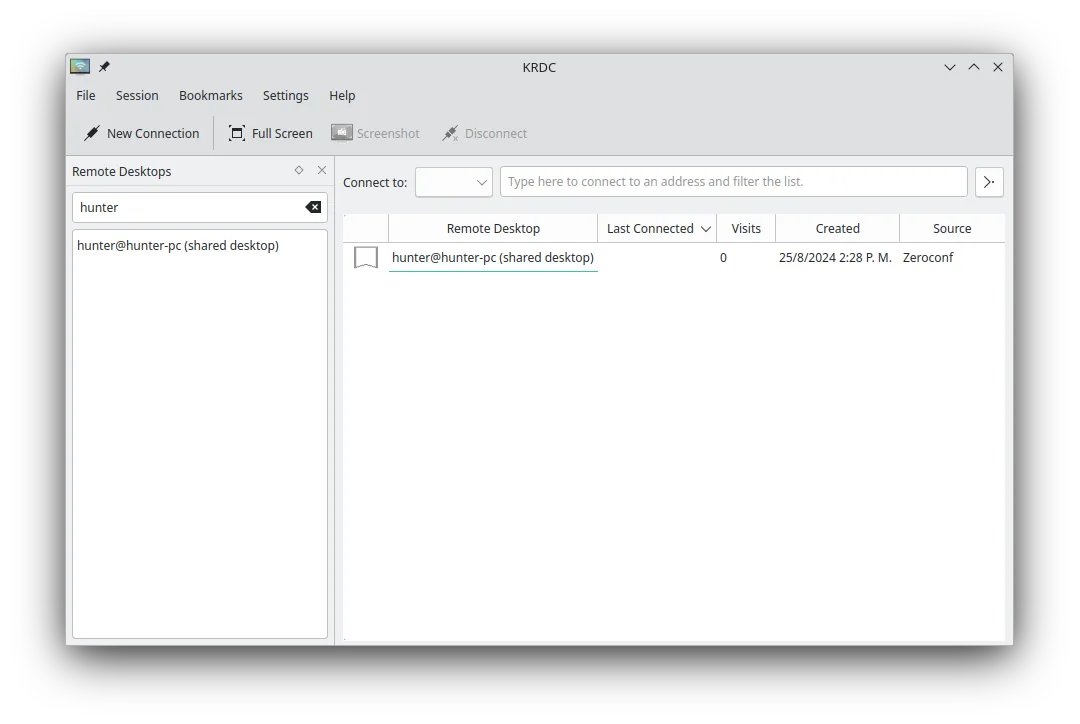
KRDC is a KDE remote desktop client that connects to Windows or Linux machines via RDP or VNC.
KRDC is a solid replacement for Microsoft Remote Desktop for Linux users who need to connect to Windows machines via RDP. It covers most everyday tasks: connecting, full‑screen mode, keyboard/mouse integration, and encryption. It is ideal for KDE users who want a native, open‑source client…
Feature parity80% -
FreeRDP is an open-source implementation of the Remote Desktop Protocol, allowing you to connect to Windows or Linux remote desktops.
FreeRDP is a solid, native Linux replacement for Microsoft Remote Desktop. It handles the core job well: connecting to Windows machines via RDP with full input integration. If you need to manage multiple Windows servers or access corporate desktops from Linux, this is the standard choice. It lacks…
Feature parity85% -
rdesktop is a free, open‑source client that lets Linux users connect to Windows Remote Desktop sessions via RDP.
rdesktop is a functional, lightweight replacement for Microsoft Remote Desktop, best suited for users who prefer command-line tools or need to script connections. It handles core RDP tasks like displaying the remote desktop, sharing the clipboard, and forwarding audio. However, it lacks a graphical…
Feature parity75% -

Vinagre is a GNOME remote‑desktop viewer for VNC, RDP, SSH and SPICE, now discontinued.
Vinagre is a functional but discontinued replacement for Microsoft Remote Desktop, suitable only for users who specifically need a GNOME-integrated RDP client and do not mind using legacy software. It handles basic RDP connections, multiple sessions via tabs, and clipboard synchronization…
Feature parity65%



What is Microsoft Remote Desktop?
Microsoft Remote Desktop is a client that displays a remote Windows desktop on a local machine, allowing users to work on a remote system as if it were local. It is used by IT admins, remote workers, and anyone who needs to access a Windows machine from a non‑Windows device. The software is free for Windows users and included with most Windows editions. Linux users seek a native client because the Windows version does not run on Linux.
The main reason people look for a Linux alternative is that they want a native, well‑integrated client that works with the Linux desktop environment and can be installed from standard repositories. A native client also avoids the performance hit and compatibility issues that can arise when running Windows binaries under Wine or similar layers.
Linux offers several RDP clients that provide similar functionality: Remmina, KRDC, FreeRDP, rdesktop, and Vinagre. These tools are open source, free, and available in most distro repositories, making them easy to install and maintain.
What a replacement for Microsoft Remote Desktop must do
- Connect to Windows machines via RDP
- Display remote desktop on local screen
- Support multiple simultaneous sessions
- Allow file transfer between local and remote
- Provide keyboard and mouse integration
- Handle Windows authentication (NTLM, Kerberos)
- Support encryption and secure connections
Can you run Microsoft Remote Desktop on Linux?
All listed alternatives run natively on Linux; Remmina, KRDC, FreeRDP, rdesktop, and Vinagre are available in major distro repos. No native Windows Remote Desktop client exists for Linux, and running the Windows version under Wine is unreliable.
Which alternative should you choose?
Remmina is the most feature‑rich and widely used, suitable for most users. KRDC is a lightweight option for KDE users. FreeRDP and rdesktop are command‑line tools for advanced users or scripting. Vinagre is good for GNOME users who want a simple GUI.
Moving your Microsoft Remote Desktop files and habits
No data export is needed; you only configure the server address, credentials, and optional certificates. All clients use the standard RDP protocol, so they are fully compatible with any Windows machine running the RDP server.
Side-by-side comparison
Microsoft Remote Desktop: frequently asked questions
Is Microsoft Remote Desktop available for Linux?
No, there is no native Linux version; you need a Linux alternative.
Can I use the Windows client under Wine?
It may run, but stability and performance are not guaranteed.
Do Linux clients support file transfer?
Yes, most clients support clipboard and file transfer via RDP.
Which client is best for GNOME?
Vinagre is the GNOME‑native choice, but Remmina also works well.
How important is Microsoft Remote Desktop to you?
Know a better alternative? Suggest an alternative