
Windows · Internet
Best Linux alternatives to Microsoft Teams (full desktop calling support)
Microsoft Teams is a collaboration platform with chat, video meetings, file sharing, and full desktop calling support on Windows.
Updated
Quick answer
The best Linux alternative to Microsoft Teams (full desktop calling support) is Jitsi Meet. Other strong options: Element, Zoom, Mattermost.
6 Linux alternatives to Microsoft Teams (full desktop calling support)
-

Jitsi Meet is an open-source video conferencing client that connects to any Jitsi server for secure, account-free calls.
Jitsi Meet is a solid replacement for Microsoft Teams if your main need is video and voice calls with screen sharing. It handles group meetings well, supports end-to-end encryption, and works across platforms without requiring accounts. However, it lacks persistent messaging, real-time document…
Feature parity55% -

Element is an open‑source, matrix‑based chat and video‑conference client for Linux.
Element is a solid replacement for Microsoft Teams if your organization prioritizes privacy and open standards over deep Office 365 integration. It handles video and voice calls, screen sharing, persistent messaging, and group rooms reliably. Cross-platform sync works well, and Matrix federation…
Feature parity75% -

Zoom is a proprietary video conferencing app for online meetings, webinars, and screen sharing with broad Linux support.
Zoom is a solid replacement for Microsoft Teams if your primary need is video and voice meetings with screen sharing. It works reliably on Linux and supports large meetings, webinars, and cross-platform sync. However, it lacks deep real-time document collaboration and tight integration with office…
Feature parity75% -

Mattermost is an open-source, self-hosted collaboration platform for developer teams, offering a secure alternative to SaaS tools.
Mattermost is a solid replacement for Microsoft Teams if your priority is secure, self-hosted team messaging and developer workflow integration. It handles persistent chat, group channels, and file sharing well, and supports plugins for extended functionality. However, **desktop calling and video…
Feature parity70% -
Linphone is a free, open-source SIP client for voice and video calls, supporting standard protocols without proprietary lock-in.
Linphone is not a good replacement for Microsoft Teams if you rely on persistent messaging, file sharing, or document collaboration. It excels as a lightweight, open-source SIP client for voice and video calls with screen sharing, ideal for users in SIP-based environments. However, it lacks Teams'…
Feature parity30% -
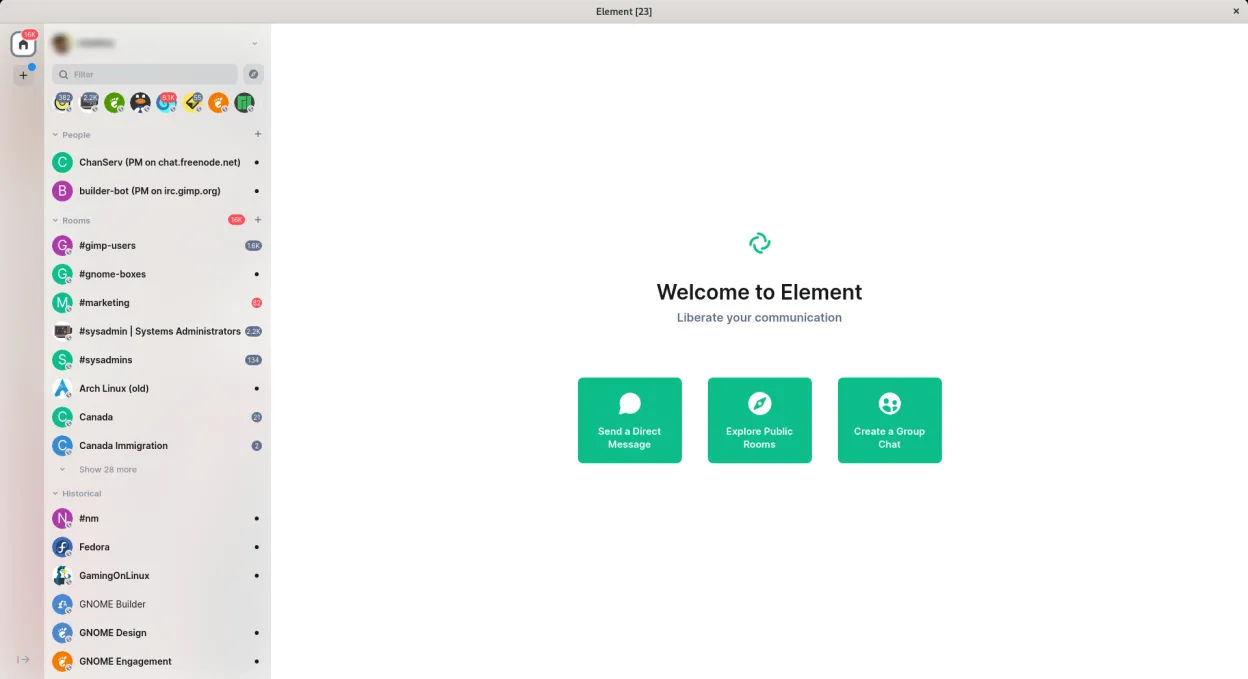
Element is a secure, open-source messaging and collaboration app based on the Matrix protocol, supporting chat, voice, and video calls.
Element is a solid replacement for Microsoft Teams if your primary needs are secure messaging, voice/video calls, and persistent group chats. It excels in transparency, decentralization, and privacy via end-to-end encryption. However, it lacks deep integration with Office 365 and real-time document…
Feature parity75%





What is Microsoft Teams (full desktop calling support)?
Microsoft Teams is widely used in businesses and schools for team communication, video conferencing, file collaboration, and calling. It integrates tightly with Microsoft 365, making it common in enterprise environments. Users rely on it daily for meetings, group chats, and document sharing.
The software is free to use at a basic level but requires a Microsoft 365 subscription for full features. Organizations typically pay per user monthly. There's no standalone paid version outside the Microsoft ecosystem. Licensing is proprietary and tied to Microsoft accounts.
People seek Linux alternatives because Teams lacks a fully functional native Linux client. The existing Linux app has limited calling features, and many users prefer open desktop clients. With more professionals switching to Linux, demand grows for capable, native replacements with similar collaboration tools.
What a replacement for Microsoft Teams (full desktop calling support) must do
- Video and voice calls with screen sharing
- Persistent group and direct messaging
- Real-time document collaboration
- File sharing and storage integration
- Reliable desktop client for daily use
- Cross-platform sync with mobile and web
- Support for large teams and organizations
Can you run Microsoft Teams (full desktop calling support) on Linux?
Teams has a native Linux client, but it lacks full desktop calling support compared to Windows. Many users report missing features and poor performance. The web version works well in browsers like Firefox or Chrome. Running the Windows version via Wine or Bottles is possible but not reliable—Proton is not supported. For full calling functionality, most Linux users switch to alternatives.
Which alternative should you choose?
Jitsi Meet suits small teams needing simple, browser-based video meetings. Element works well for those wanting decentralized, secure chat and calls using Matrix. Zoom has strong Linux support and is ideal if sticking with a mainstream platform. Mattermost is best for self-hosted team messaging without calling. Linphone focuses on SIP-based voice and video calls, fitting telecom-heavy workflows.
Moving your Microsoft Teams (full desktop calling support) files and habits
Export chat history and files manually from Teams, as bulk export isn't straightforward. Files are typically in common formats like .docx, .xlsx, and .pptx, which Linux apps can open. For collaboration, OnlyOffice or LibreOffice handle Microsoft formats well. Calendar and contact data can be migrated via Outlook or Exchange sync if available.
Side-by-side comparison
| App | License | Flatpak | Latest version | Feature parity | Rating |
|---|---|---|---|---|---|
| Jitsi Meet | Apache-2.0 | ✓ | 2026.8.0 | 55% | — |
| Element | AGPL-3.0-only OR… | ✓ | 1.12.32 | 75% | — |
| Zoom | LicenseRef-proprietary | ✓ | 7.2.1.5760 | 75% | — |
| Mattermost | Apache-2.0 | ✓ | 6.3.1 | 70% | — |
| Linphone | GPL-3.0 | — | 6.2.3 | 30% | — |
| Element | AGPL-3.0-only OR… | ✓ | 1.12.32 | 75% | — |
Microsoft Teams (full desktop calling support): frequently asked questions
Can I use Microsoft Teams on Linux with full calling support?
No, the Linux desktop app lacks full calling features available on Windows. Use the web version in a browser for better functionality.
Is there a way to run the Windows Teams app on Linux?
Yes, through Bottles or Wine, but performance is unreliable. The official web app is a better option for calling and meetings.
Which alternative supports both chat and video calling?
Element offers integrated chat and video calling via Matrix and WebRTC. Jitsi Meet is strong for video, but chat is secondary.
Can I collaborate on Office files in these alternatives?
Yes, Element and Jitsi Meet allow file sharing. For editing, pair with OnlyOffice or LibreOffice for full compatibility with .docx, .xlsx, .pptx.
How important is Microsoft Teams (full desktop calling support) to you?
Know a better alternative? Suggest an alternative