
 PixeloramaLinux
vs
Adobe FrescoWindows
Pixelorama as a Linux alternative to Adobe Fresco
Updated
Our verdict
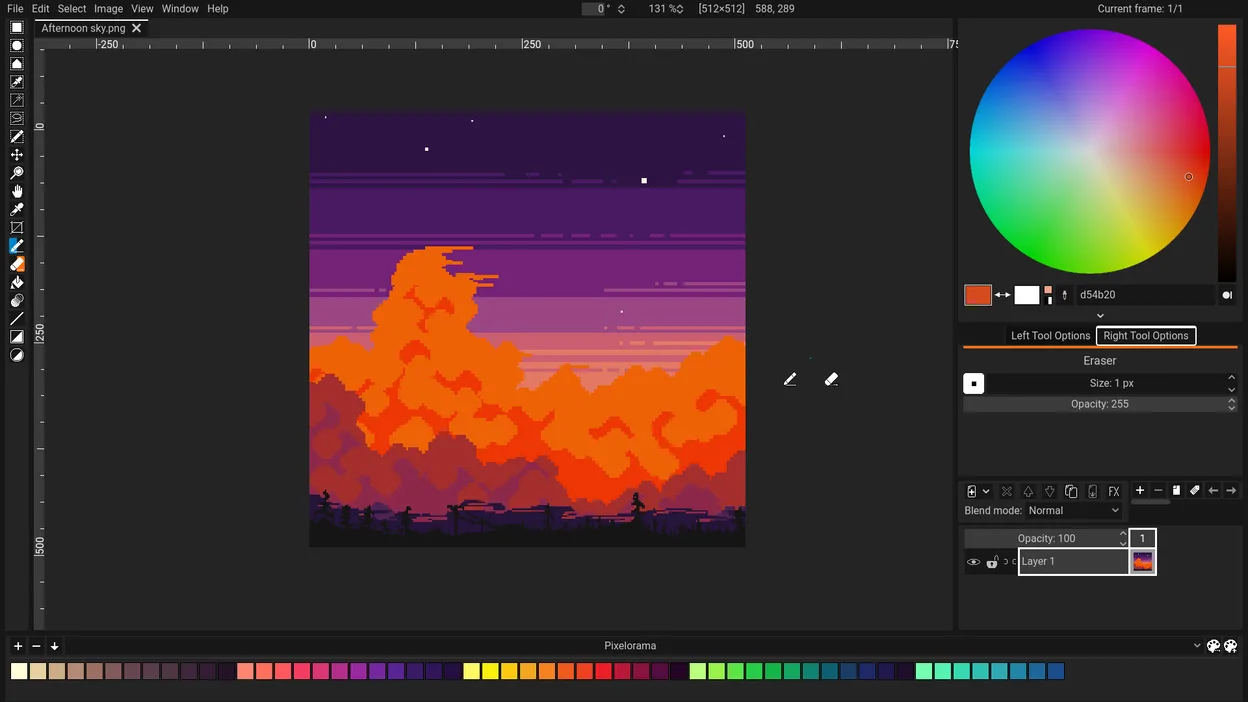
Pixelorama is not a good replacement for Adobe Fresco if you're doing digital painting with raster brushes or vector artwork. It's designed for pixel art and frame-by-frame animation, not freeform drawing with pressure-sensitive brushes. However, for artists focused on retro-style sprites, tiles, or low-resolution game assets, Pixelorama excels. Its tools are precise for grid-based work, but it lacks the brush engine, vector layers, and non-destructive editing that Fresco provides. Use Pixelorama only if your workflow is pixel-specific and you don’t need vector tools or natural media brushes.
- License
- MIT
- Price
- Free
- Latest version
- 1.2.4 (November 3, 2026)
- Rating
- —
What works the same
- Both support frame-by-frame animation with onion skinning
- Support for layers with visibility and opacity control
- Export to PNG and other common image formats
- Color palette management with custom palettes
- Lightweight interface suitable for drawing tasks
What is different
- Pixelorama lacks pressure-sensitive raster brush engine
- No vector shape tools or vector editing capabilities
- No support for PSD import/export or non-destructive editing
- Designed for pixel art, not freehand digital painting
- Missing custom brush creation and tablet pressure curve settings
Opening your Adobe Fresco files
Pixelorama does not support Adobe Fresco file formats. You cannot open .fresco or .PSD files directly in Pixelorama. Exporting from Fresco to PNG or PSD for import into Pixelorama is possible, but layer structure and animation data may be lost. Pixelorama saves in its own format and exports to PNG, GIF, and spritesheets, but lacks round-trip compatibility with Adobe's ecosystem.
Switching from Adobe Fresco to Pixelorama, step by step
- Export your assets from Adobe Fresco as PNG sequences or layers
- Install Pixelorama via Flathub or your distribution’s package manager
- Recreate sprites or animations frame by frame in Pixelorama
- Use the color palette importer to match existing schemes
- Organize frames into sprite sheets using the built-in tools
Key features of Pixelorama
- Sprite sheet creation and management
- Frame-by-frame animation editor
- Tile map editing tools
- Pixel-perfect zoom and grid alignment
- Export to common formats like PNG and GIF
- Color palette management and locking
- Onion skinning for animation
- Lightweight and fast performance
How to install Pixelorama on Linux
flatpak install flathub com.orama_interactive.Pixeloramasudo zypper install pixeloramaFrequently asked questions
Can I use Pixelorama with my drawing tablet?
Yes, but only for basic input. Pixelorama has limited tablet support and does not recognize pressure sensitivity or tilt.
Is Pixelorama suitable for creating game art?
Yes, especially for 2D pixel art games. It’s ideal for sprites, tiles, and animations at low resolutions.
Does Pixelorama support animation like Adobe Fresco?
It supports frame-by-frame animation with onion skinning, but not timeline-based tweening or vector animation.
5 other alternatives to Adobe Fresco
 KritaKrita is a full‑featured open‑source digital painting and illustration program.Open sourceFreeFlatpakKrita vs Adobe Fresco
 MyPaintMyPaint is a fast, free, open‑source raster painting program focused on brush dynamics and tablet use.Open sourceFreeFlatpakMyPaint vs Adobe Fresco
 GIMPGIMP is a free, open-source raster graphics editor for photo editing, digital painting, and image composition.Open sourceFreeFlatpakGIMP vs Adobe Fresco
 InkscapeInkscape is a free, open‑source vector graphics editor that rivals Adobe Illustrator and CorelDRAW.Open sourceFreeFlatpakInkscape vs Adobe Fresco
 Pencil2DPencil2D is an open‑source 2D animation tool for hand‑drawn vector and bitmap graphics.Open sourceFreeFlatpakPencil2D vs Adobe Fresco