
Windows · System Tools
Best Linux alternatives to Razer Synapse
Razer Synapse is Windows-only software for configuring Razer gaming peripherals, including lighting, buttons, and DPI settings.
Updated
Quick answer
The best Linux alternative to Razer Synapse is Piper. Other strong options: libratbag, openrazer, Polychromatic.
4 Linux alternatives to Razer Synapse
-
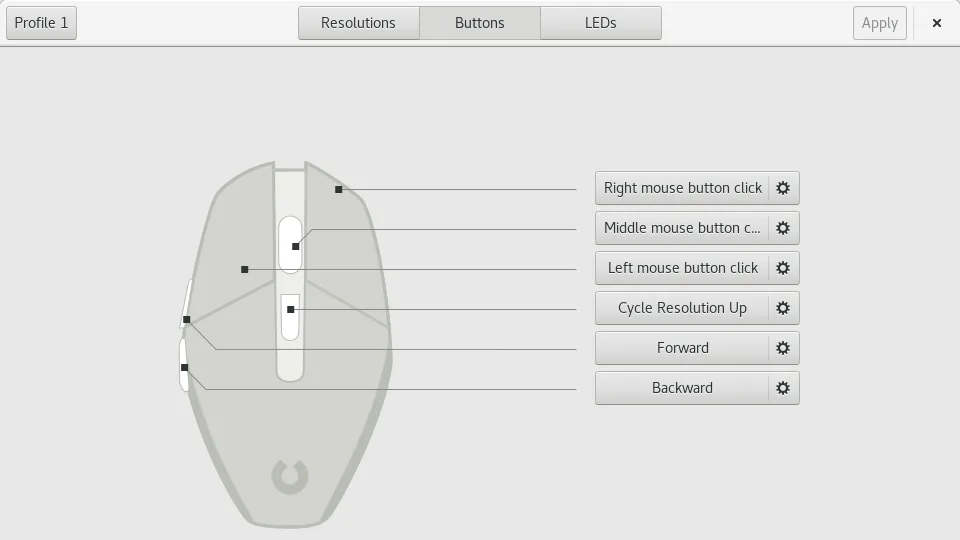
Piper is a Linux GUI for configuring gaming mice via ratbagd.
Piper is a viable replacement for Razer Synapse if you use a supported Razer mouse on Linux and need basic to intermediate customization. It handles DPI, button remapping, LED colors, and profile management through a clean interface. However, it lacks advanced macro scripting, cloud profiles, and…
Feature parity65% -
libratbag is a Linux library and CLI tool that manages gaming mice profiles, replacing Logitech G Hub.
libratbag is a viable replacement for Razer Synapse on Linux, but with important caveats. It supports many Razer mice through reverse-engineered protocols, allowing DPI adjustment, button remapping, and profile storage. However, RGB lighting control is not supported—this is a hard limitation. Users…
Feature parity65% -
A Linux daemon and CLI tool for controlling Razer gaming peripherals like mice, keyboards, and headsets.
openrazer is a solid replacement for Razer Synapse on Linux, especially for users who prioritize core functionality like DPI adjustment, key remapping, and RGB lighting control. It supports a wide range of Razer devices and works reliably once set up. However, it lacks a native GUI, so users must…
Feature parity80% -
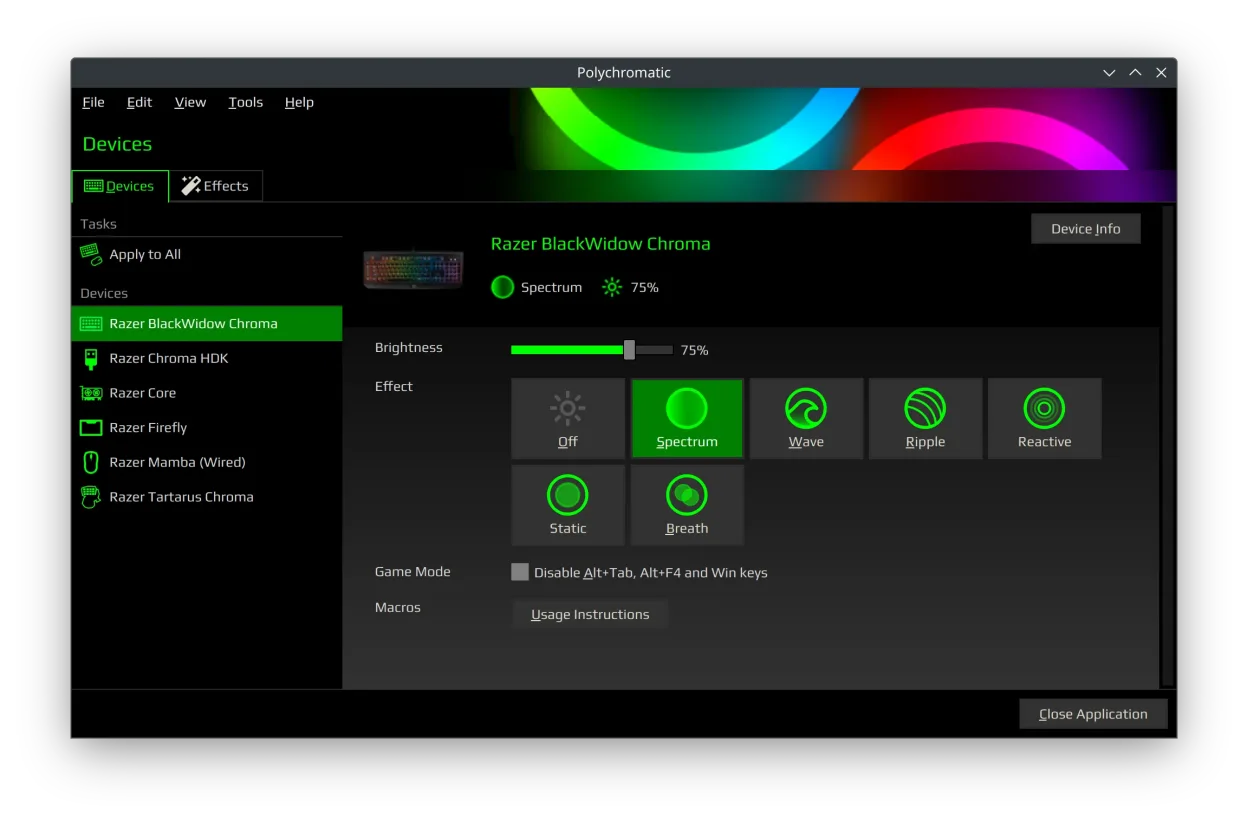
Polychromatic is an open-source RGB lighting manager for Razer devices on Linux, using OpenRazer for hardware control.
Polychromatic is a solid replacement for Razer Synapse on Linux, but with clear limits. It handles core functions like RGB lighting, DPI, polling rate, and profile management reliably if you're using supported devices and OpenRazer. Button remapping and macros are not supported—this is the biggest…
Feature parity75%


What is Razer Synapse?
Razer Synapse is used primarily by gamers and power users who own Razer mice, keyboards, and other peripherals. It allows deep customization of device behavior, such as reassigning buttons, adjusting polling rates, setting DPI levels, and syncing RGB lighting effects across devices. The software runs in the background and automatically applies profiles based on connected hardware.
The software is free to use but requires an account and is only officially supported on Windows. It's tied to Razer's ecosystem, meaning full functionality depends on proprietary drivers and cloud syncing. There is no open-source license; it's closed-source and controlled entirely by Razer.
People seek Linux alternatives because Razer does not provide native Linux support for Synapse. Most gaming peripherals lose customization options without third-party tools. Linux users want local control over their devices without relying on closed software, especially for basic functions like button remapping and lighting effects.
What a replacement for Razer Synapse must do
- Device-specific configuration for Razer peripherals
- Custom button mapping and macros
- Adjustable DPI or polling rate settings
- RGB lighting control and effects
- Profile management across devices
- Persistent settings saved locally
- Support for hotplugging and automatic profiles
Can you run Razer Synapse on Linux?
There is no official Linux version of Razer Synapse, and it does not work reliably under Wine, Proton, or Bottles. Some users report partial functionality with older versions, but device detection and saving profiles are inconsistent. Web-based access is not available. Users must rely on native Linux tools to achieve similar functionality.
Which alternative should you choose?
Piper provides a user-friendly GUI for basic remapping and works with libratbag, suitable for mice not made by Razer. For Razer-specific devices, openrazer offers kernel-level support and enables full lighting and button customization via command line or GUI frontends. Polychromatic is the best choice for managing RGB effects on Razer gear, integrating with openrazer. Advanced users may combine tools: openrazer for core functionality, Polychromatic for lighting, and Piper if supported.
Moving your Razer Synapse files and habits
There is no way to export Synapse profiles directly to Linux tools. Configuration formats are incompatible and proprietary. Users must manually recreate profiles using the Linux alternatives. Settings are stored locally by the respective tools, not in the cloud. Some openrazer configurations can be scripted for reuse, but no import feature exists from Synapse.
Side-by-side comparison
| App | License | Flatpak | Latest version | Feature parity | Rating |
|---|---|---|---|---|---|
| Piper | GPL-2.0-or-later | ✓ | 0.8 | 65% | — |
| libratbag | GPL-3.0 | — | 0.18 | 65% | — |
| openrazer | GPL-3.0 | — | 3.12.4 | 80% | — |
| Polychromatic | GPL-3.0-or-later | ✓ | 0.9.8 | 75% | — |
Razer Synapse: frequently asked questions
Can I use my Razer mouse or keyboard on Linux without any extra software?
Yes, basic input functions work plug-and-play via standard HID drivers, but customization like button remapping or lighting requires additional tools.
Does openrazer support all Razer devices?
It supports most Razer mice and keyboards made since 2014, but not every model. Check the openrazer GitHub README for the current device list.
Is Polychromatic only for RGB lighting?
Yes, Polychromatic focuses on lighting effects and color management, using openrazer as a backend. It does not handle button remapping or DPI settings.
Can I run Razer Synapse through Wine?
Generally no. It may launch but often fails to detect devices or save settings. Not recommended — native Linux tools are more reliable.
How important is Razer Synapse to you?
Know a better alternative? Suggest an alternative