
Windows · System Tools
Best Linux alternatives to Windows File Explorer
Windows File Explorer is the built-in file manager for navigating drives, managing files, and accessing system locations in Windows.
Updated
Quick answer
The best Linux alternative to Windows File Explorer is Nautilus. Other strong options: Thunar, Caja, Nemo.
6 Linux alternatives to Windows File Explorer
-

Nautilus (Files) is GNOME's default graphical file manager for browsing local and remote storage.
Nautilus is a solid replacement for Windows File Explorer for most desktop users on GNOME-based Linux systems. It handles core tasks like browsing, copying, moving, renaming, and deleting files reliably. The interface is intuitive, with tabs, split view, and drag-and-drop support. Thumbnail…
Feature parity85% -
Thunar is the default lightweight file manager for Xfce, focused on speed and simplicity rather than deep disk cleaning.
Thunar is a good replacement for Windows File Explorer if you're using Xfce or prefer a lightweight, fast file manager. It handles basic file operations reliably—browse, copy, move, rename, delete—and supports drag-and-drop and keyboard navigation. While it lacks some advanced features like…
Feature parity80% -
Caja is a file manager for the MATE desktop, providing a lightweight, familiar interface for browsing and organizing files.
Caja is a solid replacement for Windows File Explorer if you're using the MATE desktop or prefer a lightweight, traditional file manager. It handles basic file operations reliably—browse, copy, move, rename, delete—and supports drag-and-drop, keyboard shortcuts, and archive browsing. Users coming…
Feature parity85% -
Nemo is the default file manager for the MATE desktop, offering a traditional, reliable interface for browsing and managing files on Linux.
Nemo is a solid replacement for Windows File Explorer, especially for users on MATE or those who prefer a traditional desktop layout. It handles core file operations reliably—browse, copy, move, delete, drag-and-drop—and adds useful features like tabs and split views. If you're comfortable with…
Feature parity85% -
PCManFM is a fast, lightweight file manager originally developed for the LXDE desktop environment.
PCManFM is a solid replacement for Windows File Explorer for users who prioritize speed and simplicity over visual polish or deep system integration. It handles core file operations reliably—copy, move, delete, rename—with tabbed browsing and dual-pane mode improving workflow efficiency. It’s…
Feature parity85% -
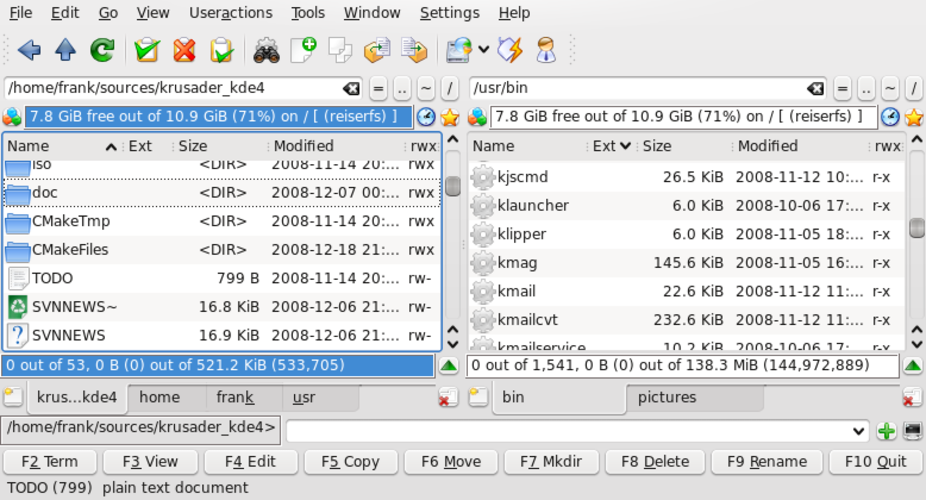
Krusader is a free, dual‑pane file manager for KDE that emulates Norton/Total Commander with advanced archive, FTP, and sync features.
Krusader is a strong replacement for Windows File Explorer if you're comfortable with power-user tools and want more control. It covers basic file operations reliably and adds advanced features like dual panes, batch renaming, and archive handling. However, its interface is denser and less…
Feature parity85%


What is Windows File Explorer?
Windows File Explorer is used by nearly every Windows user to browse folders, copy files, manage storage, and access system resources like drives and network locations. It's tightly integrated into the desktop environment, making it essential for daily computing tasks. Both casual users and IT professionals rely on it for basic and advanced file operations.
The application is proprietary and included free with every Windows license. There is no standalone pricing, as it's a core component of the operating system. It's updated alongside Windows releases and not distributed separately.
People look for Linux alternatives because they want similar file management functionality on open-source systems. When switching from Windows, users expect familiar navigation, drag-and-drop support, and quick access to home directories, external drives, and network shares—features that Linux file managers aim to replicate.
What a replacement for Windows File Explorer must do
- Browse local and external file systems
- Copy, move, rename, and delete files
- Drag-and-drop support
- Integrated search functionality
- Thumbnail previews for media
- Customizable sidebar and bookmarks
- Root/user permission handling
Can you run Windows File Explorer on Linux?
There is no native Linux version of Windows File Explorer. It does not have a web version. Running it via Wine or Proton is technically possible but not practical—performance is poor, GUI elements may break, and native Linux file managers are far more stable and integrated. Users should not rely on compatibility layers for this application.
Which alternative should you choose?
Nautilus is ideal for GNOME users wanting a clean, modern interface. Dolphin (not Dolphin Emulator) offers advanced features for power users—likely a typo on your list. Thunar suits lightweight setups like Xfce. Caja (MATE) and Nemo (Cinnamon) are good for users coming from desktop environments that forked GNOME 2. PCManFM is fast and minimal, best for low-resource systems. Krusader is for advanced users needing dual-pane layout and batch operations.
Moving your Windows File Explorer files and habits
No data migration is needed when replacing Windows File Explorer, as it doesn't store user data independently. Your files remain accessible on disk. Linux file managers read NTFS and FAT32 partitions directly. Bookmarks and folder views don't transfer automatically, but you can manually recreate them in the new file manager.
Side-by-side comparison
Windows File Explorer: frequently asked questions
Can I use Windows File Explorer on Linux with Wine?
Technically yes, but it's unstable and not usable for daily tasks. Native alternatives are much better.
Is there a Linux file manager that looks and works just like Windows Explorer?
Dolphin and Nemo come closest in features and layout. Thunar and Caja offer simpler, clean interfaces.
Do Linux file managers support thumbnails and previews?
Yes, most do—including Nautilus, Nemo, and Dolphin—provided the correct codecs are installed.
Which file manager uses the least system resources?
PCManFM and Thunar are the lightest, ideal for older hardware or minimal desktop environments.
How important is Windows File Explorer to you?
Know a better alternative? Suggest an alternative