
 XnView MPLinux
vs
Ashampoo Photo CommanderWindows
XnView MPLinux
vs
Ashampoo Photo CommanderWindows
XnView MP as a Linux alternative to Ashampoo Photo Commander
Updated
Our verdict
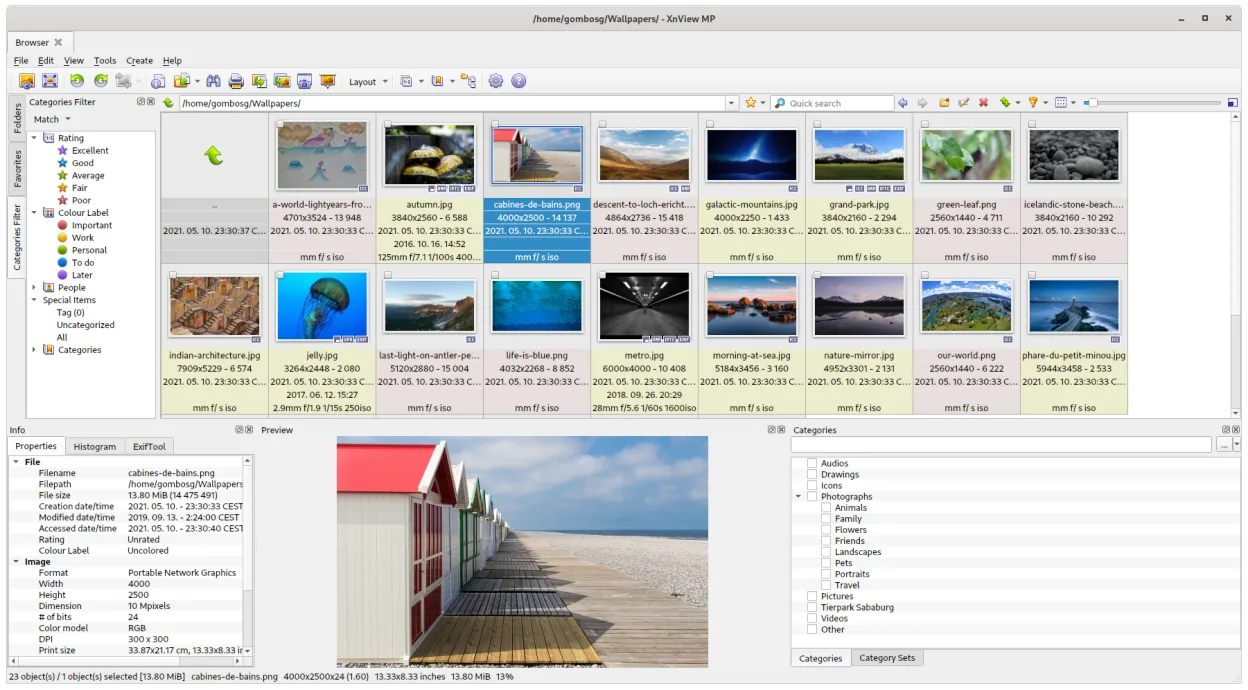
XnView MP is a solid replacement for casual users moving from Ashampoo Photo Commander. It handles folder-based browsing, thumbnail management, and basic edits like cropping and color adjustments well. The batch processing for resizing and renaming is straightforward. However, it lacks the deep cataloging features of a dedicated DAM. If you rely on complex metadata workflows or advanced non-destructive editing, you might find it limited. For simple viewing, organizing, and light tweaks, it works fine on Linux without needing Wine.
- License
- LicenseRef-proprietary=https://github.co…
- Price
- freemium
- Latest version
- 1.12.2 (October 12, 2026)
- Rating
- —
What works the same
- Folder-based image organization and thumbnail browsing
- Batch processing for resizing, renaming, and format conversion
- Basic editing tools including crop, rotate, and color adjustments
- Support for common formats like JPEG, PNG, and RAW
What is different
- Lacks a dedicated database for complex cataloging and tagging workflows
- No non-destructive editing layer or advanced masking tools
- Interface is more utilitarian than Ashampoo's guided workflow
- Proprietary license, whereas some alternatives are open source
Opening your Ashampoo Photo Commander files
XnView MP reads standard image files (JPEG, PNG, RAW, etc.) directly from your file system. It does not use a proprietary database file for storage, so you do not need to convert Ashampoo's catalog files. You simply point XnView at the folders where your images are stored. Metadata stored in EXIF/IPTC fields within the image files will be preserved and editable.
Switching from Ashampoo Photo Commander to XnView MP, step by step
- Install XnView MP via Flathub or your package manager
- Ensure your image folders are accessible and organized on the Linux filesystem
- Open XnView MP and navigate to your main image directory
- Verify that thumbnails generate correctly for your file types
- Test batch rename or resize on a small subset of files to confirm functionality
Key features of XnView MP
- Supports over 500 image formats including RAW, HEIC, and PDF
- Batch resize, rename, and format conversion
- Thumbnail browser with customizable layouts
- Basic editing tools (crop, rotate, colour adjustments)
- Slideshow mode with transition effects
- Metadata viewer and editor
- Portable mode – runs without installation
- Keyboard shortcuts for fast navigation
How to install XnView MP on Linux
flatpak install flathub com.xnview.XnViewMPFrequently asked questions
Does XnView MP require a subscription?
The provided facts do not specify current pricing or subscription models. It is listed as proprietary. Check the official website for the latest licensing terms before committing.
Can it handle large photo libraries?
It is folder-based, so performance depends on your hardware and the number of files in a single directory. For very large libraries, organizing images into subfolders is recommended to maintain speed.
Is there a learning curve compared to Ashampoo?
The interface is different, but the core concepts of browsing, editing, and batch processing are similar. Most users can adapt quickly, especially if they use keyboard shortcuts.
6 other alternatives to Ashampoo Photo Commander
 digiKamdigiKam is a comprehensive KDE photo manager for organizing, tagging, and editing digital photos with strong…Open sourceFreeFlatpakdigiKam vs Ashampoo Photo Commander
 ShotwellShotwell is a GNOME photo manager for importing, organizing, and lightly editing images.Open sourceFreeFlatpakShotwell vs Ashampoo Photo Commander
 gThumb Image ViewergThumb is a GNOME‑integrated image viewer, editor and organizer for Linux.Open sourceFreeFlatpakgThumb Image Viewer vs Ashampoo Photo Commander
 darktabledarktable is a free, open‑source photo editor that manages raw files and offers a full non‑destructive…Open sourceFreeFlatpakdarktable vs Ashampoo Photo Commander
 RawTherapeeRawTherapee is an open‑source, cross‑platform raw photo development program.Open sourceFreeFlatpakRawTherapee vs Ashampoo Photo Commander
 nomacs - Image LoungeNomacs is a free, open‑source image viewer that supports thumbnails, metadata, histograms and browsing inside…Open sourceFreeFlatpaknomacs - Image Lounge vs Ashampoo Photo Commander