
Windows · Graphics
Best Linux alternatives to Adobe Lightroom Mobile
Lightroom Mobile is a cross-platform app for organizing and non-destructively editing photos, popular with mobile photographers.
Updated
Quick answer
The best Linux alternative to Adobe Lightroom Mobile is darktable. Other strong options: RawTherapee, GIMP, Shotwell.
5 Linux alternatives to Adobe Lightroom Mobile
-

darktable is a free, open‑source photo editor that manages raw files and offers a full non‑destructive workflow.
darktable is a strong replacement for Adobe Lightroom Mobile if you are moving to a Linux desktop. It handles RAW files, non-destructive editing, and organization just like Lightroom, but it is a full desktop application, not a mobile app. You lose the convenience of editing on the go, but gain…
Feature parity85% -

RawTherapee is an open‑source, cross‑platform raw photo development program.
RawTherapee is a strong replacement for the editing core of Adobe Lightroom Mobile, specifically for RAW development. It handles non-destructive edits, color correction, and batch processing well. However, it is not a mobile app; it is a desktop program. If you rely on Lightroom Mobile for…
Feature parity70% -

GIMP is a free, open-source raster graphics editor for photo editing, digital painting, and image composition.
GIMP is a capable free alternative for pixel-level editing but is not a direct replacement for Lightroom Mobile's workflow. It lacks a built-in, non-destructive RAW development engine and a dedicated photo organizer. You will need to pair it with a separate tool like Darktable for RAW processing…
Feature parity40% -
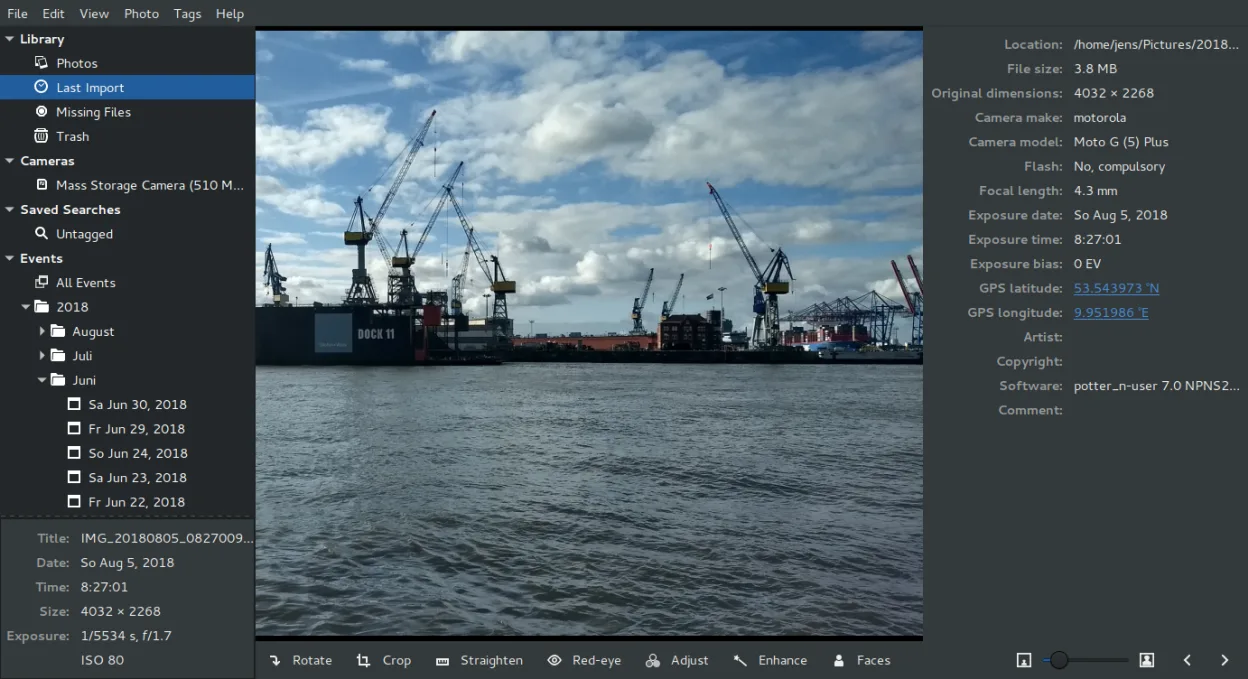
Shotwell is a GNOME photo manager for importing, organizing, and lightly editing images.
Shotwell is a reasonable replacement for casual users who need basic organization and non-destructive tweaks, but it is not a direct substitute for Adobe Lightroom Mobile. It lacks the advanced color grading, exposure controls, and batch processing power that Lightroom users rely on. If your…
Feature parity40% -
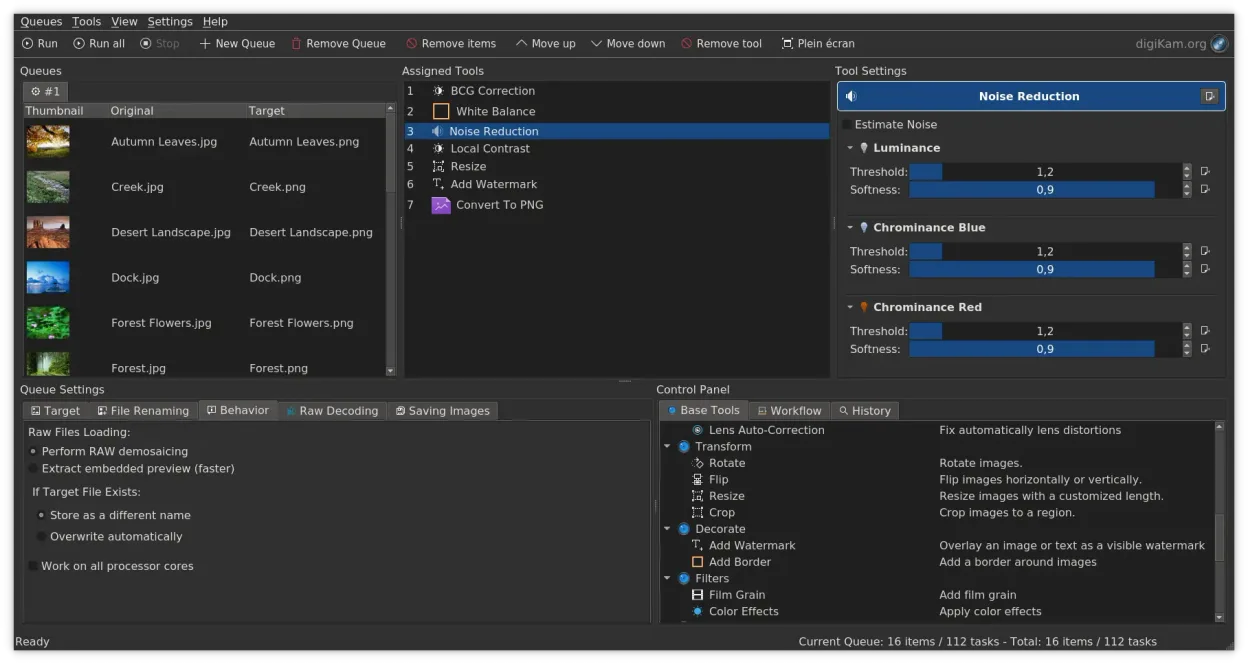
digiKam is a comprehensive KDE photo manager for organizing, tagging, and editing digital photos with strong RAW support.
digiKam is a solid replacement for Adobe Lightroom Mobile if you are moving to a desktop Linux environment. It handles non-destructive editing, RAW decoding via LibRaw, and complex tagging effectively. However, it is a desktop application, not a mobile app, so it lacks the on-the-go convenience of…
Feature parity85%




What is Adobe Lightroom Mobile?
Adobe Lightroom Mobile is a photo management and editing tool designed for photographers who need to organize, tag, and enhance images on the go. It focuses on non-destructive editing, allowing users to adjust exposure, color, and detail without altering the original file. The interface is optimized for touchscreens, making it accessible for quick edits during travel or events.
The application operates under Adobe’s Creative Cloud subscription model. While a free version exists with limited features, full access to advanced tools and cloud storage requires a paid monthly or annual plan. This pricing structure can be a barrier for casual users who prefer one-time purchases or free software.
Users seek Linux alternatives primarily to avoid subscription fees and to integrate photo editing into a unified desktop workflow. Many photographers prefer open-source tools that offer similar non-destructive capabilities without vendor lock-in. Additionally, running Adobe software on Linux often requires compatibility layers that can be unstable or resource-intensive, prompting a search for native solutions.
What a replacement for Adobe Lightroom Mobile must do
- Non-destructive editing workflow
- Support for RAW file formats
- Photo organization and tagging
- Batch processing capabilities
- Color correction and exposure tools
- Export options for web and print
Can you run Adobe Lightroom Mobile on Linux?
Adobe Lightroom Mobile does not have a native Linux version. The desktop version of Lightroom is also not officially supported on Linux. You can attempt to run the Windows version using Wine or Proton, but success varies significantly depending on the specific version and system configuration. It is generally unstable for professional use. The web version via Adobe Creative Cloud is accessible through any modern browser, but it offers limited functionality compared to the desktop app and still requires a subscription.
Which alternative should you choose?
If you need a direct replacement for Lightroom’s non-destructive RAW editing and organization, darktable is the closest match. RawTherapee is another strong option for RAW processing with a focus on technical accuracy. For general photo management and basic editing, digiKam or Shotwell are suitable. GIMP and Krita are raster editors; use GIMP for pixel-level manipulation similar to Photoshop, and Krita if you also need digital painting tools. Choose based on whether you prioritize RAW workflow or general image editing.
Moving your Adobe Lightroom Mobile files and habits
Transferring data from Lightroom to Linux alternatives is straightforward if you use standard file formats. Export your edited photos as TIFF or DNG files to preserve non-destructive metadata. Lightroom catalogs are proprietary, so you will need to re-import your image folders into the new software. Most Linux apps support standard RAW formats like CR2, NEF, and ARW. Note that specific Lightroom presets may not convert directly, so you might need to recreate adjustments manually or find community-shared presets for darktable or RawTherapee.
Side-by-side comparison
| App | License | Flatpak | Latest version | Feature parity | Rating |
|---|---|---|---|---|---|
| darktable | GPL-3.0+ | ✓ | 5.6.2 | 85% | — |
| RawTherapee | GPL-3.0+ | ✓ | 5.13 | 70% | — |
| GIMP | GPL-3.0+ AND LGPL-3.0+ | ✓ | 3.2.6 | 40% | — |
| Shotwell | LGPL-2.1+ | ✓ | 33.0 | 40% | — |
| digiKam | GPL-2.0+ | ✓ | 9.1.0 | 85% | — |
Adobe Lightroom Mobile: frequently asked questions
Can I use Lightroom presets in darktable?
Lightroom presets are not directly compatible with darktable. However, you can export look settings from Lightroom and import them into darktable using community tools, or manually recreate the settings. The underlying adjustments are similar, but the interface and implementation differ.
Is darktable a complete replacement for Lightroom?
For most photographers, yes. darktable offers non-destructive editing, RAW processing, and photo organization. It lacks some of Lightroom’s cloud integration and specific AI features, but it covers the core editing and management needs for a robust local workflow.
Do these Linux apps support HEIC files?
Support varies. darktable and RawTherapee can often read HEIC files with the appropriate libraries installed. GIMP and Krita may require plugins or conversion to standard formats like JPEG or PNG for reliable editing. It is best to check the specific version’s documentation for HEIC support.
Which app is best for batch editing?
darktable and digiKam both offer strong batch processing capabilities. darktable allows you to apply edits to multiple images at once, while digiKam provides bulk renaming and metadata editing. GIMP has a batch processing feature called Script-Fu, but it is less intuitive for non-technical users.
How important is Adobe Lightroom Mobile to you?
Know a better alternative? Suggest an alternative