
 FreeCADLinux
vs
Paint 3DWindows
FreeCADLinux
vs
Paint 3DWindows
FreeCAD as a Linux alternative to Paint 3D
Updated
Our verdict
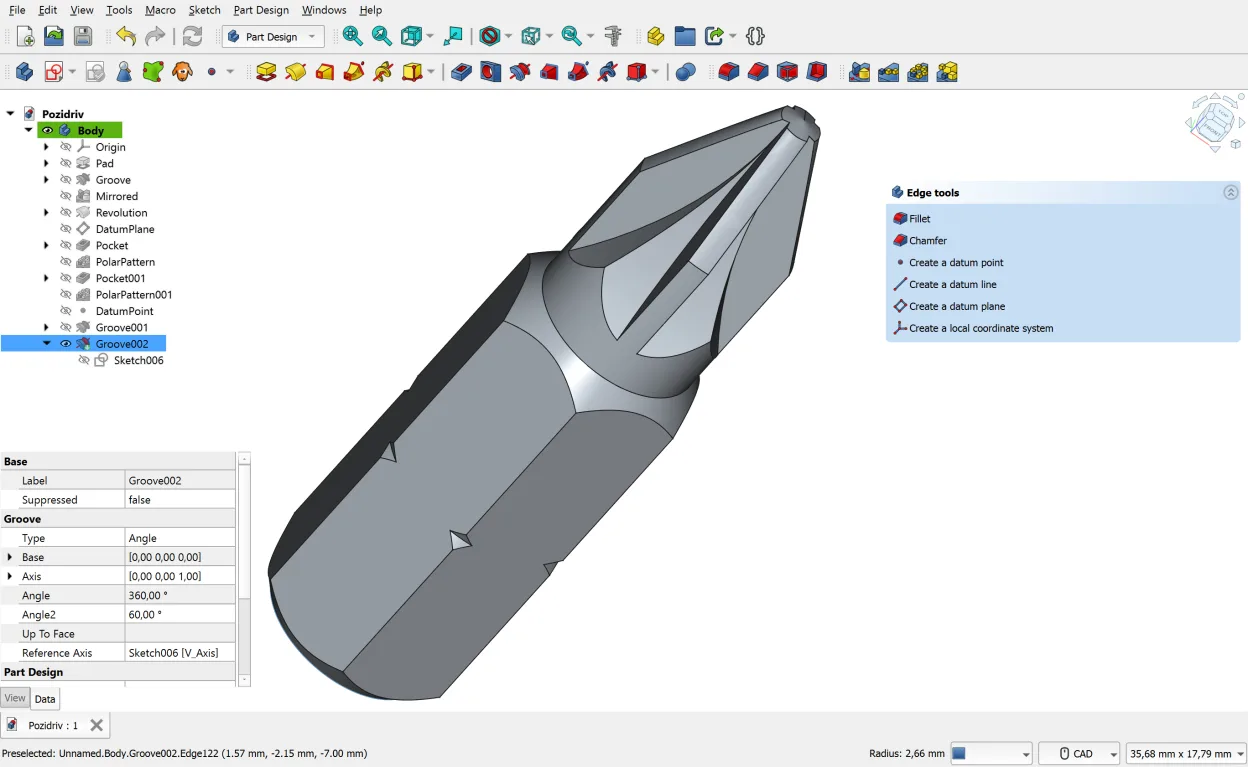
FreeCAD is not a direct replacement for Paint 3D. It is a parametric CAD tool for engineering and precise design, not a casual drawing app. If you need to sketch quickly or paint with brushes, FreeCAD will feel clunky and overkill. However, if your use of Paint 3D was primarily to create simple low-poly 3D objects for 3D printing or basic modeling, FreeCAD is a powerful, professional-grade alternative. It is ideal for users who want to move from casual tinkering to structured, parameter-driven design. For pure 2D raster drawing, look for GIMP or Krita instead.
- License
- LGPL-2.1
- Price
- Free
- Latest version
- 1.1.4 (September 28, 2026)
- Rating
- —
What works the same
- Both allow creation of 3D objects from basic shapes
- Both support exporting to common 3D formats like STL and OBJ
- Both are available on Linux (FreeCAD) and Windows (Paint 3D)
- Both include 2D sketching capabilities as a foundation for 3D work
What is different
- FreeCAD lacks raster painting tools, brushes, and layers found in Paint 3D
- FreeCAD uses parametric modeling, requiring more technical understanding than Paint 3D's direct manipulation
- Paint 3D is optimized for casual, quick edits; FreeCAD is for precise, production-ready engineering
- FreeCAD has a steep learning curve compared to Paint 3D's intuitive interface
Opening your Paint 3D files
Paint 3D uses the .3mf file format for 3D models and standard image formats for 2D. FreeCAD does not natively open .3mf files. You can export 3D models from Paint 3D to STL or OBJ, which FreeCAD can import. For 2D drawings, Paint 3D exports PNG or JPEG, which FreeCAD can import into its 2D sketcher, but this is a workflow conversion, not direct compatibility. If you need to edit the original .3mf file directly, you will need a different tool.
Switching from Paint 3D to FreeCAD, step by step
- Export your 3D models from Paint 3D as STL or OBJ files
- Install FreeCAD via your package manager or Flatpak
- Import the STL/OBJ files into FreeCAD using the Mesh workbench
- Learn the basic parametric modeling workflow in the Part Design workbench
- Use the 2D sketcher for any 2D drawing needs instead of raster tools
Key features of FreeCAD
- Parametric modeling with history tree
- Support for STEP, IGES, STL, DXF, OBJ, IFC, SVG
- Built‑in 2D sketcher with constraints
- Python scripting for automation
- Workbenches for FEA, BIM, CAM, robot simulation
- Add‑ons and macros from the community
- Cross‑platform installation via Flatpak, AUR, Debian, OpenSUSE
How to install FreeCAD on Linux
flatpak install flathub org.freecad.FreeCADsudo apt install freecadsudo pacman -S freecadsudo zypper install FreeCADFrequently asked questions
Can I use FreeCAD to draw pictures like in Paint 3D?
No. FreeCAD is for 3D modeling and engineering, not raster drawing. It does not have brushes, colors, or layers for painting. Use GIMP or Krita for 2D drawing.
Is FreeCAD too complex for a beginner?
Yes, it is significantly more complex than Paint 3D. It is designed for engineers and designers. If you just want to make simple 3D shapes, consider Tinkercad (web-based) or Blender for a more visual approach.
Does FreeCAD support 3D printing?
Yes. FreeCAD is well-suited for 3D printing. You can export your models as STL files, which are the standard format for 3D printers. It also includes tools for checking model integrity.
6 other alternatives to Paint 3D
 KritaKrita is a full‑featured open‑source digital painting and illustration program.Open sourceFreeFlatpakKrita vs Paint 3D
 GIMPGIMP is a free, open-source raster graphics editor for photo editing, digital painting, and image composition.Open sourceFreeFlatpakGIMP vs Paint 3D
 InkscapeInkscape is a free, open‑source vector graphics editor that rivals Adobe Illustrator and CorelDRAW.Open sourceFreeFlatpakInkscape vs Paint 3D
 BlenderBlender is a free, open-source 3D suite for modeling, animation, rendering, and video editing.Open sourceFreeFlatpakBlender vs Paint 3D
 OpenSCADOpenSCAD is a parametric 3D CAD modeller that generates solid models from text-based scripts rather than…Open sourceFreeFlatpakOpenSCAD vs Paint 3D
 Tux PaintTux Paint is a free, kid-friendly drawing program with a simple interface, sound effects, and a guiding…Open sourceFreeFlatpakTux Paint vs Paint 3D