
 GeanyLinux
vs
JetBrains PyCharmWindows
Geany as a Linux alternative to JetBrains PyCharm
Updated
Our verdict
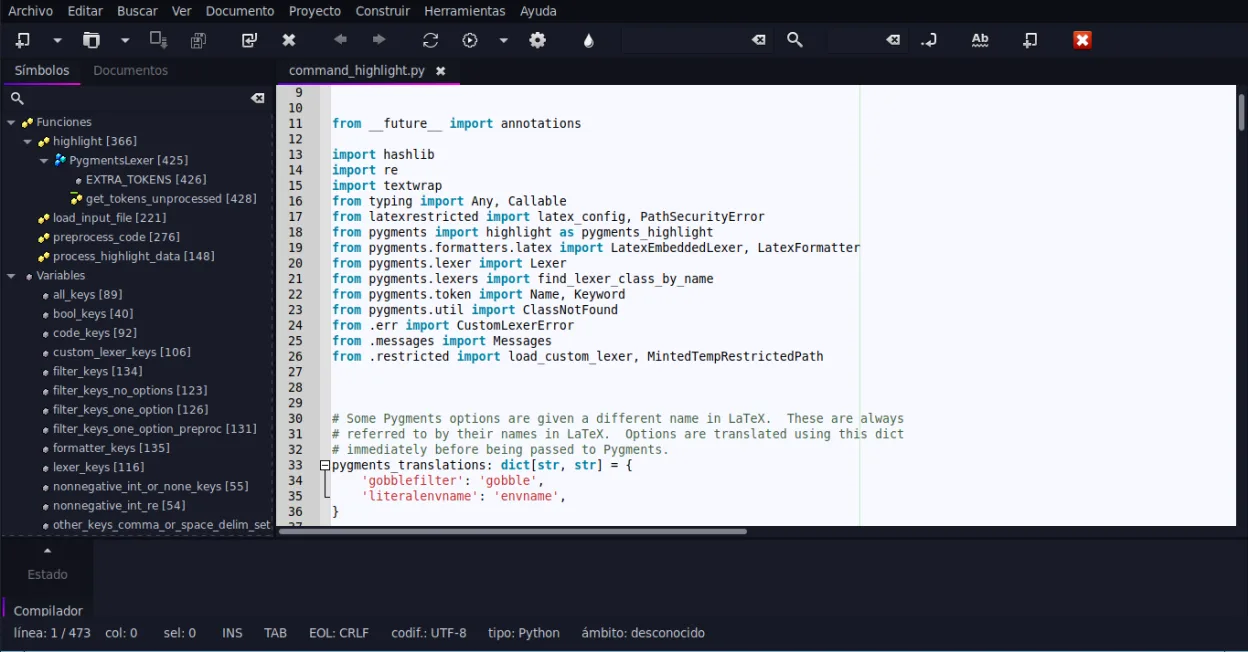
Geany is not a direct replacement for PyCharm. It is a lightweight, general-purpose IDE that handles basic Python editing, but it lacks PyCharm's deep project awareness, integrated testing frameworks, and advanced refactoring tools. If you need a full-featured Python environment with virtual environment management and VCS integration, Geany will feel like a step back. However, if you are working on small scripts or prefer a minimal editor that does not consume system resources, Geany is a solid, fast choice. It works well as a companion for quick edits, but do not expect it to replace a professional Python IDE for complex development tasks.
- License
- GPL-2.0+
- Price
- Free
- Latest version
- 2.1.0 (July 6, 2025)
- Rating
- —
What works the same
- Both provide syntax highlighting for Python and other languages
- Both offer basic code completion features
- Both are available as native Linux applications
- Both support code folding for managing large files
What is different
- Geany lacks integrated support for specific unit testing frameworks like pytest or unittest
- PyCharm offers advanced code refactoring tools that Geany does not provide
- Geany does not have built-in virtual environment management features
- PyCharm has deep, native VCS integration, while Geany relies on external tools or basic plugins
- Geany is significantly lighter and faster, whereas PyCharm is resource-intensive
Opening your JetBrains PyCharm files
Geany opens standard text files, including Python scripts (.py), which is the primary output of PyCharm projects. It does not read PyCharm's proprietary project configuration files (.idea directory) or workspace settings. You can open the source code directly in Geany, but you will lose all project-specific configurations, run configurations, and debugger states saved by PyCharm.
Switching from JetBrains PyCharm to Geany, step by step
- Install Geany via your distribution's package manager or Flathub
- Configure your preferred Python interpreter path in Geany settings
- Enable syntax highlighting for Python in the file type preferences
- Set up an external version control tool if you need VCS integration
- Open your existing Python scripts directly in Geany to begin editing
Key features of Geany
- Syntax highlighting for over 30 languages
- Code completion and auto‑completion of common constructs
- Embedded terminal emulator
- Plugin manager with pre‑installed plugins
- Code folding and symbol lists
- Support for XML/HTML tag completion
How to install Geany on Linux
flatpak install flathub org.geany.Geanysudo apt install geanysudo apt install geanysudo dnf install geanysudo pacman -S geanysudo zypper install geanyFrequently asked questions
Can Geany run Python unit tests?
Geany does not have a built-in test runner interface. You must execute tests manually from the embedded terminal or via external scripts.
Does Geany support virtual environments?
No, Geany does not manage virtual environments. You must activate them externally before launching Geany or configure the interpreter path manually.
Is Geany suitable for large Python projects?
It is not ideal for large projects due to the lack of advanced refactoring, project-wide search capabilities, and integrated debugging features found in dedicated IDEs.
5 other alternatives to JetBrains PyCharm
 Visual Studio CodeA lightweight, extensible code editor that supports debugging, Git, and many languages.FreeFlatpakVisual Studio Code vs JetBrains PyCharm
 SpyderSpyder is a free, open-source Python IDE built specifically for scientific computing, data analysis, and…Open sourceFreeFlatpakSpyder vs JetBrains PyCharm
 ThonnyThonny is a lightweight, beginner‑focused Python IDE with an integrated visual debugger and simple package…Open sourceFreeFlatpakThonny vs JetBrains PyCharm
 KateKate is a feature-rich, programmer-focused text editor from KDE with support for 300+ languages and advanced…Open sourceFreeFlatpakKate vs JetBrains PyCharm
 VimVim is a highly configurable, modal text editor for efficient editing on Linux.Open sourceFreeFlatpakVim vs JetBrains PyCharm