
Windows · Office
Best Linux alternatives to TickTick
TickTick is a cross-platform to-do and calendar app combining task management, time blocking, and habit tracking for personal productivity.
Updated
Quick answer
The best Linux alternative to TickTick is Super Productivity. Other strong options: Vikunja, Taskwarrior.
3 Linux alternatives to TickTick
-
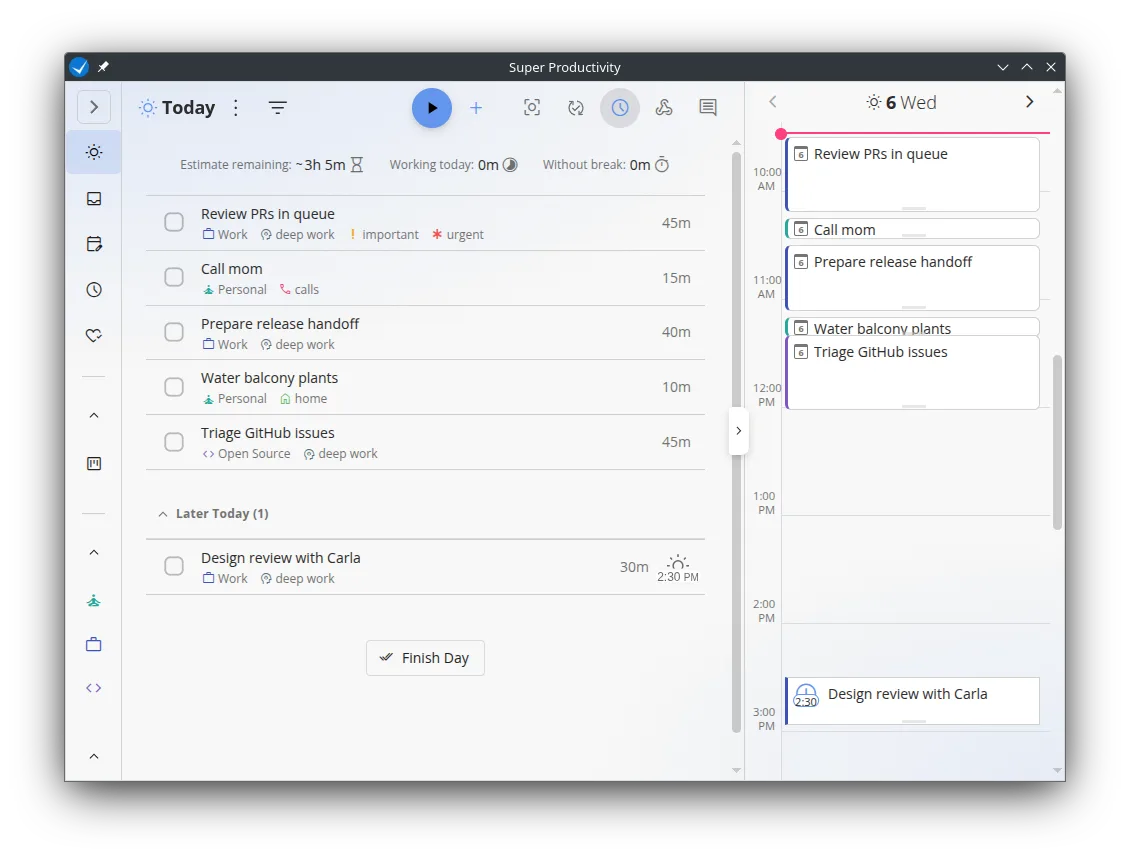
Open-source to-do list and time tracker with offline-first sync, Pomodoro modes, and integration with GitHub, Jira, and calendars.
Super Productivity is a strong, privacy-focused alternative for users who value local control over cloud convenience. It handles task management, time blocking, and calendar integration well, but it lacks native habit tracking, which is a core TickTick feature. You will need to manage habits…
Feature parity75% -

Vikunja is an open‑source, self‑hosted task manager with list, Kanban, Gantt and table views.
Vikunja is a solid replacement for TickTick if you prioritize self-hosting and open-source control over mobile convenience. It handles task lists, projects, and basic scheduling well, but it lacks native habit tracking and a true time-blocking calendar interface. You will need to install a separate…
Feature parity65% -
Taskwarrior is a command‑line task manager for Linux, offering powerful filtering, tagging, and scripting capabilities.
Taskwarrior is a strong replacement for power users who prefer the terminal, but it is not a direct swap for casual TickTick users. It handles task creation, prioritization, and recurring schedules excellently with superior filtering. However, it lacks a visual calendar interface, native habit…
Feature parity45%


What is TickTick?
TickTick serves as a unified productivity hub for individuals managing daily tasks, schedules, and long-term goals. It appeals to students, freelancers, and professionals who need to track deadlines, block out focused work time, and maintain consistent routines without switching between multiple disjointed applications. The interface is designed to be quick and intuitive for rapid task entry.
The software operates on a freemium model. Basic task management and calendar features are available for free, while advanced capabilities like time tracking, detailed habit analytics, and cross-device sync limits may require a paid subscription. This allows users to start without cost and upgrade only if they need deeper functionality or higher usage limits.
Users seek Linux alternatives primarily because TickTick lacks a native Linux desktop application. While the web version works in any browser, many Linux users prefer native apps for better performance, offline reliability, and integration with the desktop environment. Additionally, some users prefer self-hosted or open-source solutions to maintain control over their personal data and avoid cloud dependency.
What a replacement for TickTick must do
- Task creation and list management
- Calendar view with time blocking
- Habit tracking and streak monitoring
- Cross-device synchronization
- Offline access capability
- Reminders and notifications
Can you run TickTick on Linux?
TickTick does not have a native Linux desktop application. You can use the web version via a browser, which supports most core features but may lack some desktop-specific integrations. It is unclear if the Windows version runs reliably via Wine or Proton, as user reports vary and it is not an officially supported platform. For a stable experience, the web interface is the most consistent option on Linux, though it requires an internet connection for full functionality.
Which alternative should you choose?
If you want a local-first, open-source alternative with strong time tracking, Super Productivity is a solid choice for developers and tech-savvy users. For teams or those needing a self-hosted solution with multi-user support, Vikunja offers a web-based interface that can be installed locally. If you prefer a command-line workflow and minimal resource usage, Taskwarrior is ideal for users comfortable with terminal-based task management, though it lacks a graphical calendar view.
Moving your TickTick files and habits
TickTick allows exporting tasks to CSV or JSON formats, which can be imported into many alternative tools. However, specific features like time blocking layouts or habit streak history may not transfer directly and might need manual re-entry. Check the import documentation of your chosen Linux alternative to see which TickTick export formats are supported, as compatibility varies between Super Productivity, Vikunja, and Taskwarrior.
Side-by-side comparison
| App | License | Flatpak | Latest version | Feature parity | Rating |
|---|---|---|---|---|---|
| Super Productivity | MIT | ✓ | v20.1.0 | 75% | — |
| Vikunja | AGPL-3.0-or-later | ✓ | 2.8.0 | 65% | — |
| Taskwarrior | GPL-2.0 | — | 3.5.0 | 45% | — |
TickTick: frequently asked questions
Does TickTick work offline on Linux?
The web version has limited offline capabilities, but it is not a native app. For reliable offline use, consider local alternatives like Super Productivity or Taskwarrior.
Can I sync tasks between TickTick and Linux alternatives?
Direct two-way sync is not available. You would need to export from TickTick and import into the new app, or use a common format like CSV for manual transfers.
Is Vikunja self-hosted?
Yes, Vikunja can be self-hosted, giving you full control over your data. It also offers a hosted version if you prefer not to manage your own server.
Which alternative is best for habit tracking?
Super Productivity has built-in habit tracking features. Taskwarrior is more focused on task completion and may require external scripts for habit streaks.
How important is TickTick to you?
Know a better alternative? Suggest an alternative